

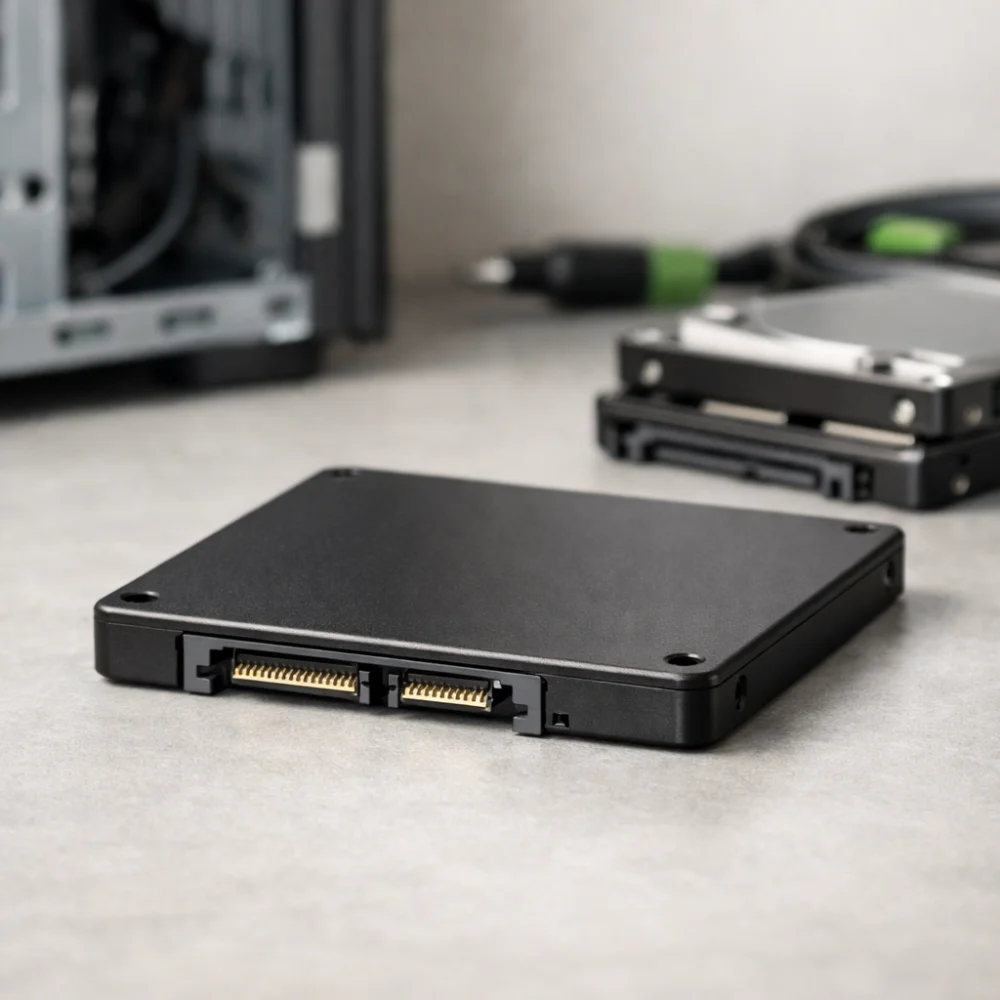
A 2.5-inch SATA SSD is an internal storage drive that connects using a SATA interface. It may be considered as an upgrade or replacement for a compatible computer, but the drive’s shape and interface both need to suit the host device.
The main checks are whether the computer accepts a 2.5-inch SATA drive, whether the drive will physically fit, and how much storage you need. This guide focuses on those compatibility and comparison questions rather than on other SSD form factors.
How do you choose a 2.5-inch SATA SSD?
First confirm that the computer supports a 2.5-inch SATA drive, not just that it has an available storage slot. Then compare capacity, physical thickness and the product’s stated interface with your device’s requirements. Features such as NAND type, cache and endurance may help distinguish options, but their value depends on your workload and the details stated for each drive. Specifications vary by model, so always check the individual product page before buying.
Compare the key buying factors
| Feature | What it means | Why it matters | What to check |
|---|---|---|---|
| Form factor | The drive’s physical shape and size category. | A drive that does not fit the device’s bay or mounting arrangement cannot be used as intended. | Confirm that the device accepts a 2.5-inch drive and check clearance and mounting requirements. |
| Interface | The connection standard used to communicate with the computer. | A 2.5-inch drive is not automatically compatible with every storage connector. | Check that the host supports SATA storage and that the drive’s stated interface matches. |
| Drive thickness | The drive’s height or profile. | Some devices have limited internal clearance. | Compare the stated thickness with the device or enclosure requirements. |
| Capacity | The amount of storage the drive provides. | It affects how much data and how many applications can be kept on the drive. | Estimate current use and likely growth, then compare the stated capacity with your needs. |
| NAND type and cache | Design details that can differ between SSDs. | They may affect workload suitability, but the implications depend on the particular drive. | Compare only details explicitly provided for the model and consider your typical reads and writes. |
| Endurance information | A manufacturer’s stated write-endurance measure, where provided. | It can be relevant for workloads that write large amounts of data. | Look for the drive’s own endurance specification and consider how closely it matches your use. |
What to check before choosing
Confirm both the format and the connection
“2.5-inch” describes a physical form factor; “SATA” describes the interface. Check both against the computer’s documentation or existing storage setup. A device with an M.2 slot, for example, does not necessarily accept a 2.5-inch drive, and M.2 and mSATA drives are different physical formats. A SATA connection also needs the appropriate connection support in the host; the drive’s shape alone does not establish compatibility.
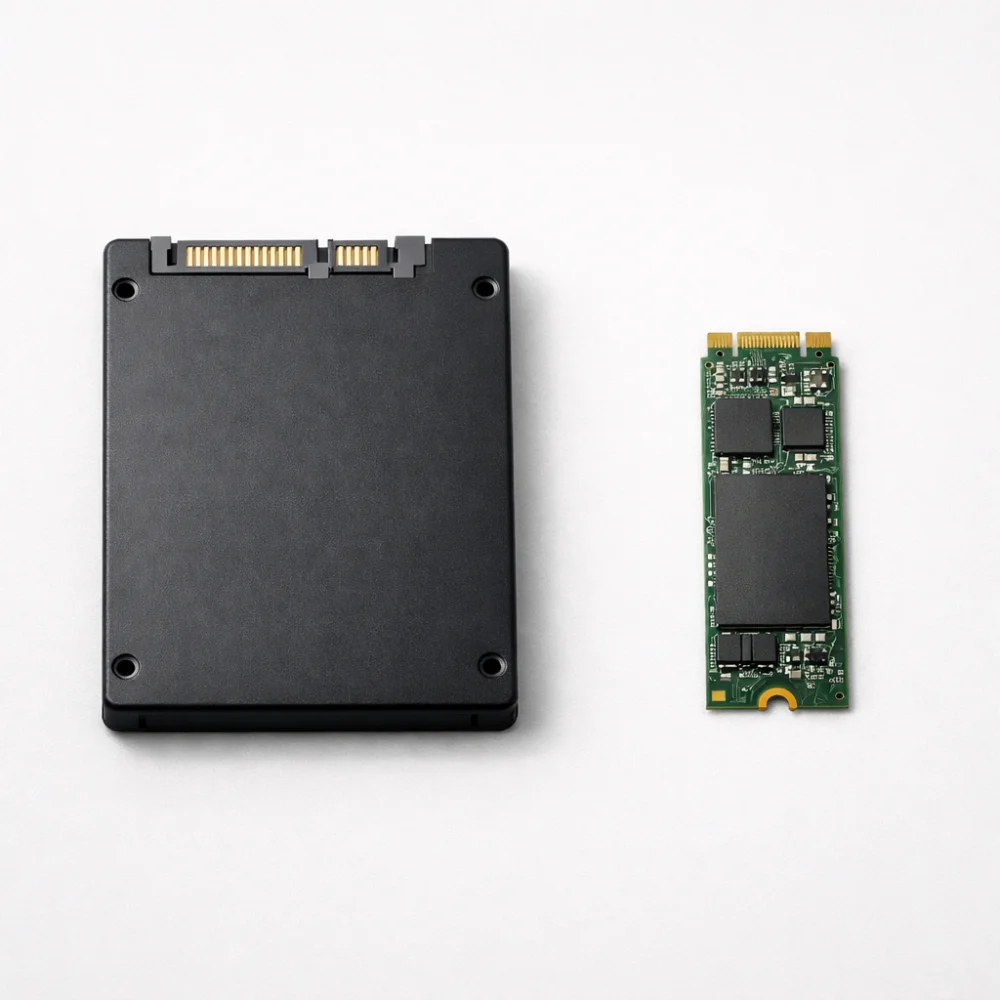
For a desktop, check the case’s mounting options and whether the system has the required SATA connection and power connection. For a laptop or other compact device, confirm that its storage bay accepts this drive format and thickness. If using an external enclosure, check that the enclosure is designed for a 2.5-inch SATA drive.
Choose capacity around your actual use
Consider what will be stored on the drive: an operating system and applications, work files, games, media, or a mix. Allow room for expected growth rather than choosing solely by the amount of data already stored. If the SSD will be a secondary drive, also consider what will remain on the computer’s existing storage.
Compare performance claims in context
Many product pages state interface or transfer information, but figures are not a guarantee of the same results in every computer or workload. The host connection and the type of work can affect the experience. For everyday file access, capacity and compatibility may matter more than comparing headline figures; for sustained or frequent writing, look for relevant model-specific information such as endurance and cache details.
Consider construction details that affect fit
Check the listed thickness and any stated mounting or connection requirements, particularly for a laptop or a tightly fitted enclosure. Do not assume that all 2.5-inch drives have identical clearances or that an adapter is included. If the device’s requirements are unclear, verify them before selecting a drive.
Types and variations
Most of the useful differences within this category are model specifications rather than separate physical formats. Capacity options suit different storage needs, while NAND types and cache arrangements may vary between models. A lower-cost design or a higher-capacity option can involve different trade-offs, so compare the stated details rather than assuming that one specification makes a drive best for every use.
Some product titles mention mSATA or M.2 drives alongside 2.5-inch SATA products. These are not interchangeable just because they may use related storage technology or similar interface terminology. Confirm the actual form factor and connection shown in the product information.
Which option may suit your need?
- Replacing a drive in a laptop: Prioritise confirmation of the laptop’s drive format, SATA support and physical clearance. Capacity is a separate choice based on what you plan to store.
- Adding storage to a desktop: Check the case mounting arrangement and available SATA data and power connections, then choose capacity for the intended files or applications.
- Using an external enclosure: Confirm that the enclosure specifically supports a 2.5-inch SATA SSD and check any stated thickness limits.
- Frequent or sustained writing: Look beyond capacity to any model-specific endurance, cache and workload information provided. Compare like with like rather than relying on a single headline claim.
Common buying mistakes
- Assuming every 2.5-inch drive uses the same interface. Check for SATA support as well as the physical format.
- Confusing M.2 or mSATA with 2.5-inch SATA. These formats have different physical connections; confirm the exact drive type your device accepts.
- Ignoring thickness or mounting. A drive may be in the right size category but still not suit a device’s clearance or mounting arrangement.
- Choosing capacity without considering growth. Think about likely future files and applications, not just current storage use.
- Treating a performance figure as a guaranteed result. Consider the stated test conditions and your computer’s connection and workload, where that information is available.
Suitability and compatibility checks
Use the device manufacturer’s specifications or reliable documentation to confirm the supported drive type before buying. Compatibility can depend on the computer, enclosure or mounting arrangement, so do not rely on a general description of the category as a guarantee of fit. If the SSD is intended to replace a drive containing important files, plan to preserve or transfer those files using an appropriate method; the drive itself does not ensure that data is backed up.
Ownership, care and storage
An SSD has no moving disk mechanism, but it still needs a compatible connection and protection from physical damage. Keep important files backed up separately, and follow the device or enclosure maker’s guidance for handling and storage. Do not assume that any particular maintenance routine, service life or included accessory applies to every model.
A practical buying process
- Identify the computer, enclosure or other host the drive is intended for.
- Confirm that it accepts a 2.5-inch drive with a SATA interface.
- Check physical clearance, thickness, mounting and required connections.
- Estimate the capacity needed for current data and likely growth.
- Compare model-specific details that matter to your workload, such as endurance or cache information when stated.
- Review the individual product information for the exact drive’s specifications and included items before deciding.
Buyer checklist
- Does the host support a 2.5-inch SATA drive?
- Will the stated thickness and mounting arrangement fit?
- Are the required SATA data and power connections supported?
- Is the capacity suitable for both current use and expected growth?
- Are any workload-specific details, such as endurance, stated and relevant?
- Have you checked the exact product information rather than relying on a title alone?
Frequently asked questions
Is every 2.5-inch SSD a SATA drive?
No. The 2.5-inch description refers to physical form factor, not by itself to the interface. Check that the product is specifically described as SATA and that the host supports it.
Will a 2.5-inch SATA SSD fit any laptop?
No. Laptop storage layouts vary, and some devices do not accept a 2.5-inch SATA drive. Check the laptop’s supported drive format, connection and physical clearance before choosing one.
Can I use a 2.5-inch SATA SSD in an external enclosure?
It may be suitable if the enclosure is designed for a 2.5-inch SATA drive. Check the enclosure’s supported drive format, thickness limits and connection requirements.
How much capacity should I choose?
Base the choice on what you intend to store and how much that data is likely to grow. An operating system, applications and frequently used files may need a different amount of space from a drive intended mainly for a smaller collection of files.
Are M.2 and mSATA drives alternatives that fit the same slot?
Not necessarily. M.2, mSATA and 2.5-inch drives have different physical formats, and M.2 drives can also differ in interface. Check the host’s specific supported format and interface rather than relying on the name alone.
Do cache and NAND type matter when choosing?
They can be useful comparison details, especially when the drive will handle frequent or sustained writing, but their significance depends on the specific model and workload. Compare stated specifications and avoid treating one feature as a complete measure of suitability.
Does an SSD remove the need to back up files?
No. Any storage device can fail or be lost, so keep separate copies of important files. Check the product information and device guidance for any model-specific care or handling advice.


