
Powerline Adapters
Powerline adapters are networking devices designed to send internet and network data through compatible mains electrical wiring. They are useful for home offices, gaming rooms, smart TVs, desktop PCs, media setups and areas where a direct Ethernet cable is difficult to run.
The right powerline adapter should suit your router, wall sockets, room layout, speed needs and the devices you want to connect. When comparing options, look at connection type, Ethernet ports, WiFi support where listed, pass through sockets where listed, kit contents, setup method, security features, plug size, compatibility guidance and how the adapters will be used in your home or workspace.
- Powerline Adapters
TP Link AV500 300Mbps Wi-Fi Powerline Extender Starter Kit
£59.57 *View On Amazon* - Powerline Adapters
BT Broadband Extender Powerline Adapter Flex 600 Kit with Pass-Through Socket, White, Renewed
Original price was: £74.99.£56.99Current price is: £56.99. *View On Amazon* - Powerline Adapters
TESSAN Double Plug Adaptor with 4 USB Ports, 2 USB-C, UK 13A Fuse
Original price was: £22.99.£21.99Current price is: £21.99. *View On Amazon* - Powerline Adapters
Strong Powerline 600 V2.0 Adapter Homeplug Passthrough Starter Kit 2 Pack
£24.99 *View On Amazon* - Powerline Adapters
STOBOK PoE Injector Adapter 48V 0.5A with UK Plug
Original price was: £5.99.£5.69Current price is: £5.69. *View On Amazon* - Powerline Adapters
TP-Link AV1000 Gigabit Powerline AC Wi-Fi Kit Refurbished
£39.99 *View On Amazon* - Powerline Adapters
TP-Link TL-WPA7617 AV1000 Gigabit Passthrough Powerline AC Wi-Fi Extender Plug & Play Add-on Unit
Original price was: £65.78.£35.99Current price is: £35.99. *View On Amazon* - Powerline Adapters
TP-Link TL-PA7027P KIT AV1000 2-Port Gigabit Passthrough Powerline Starter Kit (Renewed)
Original price was: £59.99.£38.99Current price is: £38.99. *View On Amazon* - Powerline Adapters
BT Mini Connector Kit 1GB Twin Powerline Ethernet Adapter
£59.99 *View On Amazon* - Powerline Adapters
TP-Link TL-PA4022PKIT Passthrough Powerline Adapter Starter Kit, UK Plug
£49.99 *View On Amazon* - Powerline Adapters
STRONG POWERL1000TRIMINIUK AV1000 Mini Powerline Adapter Starter Kit, Pack of 3, UK Plug, White
£136.01 *View On Amazon* - Powerline Adapters
TP-Link TL-WPA8631P Dual Band Gigabit AC1200 Powerline Adapter and Wi-Fi Extender, UK Plug, Renewed
Original price was: £79.99.£52.90Current price is: £52.90. *View On Amazon* - Powerline Adapters
Tenda PH6 AV1000 Passthrough Powerline Adapter Kit, 1 x Gigabit Port, UK Plug, Pack of 2
£44.95 *View On Amazon* - Powerline Adapters
TP-LINK TL-PA9020P 2-Port Gigabit Passthrough Powerline Adapter Triple Pack Renewed
£85.99 *View On Amazon* - Powerline Adapters
TP-Link PG2400P KIT Passthrough Powerline Adapter Starter Kit, G.hn MIMO, Pack of 2 (Renewed)
Original price was: £79.97.£59.99Current price is: £59.99. *View On Amazon* - Powerline Adapters
STRONG POWERL600DUOUKV2 AV600 Passthrough Powerline Kit, Pack of 3
£34.99 *View On Amazon*






What Are Powerline Adapters
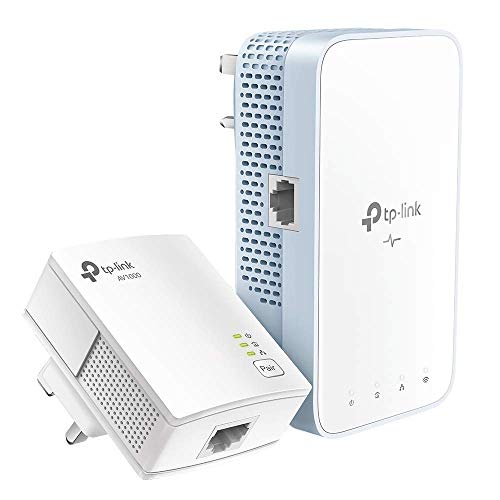
Powerline adapters are plug in networking accessories that use the electrical wiring in a building to carry network data between rooms. A typical setup uses one adapter near the router and another adapter near the device that needs a wired connection.
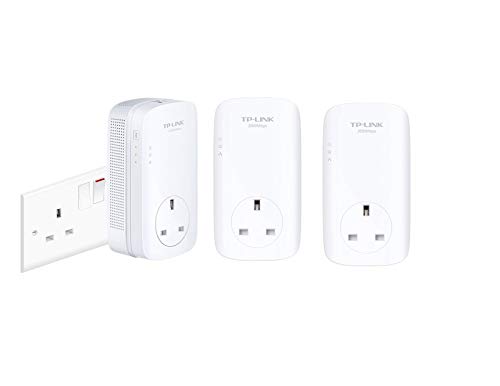
Depending on the product, powerline adapters may include one or more Ethernet ports, built in WiFi where listed, pass through mains sockets, pairing buttons, status lights, encryption features or companion app support where provided in the listing.
They are different from ordinary Ethernet cables because they do not require a long cable running through the house. They are also different from WiFi extenders because they use the mains wiring as part of the connection rather than only repeating a wireless signal.
What Powerline Adapters Are Used For
Powerline adapters are used to bring network access to rooms where WiFi is weak or where running a long Ethernet cable is inconvenient. They can be useful for desktop PCs, smart TVs, games consoles, streaming boxes, printers, network storage and home office equipment where compatible.
For gaming, a powerline adapter may be considered when a direct router connection is not practical and a more stable wired style connection is desired. For working from home, it can help connect a laptop dock, desktop PC or VoIP device where suitable.
They can also be useful in media rooms, garden offices where compatible, spare bedrooms and study spaces. Performance can vary depending on the electrical wiring, plug placement, distance and connected equipment, so it is important to choose carefully and follow the product guidance.
How To Choose The Right Powerline Adapter
Start with the devices you want to connect. If you only need to connect one device, a basic kit with one Ethernet port at the far end may be enough. If you need to connect several devices in the same room, look for models with multiple Ethernet ports where listed.
Next, think about whether you need WiFi as well as Ethernet. Some powerline adapters provide a wired connection only, while others include a WiFi access point where listed. WiFi powerline models can be useful if you want to improve wireless coverage in a room as well as connect wired devices.
Check the kit contents carefully. Many products are sold as starter kits with two adapters, while others may be single add on units. If you are starting from scratch, make sure the product includes what you need.
Also consider plug position. Larger adapters may block nearby sockets or be awkward behind furniture. Pass through socket designs where listed can help keep a mains socket available, but the connected load should still follow the product guidance.
Key Features To Compare
Ethernet ports are one of the first features to compare. Some powerline adapters include a single port, while others may include multiple ports where listed.
WiFi support can be useful if you want wireless coverage in another room. Check whether WiFi is included, and whether setup guidance matches your home network needs.
Pass through sockets where listed can be helpful when plug space is limited. This lets you plug another suitable device into the adapter, but maximum load guidance should always be followed.
Listed speed ratings can help compare products, but real world performance can vary. Electrical wiring quality, circuit layout, interference, distance, router speed and device capability can all affect results.
Pairing and security features are worth checking. Many adapters use pairing buttons or encryption where listed, helping create a more secure link between units.
Plug size and design can affect everyday use. A compact design may be easier in tight spaces, while larger models may include extra features.
Powerline Adapters Compared With Ethernet Cables
Ethernet cables provide a direct wired connection between devices. They are often the preferred option where a cable can be run neatly and safely.
Powerline adapters can be useful when running Ethernet through walls, floors or long rooms is not practical. They use existing electrical wiring, which can make setup easier in many homes.
The trade off is consistency. A direct Ethernet cable is usually simpler and more predictable, while powerline performance depends on the electrical environment. For the most reliable fixed connection, Ethernet is still worth considering where possible.
Powerline Adapters Compared With WiFi Extenders
WiFi extenders repeat a wireless signal to help improve coverage. They can be useful in some homes, but their performance depends on where they are placed and how strong the original wireless signal is.
Powerline adapters send the network through compatible mains wiring and then connect to devices by Ethernet, or provide WiFi where listed. This can be helpful where wireless signal struggles through walls or floors.
The better choice depends on the property. A WiFi extender may suit simple wireless coverage issues, while powerline adapters may suit fixed devices or rooms where a wired style connection is more useful.
Powerline Adapters Compared With Mesh WiFi
Mesh WiFi systems are designed to create a wider wireless network using multiple nodes around the home. They can be useful for larger properties or homes with several wireless devices.
Powerline adapters are more focused on sending network access through electrical wiring to specific rooms or devices. Some may include WiFi where listed, but they are not always the same as a full mesh system.
The trade off is whole home coverage versus targeted connection. Mesh may be better for improving WiFi across many rooms, while powerline adapters may be better for connecting a particular PC, TV or console where suitable.
Guidance For Beginners, Regular Users And Experienced Buyers
Beginners should focus on a starter kit, simple setup instructions and the number of Ethernet ports needed. A two adapter kit is often the easiest starting point where the product is suitable.
Regular users may want to compare WiFi support, pass through sockets, plug size, port count and status lights. These details can make everyday use easier.
Experienced buyers may look more closely at listed speed standards, network encryption, app setup where listed, compatibility with existing adapters, electrical circuit layout and whether multiple units can be added where supported.
Home office users should consider reliability, desk layout and whether important work devices would be better connected by direct Ethernet where possible.
Use Cases By Room And Device
For home offices, powerline adapters can help connect a desktop PC, laptop dock, printer or VoIP device to the router where a long cable is not practical.
For gaming rooms, they may be used with games consoles or gaming PCs where WiFi is inconsistent and a wired style connection is preferred.
For smart TVs and streaming devices, powerline adapters can help provide network access in rooms further from the router where compatible.
For student rooms or study spaces, they can support online learning, video calls and file access where the electrical setup is suitable.
For network storage, servers or media devices, check performance needs carefully before relying on powerline adapters for large file transfers.
For outbuildings or garden rooms, compatibility depends on the electrical wiring and circuit arrangement. Check the product guidance and seek professional advice if unsure.
Fit, Compatibility And Home Setup
Powerline adapters usually work best when plugged directly into suitable wall sockets, unless the product guidance says otherwise. Extension leads, surge protectors and multi socket adapters may reduce performance or may not be recommended.
Both adapters need to work within a compatible electrical setup. Some properties, circuits or consumer unit arrangements may affect performance. If you are unsure about your wiring or electrical safety, ask a qualified electrician.
Check device compatibility before buying. The device being connected should have an Ethernet port or a compatible adapter. If WiFi is needed, choose a powerline model that includes WiFi where listed.
Think about socket location. The adapter should sit where it has enough space, does not create a trip hazard and can be connected neatly to the device.
Speed, Stability And Real World Performance
Powerline adapter speed depends on more than the rating shown in the product name. The router, internet package, electrical wiring, distance, interference and connected devices all affect the real world result.
A higher listed speed may be useful for demanding setups where all parts of the network can support it, but it will not make a slow internet service faster by itself.
For video calls, streaming and gaming, stability can matter as much as headline speed. If performance is poor, try different wall sockets, reduce interference where possible and follow the product troubleshooting guidance.
For the most demanding network tasks, a direct Ethernet cable may still be the better option where it can be installed safely.
Safety And Responsible Use
Powerline adapters connect to mains sockets, so they should be used responsibly. Always follow the product instructions and safety guidance supplied with the item.
Do not use damaged adapters, cracked plugs, loose sockets or products that become unusually hot. Stop using the adapter if there are burning smells, buzzing sounds, visible damage or connection issues linked with heat.
Keep adapters away from water, damp areas, heaters, covered spaces and places where they can be knocked or pulled. Do not overload pass through sockets, and follow the maximum load guidance where listed.
Avoid opening or modifying powerline adapters. If there is an electrical fault, use a qualified electrician or suitable technical support.
Cable Management And Desk Organisation
Powerline adapters can reduce the need for long network cables across the home, but short Ethernet cables are still usually needed between the adapter and device.
Choose cable lengths that reach comfortably without stretching or creating loops on the floor. Cable clips or ties can help keep the connection tidy around desks, TVs and gaming setups.
Place adapters where the status lights can be checked easily if needed. Avoid hiding them behind heavy furniture if this makes them hard to access or blocks ventilation.
Label cables where several network devices are connected. This can make troubleshooting easier later.
Care, Cleaning And Maintenance
Always follow the care guidance supplied with the product. Keep powerline adapters clean, dry and free from dust around vents or plug areas where present.
Unplug before cleaning and use only suitable dry cleaning methods unless the product guidance says otherwise. Do not spray cleaners into sockets, ports or vents.
Check Ethernet cables and connectors from time to time. A loose or damaged cable can cause connection issues that may be mistaken for a powerline fault.
If moving house, changing routers or adding extra adapters, follow the pairing and setup instructions again where needed.
Useful Accessories To Consider
Useful accessories may include Ethernet cables, network switches, USB to Ethernet adapters, cable clips, cable ties, routers, WiFi extenders, mesh WiFi systems, surge protected extension leads where suitable and docking stations.
For a home office, a powerline adapter may work well with a short Ethernet cable and a docking station. For a media room, a small network switch may be useful if several wired devices need to connect from one adapter where compatible.
If buying powerline adapters as a gift or replacement, check the router location, device ports, room layout and whether the user needs Ethernet only or WiFi support as well.
Why Buy From YPC
At YPC, we understand active lifestyles and the need for practical products that work in real use. Powerline adapters should be easy to compare by kit contents, Ethernet ports, WiFi support where listed, pass through sockets where listed, plug size, setup method, compatibility and everyday network needs.
This category is designed to help buyers choose practical networking accessories for home offices, gaming rooms, smart TVs, study spaces and everyday internet use. Browse the powerline adapters at YPC and compare the available options to find a suitable setup for your rooms and devices.
FAQs
What is a powerline adapter?
A powerline adapter is a networking device that uses compatible mains electrical wiring to carry network data between rooms. It usually connects to your router at one end and to a device at the other end.
What are powerline adapters used for?
Powerline adapters are used to bring wired network access to rooms where WiFi may be weak or where running a long Ethernet cable is difficult. They can be useful for PCs, smart TVs, consoles and home office devices.
Do powerline adapters need to be plugged into the wall?
Many powerline adapters work best when plugged directly into wall sockets, unless the product guidance says otherwise. Extension leads and surge protectors may reduce performance or may not be recommended.
Are powerline adapters better than WiFi?
It depends on the property and setup. Powerline adapters can be useful for fixed devices where WiFi is unreliable, while WiFi is more convenient for mobile devices such as phones, tablets and laptops.
Do powerline adapters work in every house?
Not always. Performance depends on the electrical wiring, circuits, socket placement and other devices in the property. Check product guidance and seek professional advice if you are unsure about your electrical setup.
Can I use powerline adapters for gaming?
Yes, they may be useful for gaming where WiFi is inconsistent and a direct Ethernet cable is not practical. Real world performance can vary, so compare product details and your home setup carefully.
Do powerline adapters provide WiFi?
Some powerline adapters include WiFi where listed, while others provide Ethernet only. Check the product details before buying if you want wireless coverage in another room.
How do I set up powerline adapters?
Setup usually involves plugging one adapter near the router, connecting it with Ethernet, then plugging another adapter near the device you want to connect. Follow the product pairing and security instructions carefully.
 Getting ready for Summer? View our Home and Garden Products

Heading outdoors this winter? Take a look at our Outdoor Clothing.