

Laser Printers
Laser printers are designed for producing sharp text, everyday documents and regular print jobs at home, in the office or in a study setup. Whether you need a simple printer for letters and forms, a mono printer for work documents or a colour laser printer for reports and presentations, choosing the right model can make printing easier and more reliable.
This category can include mono laser printers, colour laser printers, wireless laser printers, compact printers, office printers and multifunction laser printers, depending on the products listed. Features vary by model, so always check print type, connectivity, paper handling, toner requirements, operating system support and intended use before buying.
- Laser Printers
Canon i-SENSYS MF651Cw Wireless Colour Multifunction Laser Printer
£352.61 *View On Amazon* - Laser Printers
Brother HL-L6210DW Mono Laser Printer, Wireless, USB 2.0, UK Plug
£353.76 *View On Amazon* - Laser Printers
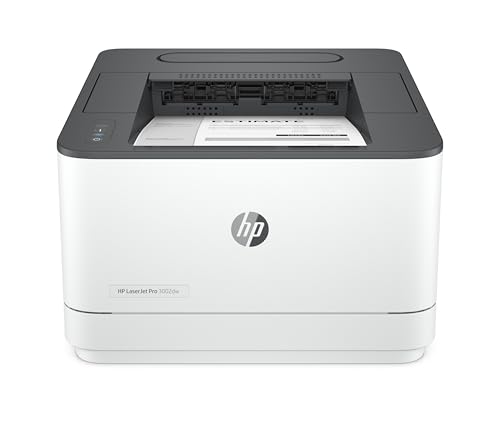
HP LaserJet 3002dw Wireless Black & White Printer
Original price was: £209.99.£179.90Current price is: £179.90. *View On Amazon* - Laser Printers
Brother HL-L5210DW Mono Laser Printer, Wireless, USB 2.0, A4, UK Plug
£258.94 *View On Amazon* - Laser Printers
HP LaserJet M234sdw Wireless Black & White Multi-function Printer
£157.90 *View On Amazon* - Laser Printers
HP LaserJet Pro 4002dw Black and White Laser Printer
Original price was: £179.99.£163.90Current price is: £163.90. *View On Amazon* - Laser Printers
HP LaserJet Pro MFP 3302sdw Colour Laser Printer
Original price was: £310.00.£291.00Current price is: £291.00. *View On Amazon* - Laser Printers
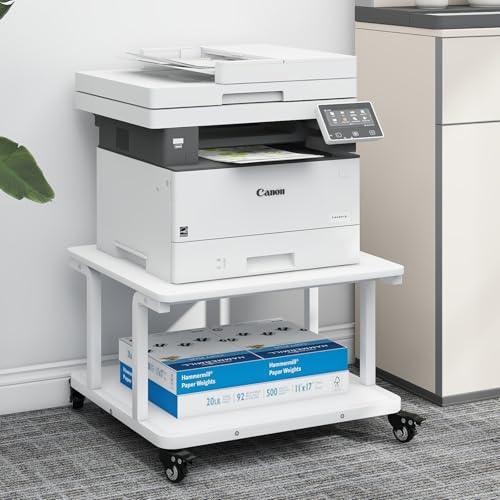
PUNCIA 2-Tier Laser Printer Stand with Storage Shelf, 60 x 50 x 38 cm, White
£59.99 *View On Amazon* - Laser Printers
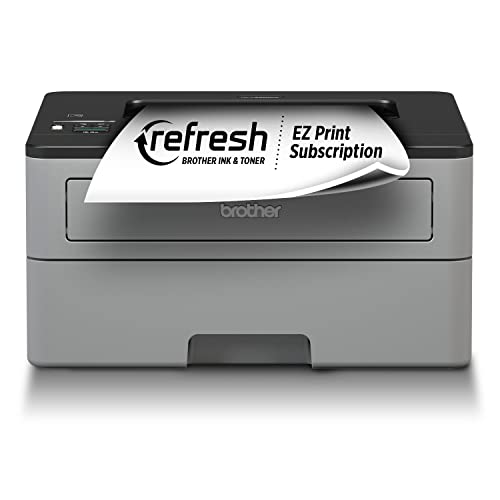
Brother HL-L1240W Wireless Mono Laser Printer
Original price was: £97.79.£95.00Current price is: £95.00. *View On Amazon* - Laser Printers
HP LaserJet MFP M140w Wireless Black & White Multi-function Printer
Original price was: £139.99.£128.00Current price is: £128.00. *View On Amazon* - Laser Printers
Xerox C235dni Wireless A4 Colour Laser All-in-One Multifunction Printer
£317.99 *View On Amazon*







What Are Laser Printers?
Laser printers are printers that use toner rather than liquid ink to create printed pages. They are commonly chosen for text documents, office paperwork, invoices, forms, reports and regular everyday printing.
Unlike many inkjet printers, laser printers are often designed around document printing and toner based output. Some models print in black only, while others print in colour where listed. Some are printer only, while others may include scanning, copying or fax features where stated.
What Are Laser Printers Used For?
Laser printers are used for printing letters, invoices, shipping labels, worksheets, reports, contracts, forms, homework, business documents, study notes and general office paperwork. They can be useful anywhere regular document printing is needed.
For home offices, a laser printer can help with work documents, returns forms, school paperwork and admin. For small businesses, it may support invoices, records, customer documents and internal paperwork. For students, it can be useful for notes, coursework and revision materials where suitable.
Colour laser printers may also be used for charts, basic graphics, handouts and presentations where listed, although buyers should check whether the model suits photo style printing if that is important.
How To Choose The Right Laser Printer
Start by deciding whether you need mono or colour printing. A mono laser printer prints in black only and can be a practical choice for letters, forms and everyday documents. A colour laser printer may be useful if you regularly print charts, colour reports or visual documents where suitable.
Next, think about how much you print. Occasional home use may only need a compact printer with simple features. Regular office use may need a larger paper tray, faster output guidance, automatic double sided printing where listed and better toner capacity options.
Connectivity is also important. Some laser printers connect by USB, while others may offer Wi Fi, Ethernet, app based printing or mobile printing support where listed. Make sure the printer works with your computer, laptop, tablet, phone or network before choosing.
Key Features To Compare
Print type is one of the first features to compare. Mono laser printers are usually aimed at black text documents, while colour laser printers can print in colour where listed.
Print speed guidance may matter if you print often or handle larger documents. For occasional use, speed may be less important than size, price and ease of setup.
Paper handling is also worth checking. Look at paper tray capacity, supported paper sizes, manual feed options, envelope support where listed and whether the printer offers automatic double sided printing.
Other useful features to compare include wireless printing, Ethernet connection, USB connection, mobile printing support, display screen, toner cartridge type, drum unit guidance where relevant, scanner features where included, footprint, noise guidance where stated and compatible operating systems.
Laser Printers Compared With Inkjet Printers
Laser printers and inkjet printers use different printing methods. Laser printers use toner, while inkjet printers use liquid ink.
Laser printers are often chosen for text heavy documents, office paperwork and regular document printing. Inkjet printers may be more suitable for photo printing or image rich home use where the product is designed for that purpose.
The main trade off is document focus versus image versatility. A laser printer can be a strong choice for paperwork, while an inkjet printer may be better if photo quality or varied creative printing is the priority.
Mono Laser Printers Compared With Colour Laser Printers
Mono laser printers print in black only. They can be a sensible choice if most of your printing is letters, forms, labels, invoices, study notes or general text.
Colour laser printers can print in colour where listed, which may be useful for presentations, charts, handouts and documents that need visual separation. They may need multiple toner cartridges, depending on the model.
The main choice is simplicity versus colour flexibility. If you rarely need colour, a mono laser printer may be more practical. If colour documents are part of your routine, a colour laser printer may be worth comparing.
Laser Printers Compared With Multifunction Printers
A printer only laser printer focuses on printing pages. This can be a good choice if you already have a scanner or only need straightforward document output.
A multifunction laser printer may include scanning, copying and fax features where listed. This can be useful for home offices, small businesses and shared workspaces where one device needs to handle several document tasks.
The main trade off is compact simplicity versus extra functions. A printer only model may take up less space and feel simpler, while a multifunction model may reduce the need for separate office equipment.
Guidance For Home Users, Students And Business Users
Home users should focus on simple setup, compact size, clear connectivity and whether mono or colour printing is needed. A small laser printer may be useful for everyday admin, school forms and occasional work documents.
Students may want a printer that is easy to connect, economical to run and suitable for notes, essays and research materials. Size can also matter if the printer will be used in a small room or shared space.
Business users may want to compare paper capacity, toner options, network connection, double sided printing, scanner features where included and support for several users. A printer used every day should be chosen around workload, not just purchase price.
Use Cases By Printing Need
For home offices, laser printers can be useful for reports, forms, invoices, returns labels and general paperwork. Wireless printing may be helpful where listed if several devices need access.
For small businesses, a laser printer may support regular document output, customer paperwork, internal records and packing slips where suitable. Paper handling and toner availability can become important.
For school and study use, a compact printer can help with worksheets, revision notes, essays and reading materials. Mono printing may be enough for many study tasks, depending on the user.
For occasional printing, a simple model may be enough if it suits the device and paper needs. For frequent printing, compare running costs, toner capacity and maintenance guidance carefully.
For colour documents, choose a colour laser printer where listed and check whether it suits the type of document you plan to print.
Fit, Compatibility And Connectivity
Before buying a laser printer, check that it works with your computer, laptop, tablet, phone or network. Compatibility can depend on operating system support, drivers, apps and connection type.
USB printing can be simple for one computer, while Wi Fi printing may suit shared home or office use. Ethernet can be useful for a wired network setup where listed.
If you want to print from mobile devices, check whether the printer supports suitable mobile printing methods where stated. Do not assume every wireless printer works with every phone, tablet or app.
Printer size should also be checked. Laser printers can vary from compact desk models to larger office machines, so compare the listed footprint with your available space.
Toner, Paper And Running Cost Considerations
Laser printers use toner cartridges. Some models may also use separate drum units or other consumable parts where listed. Check what replacement items are required before buying.
Running costs can depend on toner price, page yield guidance where listed, colour use, paper type and printing habits. A printer with a low purchase price may not always be the most practical option if consumables are expensive or hard to source.
Paper compatibility also matters. Most laser printers are designed for standard office paper, but envelope, label, card or specialist paper support varies by product. Always check the product guidance before using non standard paper.
Safety And Practical Setup
Laser printers are electrical devices and should be set up according to the product instructions. Place the printer on a stable, level surface with enough ventilation around it.
Use suitable power cables and avoid damaged plugs, cracked cables or overloaded extension leads. Keep liquids away from the printer, power sockets and paper trays.
Laser printers can produce heat during use, so do not block vents or place the printer inside a tightly enclosed space unless the product guidance allows it. Keep paper clear of heat sources and store toner safely according to the instructions.
Care, Cleaning And Maintenance
Always follow the manufacturer’s care guidance for the specific printer. Laser printers can contain toner, rollers and internal parts that should be handled carefully.
Keep the printer clean, dry and free from dust where possible. Use suitable paper, avoid overfilling trays and remove jammed paper carefully according to the instructions.
If print quality changes, check toner levels, paper type, cartridge seating and cleaning guidance. Do not force parts open or touch internal areas unless the product instructions say it is safe to do so.
Storage And Desk Organisation Tips
Place the printer where it is easy to reach for paper loading, toner replacement and collecting printed pages. A printer hidden in a tight corner may be harder to maintain.
Keep spare paper flat, dry and protected from damp. Store toner cartridges in their packaging until needed, following the product guidance.
Cable organisation can also help. Keep power cables, USB cables and network cables tidy so they do not create trip hazards or pull on the printer ports.
Useful Accessories To Consider
Useful accessories may include compatible toner cartridges, printer paper, USB printer cables, Ethernet cables, surge protectors, printer stands, storage drawers, label paper where compatible and cleaning cloths.
For home offices, a printer stand or paper organiser can keep the area tidy. For business use, spare toner and paper storage may help avoid interruptions during busy periods.
Why Buy From YPC?
At YPC, we understand active lifestyles and the need for practical products that work in real use. Laser printers can vary by mono or colour output, connectivity, paper handling, toner type, size, speed guidance, multifunction features and compatibility, so it helps to compare the details carefully before choosing.
YPC makes it easier to browse laser printers in a practical way, with options that can be compared by listed features, printing needs and workspace setup. Whether you are buying for home, study, business documents, remote working or everyday office use, you can browse and compare laser printers at YPC to find suitable options for your printing setup.
FAQs
What is a laser printer?
A laser printer is a printer that uses toner to produce printed pages. It is commonly used for documents, office paperwork, forms, invoices, reports and everyday printing.
Are laser printers good for home use?
Yes, laser printers can be useful for home use, especially if you print documents, forms, letters or school materials. Choose a size and feature set that suits your space and devices.
What is the difference between mono and colour laser printers?
A mono laser printer prints in black only. A colour laser printer can print in colour where listed, which may be useful for charts, reports and visual documents.
Are laser printers better than inkjet printers?
It depends on the use. Laser printers are often practical for text documents and regular paperwork, while inkjet printers may be better for photo printing or creative colour output where suitable.
Do laser printers need ink?
No, laser printers use toner rather than liquid ink. Some models may also require other consumable parts such as drum units where listed.
Can laser printers print photos?
Some colour laser printers can print image based documents where listed, but they may not be the best choice for photo quality printing. Check the product details if photo printing is important.
Can I print wirelessly from a laser printer?
Some laser printers support Wi Fi or mobile printing where listed. Check the product details and make sure it works with your computer, phone, tablet or network.
What should I check before buying a laser printer?
Check mono or colour output, connectivity, paper handling, toner requirements, size, operating system support, multifunction features where included and intended use.
How do I maintain a laser printer?
Follow the product instructions, keep it clean and dry, use suitable paper, replace toner as needed and remove paper jams carefully according to the guidance.
Do laser printers take up much space?
Size varies by model. Some laser printers are compact enough for a home desk, while others are larger office machines. Check the listed dimensions before buying.
 Getting ready for Summer? View our Home and Garden Products

Heading outdoors this winter? Take a look at our Outdoor Clothing.
