





Quick Summary
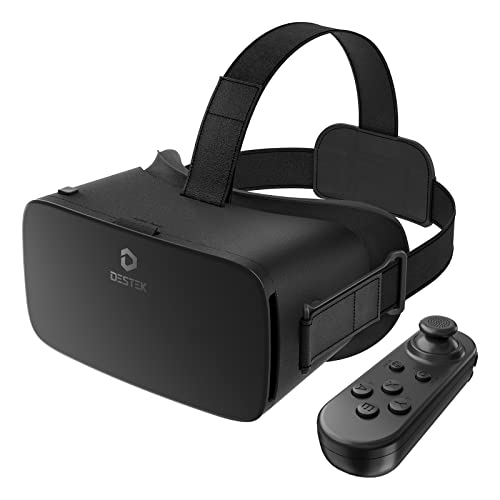
The DESTEK V5 is a black VR headset for phone use with 110° field of view HD lenses and anti-blue light eye protection. It is designed for smartphone-based virtual reality viewing, including 3D VR games, movies and 360° video.
The headset is also described as suitable for many glasses wearers and includes a Bluetooth remote controller. Phone compatibility depends on the device size, gyro sensor support and operating mode, so those points matter most before choosing an offer.
Key Details
| Detail | Verified information and buyer relevance |
|---|---|
| Product type | Phone VR headset for virtual reality viewing. |
| Colour | Black. |
| Field of view | 110° field of view, which is part of the headset’s viewing specification. |
| Lenses | HD lenses with anti-blue light, anti-reflective and anti-distortion features. |
| Included control | Bluetooth remote controller included. |
| Phone compatibility | Supports phones with a gyro sensor and a stated phone size limit of 6.4 x 3.3 x 0.39 inches (L x W x H). |
| Operating note | Only Player Mode is supported for iOS devices; Game, Cursor and Mouse modes are Android-only. |
What to Compare Before Buying
- Phone size: Check the stated 6.4 x 3.3 x 0.39 inch limit against your phone, including any case if it stays fitted.
- Gyro sensor support: This headset is intended for phones with a gyro sensor, so confirm your device has it.
- Operating system mode: iOS is limited to Player Mode, while Game, Cursor and Mouse modes are Android-only.
- Glasses space: If you wear glasses, compare the headset’s fit with your frames and comfort needs.
- Controller use: The Bluetooth remote is included, but app support should still be checked for the experience you want.
Compatibility, Size and Fit
This headset is made for phones rather than standalone VR hardware. The stated compatibility covers many iPhone and Samsung Galaxy models, but the key checks are the phone’s overall size, whether it has a gyro sensor and which mode you plan to use. The fit also matters if you wear glasses, since the headset is described as accommodating most glasses wearers.
Before You Decide
Confirm your phone meets the stated size limit and has a gyro sensor before choosing this headset. Check whether you need iOS Player Mode only or Android-only Game, Cursor and Mouse modes. If you wear glasses, make sure the headset fit works for your frames.
Simple First VR Session
A straightforward first use is to set up a VR video or app on the phone, fit the headset comfortably and try a short viewing session first. That lets you check the phone fit, lens position and controller use before settling in for longer viewing.



