Quick Summary
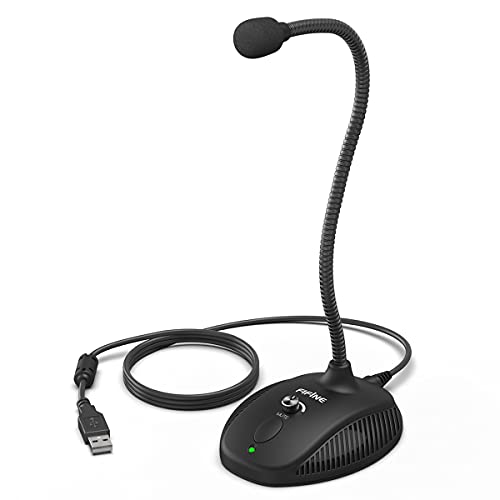
The FIFINE K054 is a USB computer microphone with a fully flexible gooseneck, volume control, mute button and LED indicator. It is set up for desktop use and connects by USB for plug and play operation on Windows or Mac.
The microphone is described with a cardioid polar pattern for clear sound quality, while helping to block out most background noise and pop sound. The straight length of the gooseneck is stated as up to 12" (32.5cm), and the USB cable is stated as 2M (6.6ft).
Who It Is Best For
This microphone is aimed at people using a computer for Zoom meetings, conference calls, voice recording, streaming, gaming and working from home. It also suits buyers who want a desktop mic they can position with the flexible neck and adjust from the onboard controls.
Key Details
| Detail | Verified information and buyer relevance |
|---|---|
| Brand | FIFINE, helping identify the exact product. |
| Model | K054, the key identifier for checking the right listing. |
| Connection | USB plug and play for use with a computer. |
| Compatibility | Works with Windows or Mac according to the product wording. |
| Gooseneck length | Straight length stated as up to 12" (32.5cm), which affects positioning on a desk. |
| USB cable length | 2M (6.6ft) cable, giving reach from the microphone to the computer connection point. |
| Controls | On-board volume knob and mute button for quick local adjustment. |
| Indicator | Green/red LED indicator shows mute status. |
| Included items | Microphone, non-detachable premium 2M (6.6ft) USB cable and user manual. |
Why Buyers Choose It
- The cardioid polar pattern is stated to produce clear sound quality while blocking out most background noise and pop sound.
- The flexible gooseneck lets you adjust the microphone angle and height for desktop placement.
- The mute button and LED indicator give a quick way to check and change mute status during calls or recording.
- The 2M USB cable gives some flexibility when positioning the microphone on a desk.
How It Works
- Connect the microphone to your computer using the USB cable.
- Wait for the system to recognise it on Windows or Mac.
- Use the volume knob to adjust microphone sensitivity.
- Use the mute button when you want to mute the microphone.
- Check the LED indicator to see whether the microphone is muted.
Real World Use
As a desktop microphone, this model is positioned on a desk and adjusted using the flexible gooseneck. The stated cable length and plug and play connection make it straightforward to place near a computer, while the onboard controls keep basic adjustments close at hand.
What To Know Before You Buy
Check that you want a USB computer microphone rather than a wireless or 3.5mm option. Confirm the 2M cable length and the 12" gooseneck length suit your desk layout, and review the Windows or Mac compatibility wording before ordering. The included manual may also help with setup and placement.
Common Buyer Questions
Does it need extra software?
No, it is described as plug and play through USB.
Can I mute it quickly during a call?
Yes, it has a tactile mute button and an LED indicator that shows mute status.
How long is the cable?
The USB cable is stated as 2M (6.6ft).
Can the neck be adjusted?
Yes, the gooseneck is described as completely flexible.
Final Buying View
If you want a USB desktop microphone with local volume control, mute access and a flexible gooseneck, the FIFINE K054 gives a clear, desk-friendly specification. Check the cable length, gooseneck length and your Windows or Mac setup before choosing it.