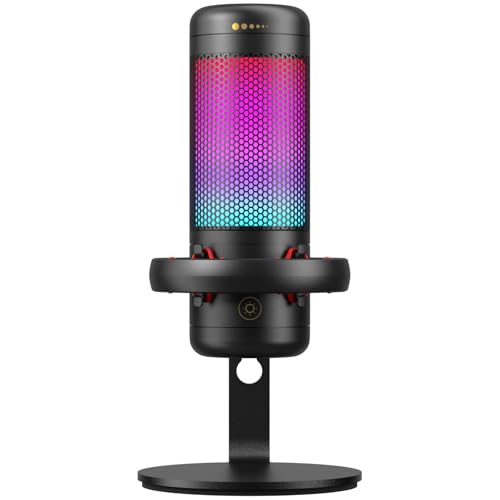
Quick Summary
The KASOHQEE USB Conference Microphone is a desktop PC microphone with an omnidirectional condenser pickup pattern, a mute button, and plug and play USB use. It is written for group discussions, online calls, class use and gaming, with colour lighting effects mentioned in the product description.
The microphone is also described as a mini size unit that is easy to carry, which may suit buyers who want a compact desktop microphone for different locations.
Who It Is Best For
This microphone is aimed at people who need a desktop microphone for laptops or desktop PCs and want to use it for online calls, gaming or class sessions. It is also relevant if you want a compact unit that can be moved easily.
Key Details
| Detail | Verified information and buyer relevance |
|---|---|
| Brand | KASOHQEE, which identifies the product listing clearly. |
| Product type | USB conference microphone for desktop PC use. |
| Pickup pattern | Omnidirectional 360 degree pickup, which is intended to capture sound from different directions. |
| Mute function | One-touch mute button with light change, and red light indicates mute. |
| Compatibility | Works with laptops and tablets, and is stated to be compatible with Windows and Mac OS. |
| Connection | USB plug and play use without driver or software installation. |
| Size | 3.54 x 3.54 x 1.37 inches, which supports the compact desktop design. |
| Appearance | Metal body with colourful lighting effects. |
Why Buyers Choose It
- 360 degree omnidirectional pickup is suited to capturing speech from around the microphone rather than a single direction.
- One-touch mute gives a quick way to mute or unmute during calls or classes.
- USB plug and play setup removes the need for driver or software installation.
- The stated mini size makes it easier to store or carry between uses.
How It Works
- Connect the microphone by USB to a desktop or laptop computer.
- Use it with a compatible device running Windows or Mac OS, or with a tablet as stated.
- If the microphone does not respond, open your computer microphone settings and select it as the input device.
- Press the mute button to mute or unmute, with the red light indicating mute.
Real World Use
The microphone is described for gaming, online calls and class use, so it suits a desk setup where a compact USB microphone is needed. Its omnidirectional pickup may be useful for people speaking from different directions around the same desk.
What To Know Before You Buy
Check that you want a USB conference microphone rather than a headset or handheld mic. Confirm that your device has a USB connection and that you are happy with the stated desktop size of 3.54 x 3.54 x 1.37 inches. The listing also refers to laptops, tablets, Windows and Mac OS, so it is worth matching the microphone to your device before ordering.
Common Buyer Questions
Does it need driver software?
No, it is described as plug and play with no driver or software installation.
How do I mute it?
Use the one-touch mute button, and the red light indicates mute.
What devices is it for?
It is stated to work with laptops and tablets, and to be compatible with Windows and Mac OS.
Is it compact?
Yes, the body size is stated as 3.54 x 3.54 x 1.37 inches.
Final Buying View
This KASOHQEE USB conference microphone is a compact desktop option with omnidirectional pickup, mute control and plug and play USB use. Confirm your device connection and preferred setup before ordering.