

Quick Summary
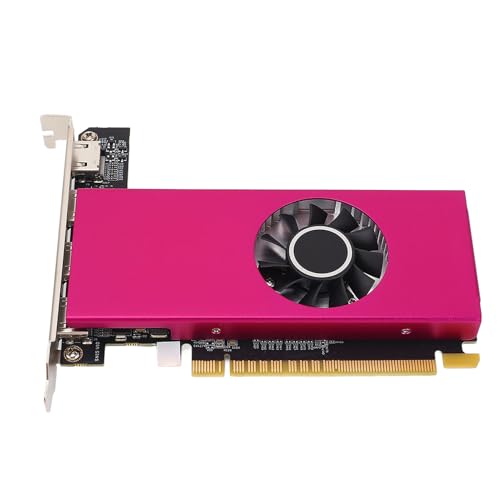
The RX580 graphics card is a desktop graphics card with 8GB GDDR5 memory, a 256-bit interface, 2 cooling fans and 2048 stream processor cores. The specification also lists a 1284MHz GPU speed and 7000MHz memory speed, so it is aimed at buyers who need a card with those stated figures.
It also mentions DP, HDMI and DVI-D output ports, PCI Express 3.0 slot support and DirectX 12 and OpenGL 4.6 support. Check your system slot, display connections and case space before ordering.
Who It Is Best For
This card suits buyers replacing or selecting a desktop graphics card who need the stated memory capacity, output options and PCI Express 3.0 connection. It is also described for gaming, video and photo editing, 3D CAD or CAM, and dual-monitor use if there is room in the desktop chassis.
Key Details
| Detail | Verified information and buyer relevance |
|---|---|
| Product type | RX580 desktop graphics card for computer use. |
| Memory | 8GB GDDR5 memory, which is a key specification to check against your needs. |
| Interface width | 256-bit. |
| Cooling | 2 cooling fans are listed for the card. |
| GPU speed | 1284MHz is stated for the GPU speed. |
| Memory speed | 7000MHz is stated for the memory speed. |
| Stream processors | 2048 stream processor cores are listed. |
| Output ports | DP, HDMI and DVI-D outputs are mentioned. |
| Slot support | PCI Express 3.0 graphics card slot support is stated. |
| Other support | DirectX 12 and OpenGL 4.6 support are mentioned. |
Why Buyers Choose It
- 8GB GDDR5 memory gives a clear capacity figure to compare with your intended workload.
- DP, HDMI and DVI-D outputs provide several connection options for a compatible monitor setup.
- 2 cooling fans are listed, along with automatic stopping when GPU temperature or load is low.
- PCI Express 3.0 support means the card needs the matching slot in the desktop system.
- Dual-monitor use is mentioned, so buyers can check whether their chassis has enough room for their setup.
How It Works
- Switch off the power and unplug all connectors.
- Disassemble the main chassis if you are fitting the card into a desktop system.
- Insert the graphics card into the motherboard PCI Express X16 slot.
- Tighten the fixing screws on the bezel so the card is secured.
- Close the case, reconnect the peripherals and plug the monitor into the matching graphics card connector.
Real World Use
The card is described for gaming, 3D CAD or CAM, video and photo editing, and dual-monitor use. It also mentions 4K resolution output at 60Hz and Blu-ray HD support, so buyers should match those stated features with their own display and workflow needs.
What To Know Before You Buy
Confirm that your desktop has a PCI Express X16 slot and enough internal space for the card and its dual-fan layout. Check that your monitor connections match the available DP, HDMI or DVI-D outputs. Review the stated 8GB memory, 256-bit interface, 1284MHz GPU speed and 7000MHz memory speed before ordering.
Check whether you need the stated DirectX 12 and OpenGL 4.6 support for your intended software or games. If you plan to use more than one display, make sure your chassis and monitor setup suit the available ports and space.
Common Buyer Questions
Which slot does this graphics card use?
It is stated for a PCI Express 3.0 graphics card slot and is installed into a motherboard PCI Express X16 slot.
What display connections are listed?
DP, HDMI and DVI-D output ports are mentioned.
Does it support more than one monitor?
Dual-monitor use is mentioned, provided there is room in the desktop chassis.
What should I check before fitting it?
Check slot type, internal space, monitor connectors and the rest of your system before ordering.
Final Buying View
This RX580 graphics card is for buyers who need the stated 8GB GDDR5 specification, multiple display outputs and PCI Express 3.0 support in a desktop system. Compare the listed figures and connections with your intended use before choosing.