

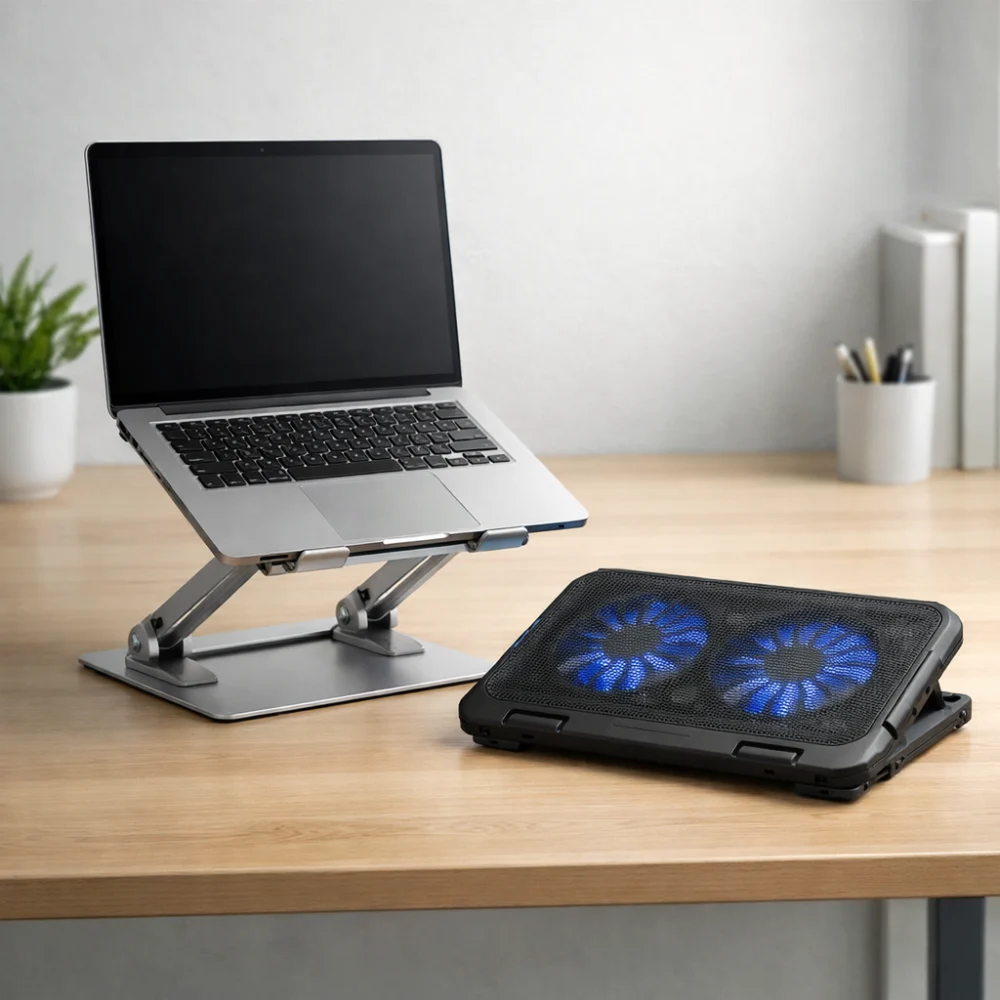
Laptop stands and cooling pads raise or support a laptop on a desk or other suitable surface. Some are passive supports; others include fans intended to move air around the laptop, and some combine support and cooling features.
The right choice depends on your laptop, where you use it and what you want the accessory to do. This guide focuses on practical selection checks, including fit, desk space, adjustability, power and the trade-offs between a simple riser and a fan-assisted pad.
What should you look for in a laptop stand or cooling pad?
Start with the laptop’s size and shape, then check that the support is designed to hold it securely. Choose a stand if raising or positioning the screen is your main aim; consider a cooling pad if you specifically want a fan-assisted surface. For a combined design, check that it suits both needs without taking up more space or adding features you will not use. Compare stability, adjustability, portability and any power or connection requirements before deciding.
Compare the main buying factors
| Feature | What it means | Why it matters | What to check |
|---|---|---|---|
| Fit and support | The dimensions and support points the design can accommodate. | A suitable fit helps the laptop sit securely without blocking important areas. | Check the stated laptop size or compatibility guidance, the support layout and any product-page limitations. |
| Stand height and angle | Whether and how the laptop’s position can be adjusted. | Adjustability can help you set up a screen position that suits your desk and working arrangement. | Look for adjustment information and consider whether you need a fixed or foldable design. |
| Cooling design | A passive surface, fan-assisted pad or combined support. | These designs have different power, noise, airflow and portability considerations. | Check whether fans are included, how the product is powered and where its vents or fans are positioned. |
| Stability | How the stand supports the laptop and resists movement during use. | A secure-feeling setup matters when typing or using a trackpad on the laptop itself. | Review the base, contact points and any stated use limitations; consider your desk surface and laptop shape. |
| Footprint and portability | The space the product occupies and whether it folds or is intended to be moved. | A larger cooling pad may be less convenient to carry or fit on a compact desk. | Check product dimensions, folded dimensions if given, weight information and how you expect to store or transport it. |
| Connections and controls | Any power connection, fan controls or additional ports. | These can affect desk cabling and how the product fits into your setup. | Check the connection type, power requirements, control details and whether any ports meet your needs. |
Choosing the features that matter
Fit, support and stability
Do not rely on a broad label such as suitable for laptops alone. Laptop sizes, base shapes and vent positions differ, so check the product’s stated fit and inspect how the laptop would rest on its supports. If you type directly on the laptop, consider whether the stand design is intended to hold it steadily in that use; some raised setups may be better suited to an external keyboard and mouse.
Height and angle adjustment
A fixed riser may be straightforward if its position suits your desk. An adjustable stand offers more scope to change the angle or height, but check how the adjustments work and whether the design can be folded for storage. Raising a laptop can change the position of its keyboard, so consider your whole desk setup rather than the screen alone.
Passive support or fan-assisted cooling
A passive stand has no fan power requirement and may be simpler to carry or store. A cooling pad adds fans, which may suit someone specifically looking for active airflow, but it also brings power, connection and possible fan-noise considerations. A fan-assisted pad is not a guarantee of lower temperatures: results can depend on the laptop’s design, vent locations and the surrounding conditions.
Power, controls and desk space
If a product uses fans, check how it is powered and whether its cable and controls are convenient for your setup. Extra ports or fan controls are useful only if they serve a purpose for you. Specifications vary by model, so always check the individual product page before buying.
Types of laptop stands and cooling pads
- Basic laptop riser: A passive support for raising or angling a laptop. It may suit a simple desk setup, but does not provide fan-assisted airflow.
- Adjustable or foldable stand: Offers a way to change the position or store the support more compactly. Check stability, adjustment details and whether the design suits your intended use.
- Fan-assisted cooling pad: Combines a laptop-supporting surface with one or more fans. It may suit buyers seeking active airflow, but requires attention to power, fan noise and vent alignment.
- Combined stand and cooling design: Brings positioning and fan-assisted features together. It can reduce the need to choose between those functions, but may take up more space or involve more connections than a passive stand.

Match the design to your setup
| Your priority | What to consider | Main trade-off |
|---|---|---|
| Raising the screen on a desk | Stand height, angle, stability and whether you will use separate input devices. | A raised position changes where the laptop keyboard sits. |
| Keeping a compact setup | A smaller or foldable design, plus its folded size and any required cable. | Compact designs may offer fewer adjustment options or a smaller support area. |
| Adding fan-assisted airflow | Fan placement, laptop vent positions, power and control arrangements. | Fans add connections and may make noise; cooling results are not guaranteed. |
| Using the laptop in more than one place | Weight, portability, storage and how quickly the stand can be set up. | A larger or more feature-rich design may be less convenient to move. |
Common buying mistakes
- Choosing by laptop size label alone. Check the stated fit and support layout as well as the size range, since laptops of similar size can have different shapes and vent positions.
- Assuming more fans mean better cooling. Fan count alone does not establish how well a pad suits a particular laptop. Consider vent alignment, power and noise as well as the overall design.
- Overlooking the keyboard position. A higher screen can make the built-in keyboard less convenient to use. Think about whether you will type on the laptop or use separate input devices.
- Ignoring desk space and cabling. Compare the product’s footprint with your available area, and check power or connection needs before choosing a fan-assisted model.
- Expecting a cooling pad to solve every heat issue. A pad is an accessory, not a promise of a particular temperature or performance result. Check its intended use and keep expectations realistic.
Safety and suitability
Use a stand or pad only in the manner described for that product, and check that the laptop is supported securely on a suitable surface. Keep the laptop’s vents and the accessory’s airflow areas unobstructed. If the product has powered fans, check its connection and power information before use; do not assume every model uses the same setup.
Care, storage and day-to-day use
Consider whether the design is easy to keep clear of ordinary desk dust, especially around fan openings, and follow any care guidance supplied with the product. A passive stand does not need fan power; a powered pad brings a cable and may need a convenient connection point. For a portable setup, check how the product folds or stores and whether its shape fits the space you have available.
A practical buying process
- Decide whether your main need is to raise the laptop, add fan-assisted airflow or combine both.
- Check the laptop’s dimensions, shape and vent positions against the product information.
- Narrow the options by desk space, stability, adjustability and how often you will move the accessory.
- For a cooling pad, compare fan placement, power, controls and any stated noise information without assuming a particular cooling result.
- Read the individual product information for fit, use limitations, connections and care details before choosing.
Buyer checklist
- Does the product’s stated fit suit your laptop’s size and shape?
- Will its supports leave the laptop stable in your intended setup?
- Do you need a fixed, adjustable, foldable or fan-assisted design?
- Have you considered screen position and where the keyboard will sit?
- For a fan-assisted pad, have you checked vent alignment, power, controls and cable needs?
- Will the footprint, weight and storage arrangement work for your desk or travel needs?
- Have you checked the individual product page for limitations and care information?
Frequently asked questions
Should I choose a laptop stand or a cooling pad?
Choose according to your main purpose. A passive stand is for supporting and positioning the laptop, while a cooling pad includes fans for fan-assisted airflow. A combined design may offer both, so check its fit, space and power requirements.
Will a cooling pad make my laptop cooler?
It is designed to provide airflow around a supported laptop, but the result can vary with the laptop’s design, vent positions and surroundings. Check the pad’s layout against your laptop and avoid treating a particular temperature change as guaranteed.
How do I know whether a stand will fit?
Compare the laptop’s size and shape with the product’s stated compatibility information. Also look at the support points and consider whether they could interfere with vents or other parts of the laptop’s base.
Is an adjustable stand always the better choice?
Not necessarily. Adjustment can help if you need to change the screen position, while a fixed design may be enough for a setup that already suits you. Compare stability, storage and how you will use the laptop keyboard.
Do cooling pads need a separate power connection?
Powered designs need a way to supply power, but the connection arrangement can vary. Check the individual product information for its power source, cable and controls before buying.
Can I use a laptop stand without an external keyboard?
That depends on the stand’s design and the position at which you intend to use the laptop. Raising the laptop can change the keyboard angle or height, so check the product’s intended use and whether that arrangement is comfortable for your setup.


