

Laptop Stands and Cooling Pads
Laptop stands and cooling pads are practical computer accessories designed to raise, support or help ventilate a laptop during work, study, gaming, streaming and everyday use. They are useful for home offices, gaming desks, student rooms, travel setups, shared workspaces and anyone who wants a more organised laptop area.
The right option should suit your laptop size, desk space, viewing angle, cooling needs and how often the setup will be moved. When comparing laptop stands and cooling pads, look at size compatibility where listed, height adjustment, angle adjustment, material, stability, fan design where listed, USB power, noise level where listed, portability, cable access and storage needs.
- Laptop Stands and Cooling Pads
Babacom Ergonomic Laptop Stand for Desk, Dual-Bar Support, Height Adjustable, Foldable, Ventilated, for 10-16 Inch Laptops
Original price was: £18.99.£16.79Current price is: £16.79. *View On Amazon* - Laptop Stands and Cooling Pads
Gorilla Tech Newton Adjustable Laptop Stand with Mouse Pad and Dual Cooling Fans
£29.99 *View On Amazon* - Laptop Stands and Cooling Pads
NEDIS Portable Laptop Stand with 6 Adjustable Height Levels, Foldable Aluminium, Silver
£12.79 *View On Amazon* - Laptop Stands and Cooling Pads
Lunaanda Adjustable Foldable Laptop Stand for 10 to 16 Inch Laptops, Black
Original price was: £11.99.£9.59Current price is: £9.59. *View On Amazon* - Laptop Stands and Cooling Pads
AboveTEK Portable Laptop Tray with Retractable Right Mouse Pad
£29.99 *View On Amazon* - Laptop Stands and Cooling Pads
IETS GT600 Laptop Cooling Pad with 5.5-inch Turbo-Fan, 3-Port USB Hub
£158.16 *View On Amazon* - Laptop Stands and Cooling Pads
Generise Laptop Cooling Pad Gel Cooling Mat 40cm x 30cm Grey
£11.99 *View On Amazon* - Laptop Stands and Cooling Pads
SAIJI Standing Laptop Stand for Desk with Foldable Mouse Pad, 4 Adjustable Heights up to 20.47 in, Walnut
£79.99 *View On Amazon* - Laptop Stands and Cooling Pads
rongweiwang 14-inch Laptop Cooler USB External Cooling Pad
£16.99 *View On Amazon* - Laptop Stands and Cooling Pads
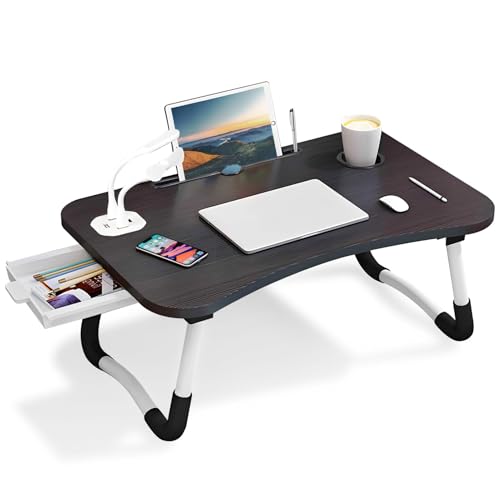
Adjustable Laptop Bed Table with Folding Legs, Cup Holder, 60 x 40 cm
£19.70 *View On Amazon* - Laptop Stands and Cooling Pads
Bestand Aluminium Laptop Stand with Heat Vent, Silver
£42.98 *View On Amazon* - Laptop Stands and Cooling Pads
Warmiehomy Laptop Desk with USB Ports, Foldable Portable Laptop Bed Table, Black
Original price was: £14.74.£12.47Current price is: £12.47. *View On Amazon* - Laptop Stands and Cooling Pads
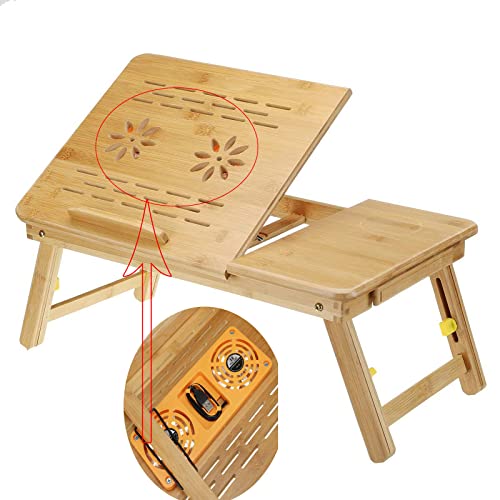
electromax Bamboo Foldable Laptop Desk with Built-in 2 USB Fans, Height & Angle Adjustable, with Drawers
£26.99 *View On Amazon* - Laptop Stands and Cooling Pads
Metal Laptop Cooling Pad with Adjustable Fan Heights and Detachable Thermoelectric Coolers
£42.23 *View On Amazon* - Laptop Stands and Cooling Pads
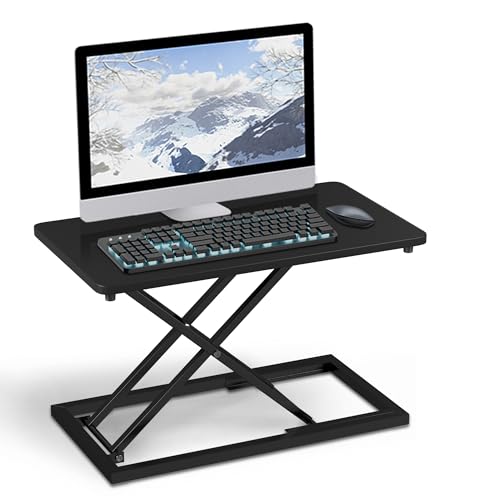
jxgzyy Standing Desk Converter 60 x 34 cm Height Adjustable Monitor Stand Platform
£37.58 *View On Amazon* - Laptop Stands and Cooling Pads
Laptop Cooling Stand Portable Magnetic Cooler Stand
Original price was: £20.34.£17.46Current price is: £17.46. *View On Amazon* - Laptop Stands and Cooling Pads
Teskyer 360° Rotation Adjustable Laptop Stand for Desk, Aluminium Alloy, Grey
£29.99 *View On Amazon* - Laptop Stands and Cooling Pads
Foldable Laptop Cooling Pad with Double Fan Adjustable Metal Stand
£13.39 *View On Amazon* - Laptop Stands and Cooling Pads
DIYEAH Ergonomic Laptop Cooling Stand with Silent Fans
£20.49 *View On Amazon* - Laptop Stands and Cooling Pads
TechShak Adjustable Laptop Riser for Desk, Aluminium Ergonomic Stand, Silver
£12.99 *View On Amazon* - Laptop Stands and Cooling Pads
Foldable Laptop Cooling Pad with Dual External Fans
£29.62 *View On Amazon* - Laptop Stands and Cooling Pads
HUANUO Lap Desk with Cushion, Adjustable 8-Angle Laptop Tray for up to 15.6 in
Original price was: £24.99.£19.99Current price is: £19.99. *View On Amazon*






What Are Laptop Stands And Cooling Pads
Laptop stands are supports that raise a laptop from the desk or change the viewing angle. They can help create a tidier and more comfortable working position, especially when used with a separate keyboard and mouse where suitable.
Cooling pads are laptop supports that include fans or ventilation features to help improve airflow around the laptop base where compatible. They are often used for gaming laptops, work laptops, older laptops or devices used for long sessions.
Depending on the product, laptop stands and cooling pads may include adjustable heights, foldable frames, metal construction, non slip pads, built in fans, USB power connections, cable openings, phone holders, RGB lighting, quiet fan modes or portable designs where listed.
What Laptop Stands And Cooling Pads Are Used For
Laptop stands and cooling pads are used to make laptop setups more practical. A stand can raise the screen closer to eye level, free up desk space and improve the way accessories sit around the laptop.
Cooling pads are used when extra airflow under the laptop may be helpful. This can be useful during long work sessions, gaming, video editing, streaming or use in warmer rooms, depending on the laptop and cooling pad design.
They can also help keep a desk more organised. A raised stand may create space underneath for a keyboard, notebook or small accessories, while a cooling pad can give the laptop a stable ventilated surface rather than placing it directly on soft bedding, sofas or laps.
How To Choose The Right Laptop Stand Or Cooling Pad
Start with your laptop size. Check the product details for supported laptop sizes where listed, then compare this with your own device. A stand that is too small may feel unstable, while a very large pad may take up more desk space than needed.
Next, decide whether you mainly need height support or airflow support. If your priority is screen position and desk comfort, a laptop stand may be enough. If your laptop becomes warm during heavy use, a cooling pad with suitable ventilation features where listed may be more appropriate.
Think about how fixed your setup is. For a permanent desk, a sturdy stand with good adjustment may be useful. For travel, commuting or student use, a foldable lightweight option may be easier to carry.
Also consider accessories. A raised laptop often works best with a separate keyboard and mouse, because typing directly on a raised stand may not feel comfortable for everyone.
Key Features To Compare
Size compatibility is one of the most important features. Check the laptop size range where listed and make sure the stand or pad supports the laptop securely.
Height adjustment can help create a better viewing position. Some stands are fixed height, while others offer multiple levels or adjustable angles where listed.
Stability matters. A stand should hold the laptop securely without wobbling during normal use. Non slip feet or rubber contact points where listed can help keep the laptop in place.
Cooling features vary. Some cooling pads include one or more fans, ventilation panels or speed controls where listed. Fan size, placement and airflow design should be compared carefully.
Noise level may matter if the pad will be used for calls, study or quiet offices. Fan noise information should only be relied on where listed.
Portability is useful for travel or shared workspaces. Foldable or lightweight designs can be easier to move, while heavier stands may feel more stable on a fixed desk.
Cable access is also worth checking. A good setup should leave room for chargers, USB cables, docking stations, headsets and external displays where compatible.
Laptop Stands Compared With Cooling Pads
A laptop stand is mainly designed to raise and support the laptop. It can improve screen position and help create a more organised desk, but it may not include active cooling.
A cooling pad is designed to support the laptop while helping airflow through fans or ventilated surfaces where listed. It can be useful for laptops that become warm during heavier use, but it may be larger or need USB power.
The trade off is simplicity versus airflow support. A stand may suit everyday work and study, while a cooling pad may be better for gaming, editing or longer sessions where extra ventilation is useful.
Adjustable Stands Compared With Fixed Stands
Adjustable laptop stands allow the user to change the height or angle where listed. This can be useful when different people use the same desk, or when you switch between sitting, standing or different working positions.
Fixed stands are usually simpler. They can feel sturdy and easy to use because there are fewer moving parts. They may suit a permanent desk where one height works well.
The better choice depends on how flexible your setup needs to be. If your desk is shared or changes often, adjustment can be useful. If you want a simple stable setup, a fixed stand may be enough.
Cooling Pads Compared With Laptop Risers
Laptop risers lift the laptop away from the desk, often improving airflow underneath simply by creating space. They are usually simple and may not need power.
Cooling pads may include powered fans where listed, providing active airflow under the laptop. This can be useful for demanding tasks, but it adds cables, fan noise and another powered accessory to the desk.
The trade off is convenience versus active cooling. A riser may suit everyday productivity, while a cooling pad may be more useful for warm running laptops or longer intensive use.
Guidance For Beginners, Regular Users And Experienced Buyers
Beginners should focus on simple compatibility, stability and desk comfort. A basic stand can make a laptop setup feel more organised without adding much complexity.
Regular laptop users may want to compare height adjustment, build quality, cable access and whether the stand works with an external keyboard, mouse and monitor.
Experienced users may look more closely at cooling fan layout, airflow direction, USB power, fan control where listed, desk footprint, material and compatibility with docking stations or multiple displays.
Gaming and creative users may prefer cooling pads where airflow, laptop size support and long session comfort are key considerations. Office users may prioritise quiet operation, neat cable routing and a comfortable screen position.
Use Cases By Workstyle And Setup
For home offices, laptop stands can raise the laptop screen and create a tidier desk layout when used with a keyboard and mouse.
For gaming laptops, cooling pads may help support airflow during longer sessions where the laptop and pad are compatible.
For students, portable stands can be useful in bedrooms, libraries and shared study spaces where desk height and seating may vary.
For travel and hybrid working, foldable laptop stands can provide a more comfortable temporary setup without taking up much bag space where suitable.
For video calls, a raised laptop can help position the camera at a more natural height, depending on the stand and laptop.
For creative work, stands and cooling pads can support longer laptop sessions involving editing, design, streaming or multitasking where the setup is suitable.
Fit, Compatibility And Laptop Matching
Laptop stands and cooling pads should be matched to the laptop size, weight and base design. Check supported sizes and weight guidance where listed before buying.
Vent placement matters for cooling pads. Laptops draw in and release air in different places, so a cooling pad may work better with some laptop designs than others. Check the laptop ventilation layout and product details where possible.
If the laptop has ports on the sides or rear, make sure the stand or pad does not block chargers, USB cables, HDMI cables, Ethernet adapters or docking station connections.
If the laptop is used with an external monitor, keyboard, mouse or docking station, plan the full desk layout rather than choosing the stand alone.
Desk Comfort And Working Position
A laptop stand can help lift the screen, but it should be used in a way that feels comfortable for the user. A raised laptop may be awkward for typing directly on the built in keyboard, so a separate keyboard and mouse may be useful for longer sessions.
The screen should be easy to see without leaning forward too much. The exact height depends on desk height, chair position, laptop size and personal comfort.
Angle adjustment can help reduce glare and improve visibility where suitable. It can also make the laptop easier to view during calls, reading or watching video.
Comfort is personal. The best setup is the one that supports your actual work routine, desk space and device use without causing extra clutter.
Cooling, Airflow And Device Care
Laptops need clear ventilation to manage heat properly. A stand or cooling pad can help keep the base lifted from the desk, and a cooling pad may provide fan assisted airflow where listed.
Do not block laptop vents with soft furnishings, papers, blankets or other objects. Using a laptop on a bed or sofa can restrict airflow depending on the device design.
A cooling pad should not be treated as a repair for a faulty laptop. If a laptop becomes unusually hot, shuts down, makes strange fan noises or performs poorly, it may need cleaning, servicing or professional diagnosis.
Keep the laptop and cooling pad free from dust where suitable, as dust can reduce airflow over time.
Safety And Responsible Use
Use laptop stands and cooling pads on stable, flat surfaces. A stand should not wobble, slide or place the laptop at an unsafe angle.
Check that the laptop is secure before typing, adjusting the screen or connecting cables. If the laptop moves easily, the stand may not be suitable for the device or desk.
For powered cooling pads, use the correct USB connection and avoid damaged cables. Stop using any product that becomes unusually hot, smells unusual or shows visible damage.
Keep liquids away from laptops, cooling pads and desk electronics. Make sure cables do not create trip hazards or pull the laptop from the stand.
If using a stand with children or shared spaces nearby, place it where it cannot be knocked easily.
Cable Management And Desk Setup
Laptop stands and cooling pads can make desks cleaner, but cable planning matters. Chargers, USB hubs, docking stations, monitors, headsets and external drives can quickly create clutter if not arranged well.
Look for stands that leave space for cable routing where listed. Some setups may benefit from cable clips, ties or a docking station to keep connections neat.
If using a cooling pad, remember that it may need a USB cable for power. Check whether this leaves enough available ports for other accessories.
A tidy setup can make it easier to move the laptop, clean the desk and avoid strain on ports or cables.
Care, Cleaning And Storage
Always follow the care guidance supplied with the product. Keep laptop stands and cooling pads clean, dry and free from dust.
For cooling pads, dust can build up around fans and vents. Clean gently where suitable and make sure the device is unplugged before any cleaning.
Do not overload a stand beyond the product guidance. Avoid placing heavy items on top of foldable stands or using them for devices they are not designed to hold.
Store portable stands folded where suitable, away from pressure or sharp objects in a bag. Keep cables with cooling pads so they are not lost.
Useful Accessories To Consider
Useful accessories may include external keyboards, wireless mice, USB hubs, docking stations, monitors, laptop sleeves, USB cables, cable organisers, desk mats, webcams and headsets.
For a home office, a laptop stand often works well with a monitor, keyboard, mouse and docking station. For travel, a foldable stand, compact mouse and short USB cable can be useful.
If buying a laptop stand or cooling pad as a gift, check the recipient’s laptop size, desk setup and whether they need portability, cooling support or simple screen height adjustment.
Why Buy From YPC
At YPC, we understand active lifestyles and the need for practical products that work in real use. Laptop stands and cooling pads should be easy to compare by size compatibility, stability, height adjustment, cooling features where listed, portability, cable access, care needs and suitability for the setup.
This category is designed to help buyers choose practical accessories for home offices, gaming desks, study spaces, travel and everyday laptop use. Browse the laptop stands and cooling pads at YPC and compare the available options to find a suitable support for your device and routine.
FAQs
What is a laptop stand used for?
A laptop stand is used to raise or angle a laptop on a desk. It can help improve screen position, free up desk space and make a laptop setup more organised, especially with a separate keyboard and mouse.
What is a laptop cooling pad?
A laptop cooling pad is a support accessory that may include fans or ventilated areas to help airflow under a laptop where compatible. It is often used for gaming, long sessions or warm running laptops.
Do laptop cooling pads really help?
They may help improve airflow around the laptop base where the design and laptop ventilation are compatible. Results vary by laptop, pad design, room temperature and workload.
How do I choose the right laptop stand?
Check laptop size compatibility, stability, height adjustment, angle adjustment, desk space and whether you will use a separate keyboard and mouse. Choose a stand that suits your actual working setup.
Are laptop stands suitable for typing?
Some people can type on a low angled stand, but higher stands may feel awkward for long typing sessions. A separate keyboard and mouse are often more comfortable for raised laptop setups.
Can a cooling pad stop a laptop overheating?
A cooling pad may help with airflow, but it should not be used as a fix for a faulty or dirty laptop. If a laptop overheats regularly, shuts down or behaves unusually, it may need servicing or professional help.
Do cooling pads need USB power?
Many cooling pads use USB power for their fans where listed, but designs vary. Check the product details to see how the pad is powered and whether it needs a spare USB port.
How do I clean a laptop cooling pad?
Follow the care guidance supplied with the product. Unplug it first, remove dust gently where suitable and keep fans, vents and surfaces clear without using harsh cleaning methods unless stated as safe.
 Getting ready for Summer? View our Home and Garden Products

Heading outdoors this winter? Take a look at our Outdoor Clothing.
