
Network Switches
Network switches are used to connect multiple wired devices to the same network, making them useful for homes, offices, gaming rooms, workshops, CCTV systems, media setups and business environments. The right network switch should provide enough ports, suit your network speed and support the features your devices need.
At YPC, you can browse network switches for home broadband setups, office desks, smart devices, access points, printers, servers, gaming consoles and wired workstations. This category helps you compare port count, speed, management features, Power over Ethernet support, mounting style, cooling, power use and listed compatibility before choosing.
- Network Switches
VIMIN 10-Port Unmanaged 100Mbps Network Switch with 8 PoE Ports, AI Watchdog, VLAN, Extend 250m, IEEE 802.3af/at, 120W PoE Power
Original price was: £15.59.£14.29Current price is: £14.29. *View On Amazon* - Network Switches
8 Port Full Gigabit PoE+ Switch with 2 Gigabit Uplink, 120W Built-In Power, 802.3af/at, Unmanaged VLAN Plug and Play
Original price was: £33.98.£30.98Current price is: £30.98. *View On Amazon* - Network Switches
Yunseity Gigabit Network Switch 2 Port RJ45 Splitter Adapter
£6.34 *View On Amazon* - Network Switches
Edimax ES-5104PH V2 5-Port Fast Ethernet Switch with 4 PoE+ Ports and DIP Switch
£40.20 *View On Amazon* - Network Switches
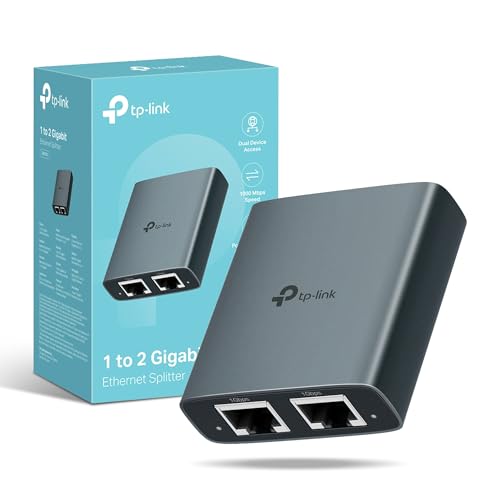
TP-Link EH210 Ethernet Splitter 1 to 2 Gigabit Network Switch
Original price was: £12.99.£9.99Current price is: £9.99. *View On Amazon* - Network Switches
Gigabit PoE Switch, 4-Port Gigabit, 802.3af/at, 65W Power Budget
£19.99 *View On Amazon* - Network Switches
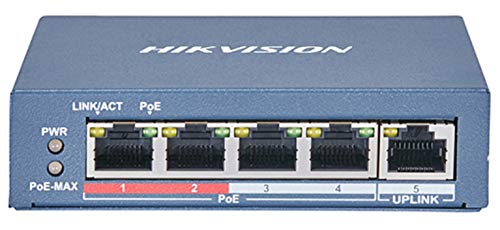
Hikvision DS-3E0105P-E2 4-Port Fast Ethernet Unmanaged PoE Switch
£67.26 *View On Amazon* - Network Switches
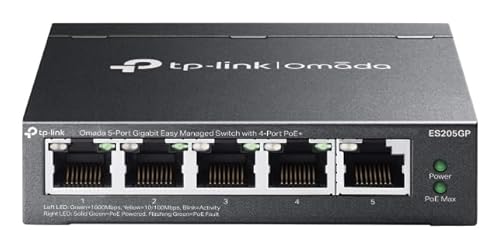
TP-Link ES205G Omada 5-Port Gigabit Switch
Original price was: £59.31.£55.14Current price is: £55.14. *View On Amazon* - Network Switches
6 Port 2.5G Web Smart Managed Ethernet Switch with 10G SFP Uplink
£48.99 *View On Amazon* - Network Switches
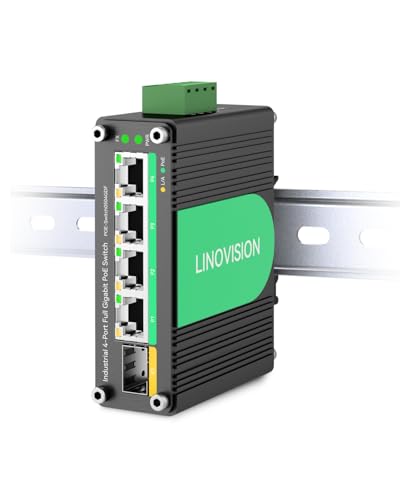
LINOVISION Industrial 10 Gigabit Ethernet Fibre PoE+ Switch and Media Converter
£139.99 *View On Amazon*








What Are Network Switches?
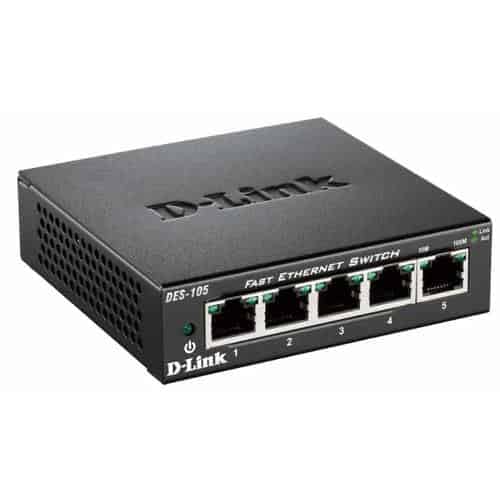
Network switches are devices that connect several wired network devices together using Ethernet cables. They allow computers, printers, access points, cameras, network storage, smart TVs, games consoles and other wired equipment to communicate through the same network.
A switch is usually connected to a router, modem router or wider network. The router manages the internet connection, while the switch provides extra wired ports for more devices.
Depending on the product, network switches may include unmanaged operation, managed settings, Gigabit Ethernet, faster Ethernet standards, Power over Ethernet, rack mounting, desktop placement, metal housings, fanless designs or business features where listed.
What Are Network Switches Used For?
Network switches are used to expand wired network access. They are useful when a router does not have enough Ethernet ports or when devices need a more stable wired connection than WiFi can provide.
They can be used for home offices, gaming desks, smart TVs, desktop PCs, printers, access points, CCTV cameras, network attached storage, business systems and media devices.
A network switch can also help tidy a setup by bringing several wired connections together in one place, especially around desks, cabinets, TV units or network cupboards.
How To Choose The Right Network Switch
Start by counting how many wired devices you need to connect. Choose a switch with enough ports for today and consider leaving spare ports for future devices.
Next, check speed. Gigabit switches are common for many home and office setups, while faster switches may be useful for higher performance networks where supported by your devices, cables and router.
Also consider whether you need a managed or unmanaged switch. A simple home setup may only need an unmanaged switch, while a business, CCTV or advanced network may benefit from managed features where listed.
Key Features To Compare
When comparing network switches, look at port count, Ethernet speed, managed or unmanaged operation, Power over Ethernet support, PoE power budget, mounting options, cooling design, power supply, case material and listed compatibility.
Port count affects how many devices can connect. Speed affects the maximum wired connection supported by the switch where compatible. Power over Ethernet can be useful for access points, cameras and phones where supported.
Also check size, noise and placement. A small fanless switch may suit a desk, while a larger rack mounted switch may suit an office cabinet or network room.
Network Switches Compared With Routers
A router connects your network to the internet and manages traffic between your local network and broadband connection. Many routers also provide WiFi and a few Ethernet ports.
A network switch expands the number of wired Ethernet connections available on the local network. It does not usually replace the router or manage the broadband connection.
If you need internet access and network control, you need a router. If you already have a router but need more wired ports, a network switch is usually the right product to compare.
Network Switches Compared With Access Points
An access point provides WiFi coverage for wireless devices. It usually connects to the network by Ethernet and broadcasts a wireless signal.
A network switch provides wired Ethernet connections. It can also connect access points to the network, especially in larger homes, offices and business spaces.
The two products often work together. A switch can provide the wired link, while access points provide WiFi in the areas that need coverage.
Network Switches Compared With WiFi Extenders
WiFi extenders are used to repeat or extend wireless coverage. They can be useful in simple home setups where running network cables is not practical.
Network switches are used for wired connections. They can support more stable links for devices such as desktop PCs, consoles, printers, servers and access points where Ethernet cabling is available.
If your problem is weak WiFi coverage, an extender or access point may be relevant. If your problem is not enough wired ports, a network switch is usually more suitable.
Network Switches Compared With Network Hubs
Older network hubs send data to all connected devices, which can be less efficient. They are rarely the preferred choice for modern networks.
Network switches are designed to direct traffic more intelligently between connected devices. They are the normal choice for expanding Ethernet connections in homes and businesses.
For most current setups, a network switch is the practical option rather than a hub.
Unmanaged Switches Compared With Managed Switches
Unmanaged network switches are usually simple to use. You connect the power, plug in Ethernet cables and the switch handles basic network traffic automatically. They are often suitable for homes, small offices and simple desk setups.
Managed network switches offer more configuration options where listed. These may include VLANs, traffic monitoring, port control, link aggregation, Quality of Service settings or security features depending on the product.
Choose an unmanaged switch for straightforward expansion. Choose a managed switch if you need more control over how the network behaves.
Smart Switches Compared With Fully Managed Switches
Smart switches sit between unmanaged and fully managed options. They may offer some useful settings without the full complexity of an advanced managed switch where listed.
Fully managed switches are usually designed for business, professional or more complex networks. They may offer deeper configuration, monitoring and control features where listed.
The right choice depends on your confidence and needs. A smart switch may suit a small business or advanced home network, while a fully managed switch may suit larger or more technical installations.
PoE Switches Compared With Standard Switches
PoE switches, also called Power over Ethernet switches, can send power and data through one Ethernet cable to compatible devices where supported. This can be useful for access points, CCTV cameras, VoIP phones and some network devices.
Standard switches provide network data only and do not power connected devices. Devices still need their own power adapters.
If your devices support Power over Ethernet, a PoE switch can reduce plug clutter and simplify installation. If your devices have their own power, a standard switch may be enough.
Desktop Switches Compared With Rack Mounted Switches
Desktop switches are usually compact and designed to sit on a desk, shelf, TV unit or small office surface. They are often useful for home networks and smaller setups.
Rack mounted switches are designed for installation in network racks or cabinets where listed. They are useful for businesses, larger offices, structured cabling and more permanent network layouts.
The better choice depends on where the switch will live. A desktop switch suits simple placement, while a rack mounted switch suits organised network infrastructure.
Gigabit Switches Compared With Faster Network Switches
Gigabit switches are suitable for many home and office networks, especially where devices use standard wired connections for broadband, file sharing, printers and access points.
Faster switches, such as multi Gigabit or higher speed models where listed, may be useful for network storage, fast workstations, creative workflows, high performance access points or advanced home networks.
Faster switches only help where the connected devices, cables and router or network equipment also support the higher speed. Check the full setup before buying.
Beginner, Regular User And Network Installer Guidance
If you are buying your first network switch, focus on port count, speed and simple setup. An unmanaged switch can often solve the basic problem of needing more Ethernet ports.
Regular users may want to compare switch size, power supply, fan noise, mounting options, cable routing, energy use and whether PoE is needed.
Network installers and advanced users may look more closely at VLAN support, PoE budget, uplink speed, management interface, rack mounting, monitoring, redundancy features and compatibility with existing equipment where listed.
Use Cases By Home, Office And Business Setup
For homes, network switches can connect smart TVs, games consoles, desktop PCs, printers, media boxes, access points and network storage. They are useful around routers, TV units and home offices.
For offices, switches can connect desks, printers, meeting room equipment, VoIP phones, access points and business systems. Managed or PoE features may be useful where listed.
For CCTV and security setups, PoE switches may power compatible cameras and carry network data through the same cable where supported.
For workshops, studios and creative spaces, switches can connect computers, storage drives, printers and wired devices more neatly.
Port Count And Future Expansion
Port count is one of the first details to consider. Common switch sizes may include small desktop models and larger business models depending on the products listed.
Count each wired device, then allow extra capacity for future additions. It is common to underestimate how many ports a setup will need once printers, access points, cameras, consoles and network storage are included.
Choosing a switch with spare ports can be more convenient than replacing it too soon.
Ethernet Speeds And Real Network Performance
Network switch speed shows the maximum connection supported by each port where compatible. Real performance also depends on cables, devices, router speed, storage speed and internet connection.
A faster switch will not make broadband faster than the service supplied by your provider. It can, however, support faster local network transfers where the rest of the equipment allows.
For file transfers, gaming, streaming and network storage, check the full path between devices rather than only the switch speed.
Power Over Ethernet And PoE Budget
If choosing a PoE switch, check the PoE standard and total power budget where listed. The switch must provide enough power for the connected devices.
Each PoE device uses a certain amount of power. The total demand should stay within the switch’s listed PoE budget. If too many devices are connected, some may not power correctly.
PoE support must exist on both sides. A PoE switch only powers devices that are designed to receive power over Ethernet.
VLANs, Traffic Control And Network Segmentation
Some managed network switches may support VLANs where listed. VLANs can help separate parts of a network, such as staff devices, guest networks, cameras or smart devices.
Traffic control features such as Quality of Service may help prioritise certain types of network traffic where supported and configured correctly.
These features are useful in advanced home, office and business networks, but they may not be needed for simple plug and play setups.
Compatibility With Routers, Modems And Broadband
A network switch usually connects to a router or modem router using an Ethernet cable. The router still manages the internet connection and local network services.
Check that your router has an available Ethernet port and that the switch speed suits your network. If the router ports are slower than the switch, performance may be limited by the router.
A switch can expand wired access, but it cannot improve poor broadband service by itself.
Compatibility With Access Points And Cameras
Network switches are often used with access points and security cameras. PoE switches can be especially useful where compatible devices need power and data through one cable.
Check whether the access point or camera needs PoE, PoE plus or another listed standard. Also check the total power required by all connected devices.
For outdoor cameras or external access points, make sure the cabling, mounting and device ratings are suitable for the environment.
Compatibility With Network Storage And Servers
Network attached storage, small servers and shared drives often benefit from stable wired connections. A network switch can connect these devices to computers and the router.
If file transfer speed matters, check switch speed, device port speed, cable quality and storage performance. A slow drive or older computer can limit transfer speeds even when the switch is capable of more.
For advanced storage setups, managed switch features or faster ports may be useful where listed and supported.
Ethernet Cables And Cable Quality
Network switches rely on Ethernet cables to connect devices. Cable type, length and condition can affect performance.
For faster network speeds, check that cables support the required standard. Damaged, poorly made or very long cables may cause connection issues.
Keep cables labelled and routed neatly where possible. This makes troubleshooting easier and reduces accidental unplugging.
Placement, Mounting And Cable Management
Switch placement affects convenience and reliability. A switch should be placed where cables can reach without strain and where ventilation is not blocked.
Desktop switches can sit on shelves, desks or cabinets. Rack mounted switches need compatible racks or cabinets where listed. Some switches may support wall mounting where suitable.
Good cable management helps keep networks tidy. Cable ties, clips, patch panels and labels can make a setup easier to maintain.
Cooling, Noise And Ventilation
Some network switches are fanless and quiet where listed. These can be useful for bedrooms, offices, living rooms and desks.
Larger or higher power switches may include fans. These can create noise and should be placed where sound and airflow are acceptable.
Always keep vents clear. Switches that overheat may become unreliable or uncomfortable to use.
Energy Use And Always On Networks
Network switches are often left on all day. Energy use can matter in home offices, business setups and larger networks.
Some switches may include energy saving features where listed. However, power use depends on the model, port count, connected devices and PoE demand.
If a switch will be left running continuously, choose a product that suits the size and needs of the network without unnecessary excess.
Security And Network Control
For simple home networks, security is mostly managed by the router, passwords and connected devices. A basic unmanaged switch usually passes traffic without advanced controls.
Managed switches may provide extra network control where listed, including port settings, VLANs and monitoring. These can be useful for businesses or advanced users.
Security depends on the whole network, not only the switch. Keep router settings, passwords and connected devices maintained.
Installation And Setup Considerations
Installing an unmanaged switch is usually straightforward. Connect power, connect one port to the router or network, then connect wired devices to the other ports.
Managed switches may need configuration before use, especially if VLANs, PoE settings or monitoring features are required.
For larger networks, structured cabling, patch panels and professional installation may be worth considering where suitable.
Troubleshooting Network Switch Issues
If a connected device has no network access, check the Ethernet cable, port, router connection and device settings. Many switches have indicator lights that show link activity where listed.
If speed is lower than expected, check cable type, device port speed, router speed and whether the switch supports the required rate.
If PoE devices do not power on, check PoE support, power budget and cable condition. Also confirm that the device is designed to receive Power over Ethernet.
Safety And Practical Electrical Considerations
Use network switches only with the correct power adapter or power supply supplied or specified for the product. Avoid damaged power cables, loose plugs or overloaded sockets.
Keep switches away from water, damp areas, excessive heat and places where cables may be pulled or trapped.
For rack installations, PoE networks, ceiling access points or business systems, ensure cabling and power arrangements are safe and suitable for the environment.
Care, Cleaning And Maintenance
Network switches should be kept clean, dry and well ventilated. Dust can build up around vents and ports over time.
Wipe external surfaces carefully where suitable and avoid pushing dust or debris into ports. Do not use excessive moisture near electrical equipment.
For managed switches, firmware updates may be available where supported. Follow product guidance before updating and keep a record of important settings.
Storage And Network Organisation
Store spare switches, cables and power adapters clean and dry. Keep the correct power supply with the switch so it is not confused with another adapter.
For active networks, label cables by room, device or port where useful. This can save time when moving equipment or troubleshooting.
If you use several switches, keeping a simple network diagram can make future changes easier.
Useful Accessories To Consider
Network switches work well with other networking accessories. Useful items may include Ethernet cables, patch cables, routers, access points, PoE injectors, rack cabinets, patch panels, cable clips, wall plates, cable testers and surge protected power strips where suitable.
For home offices, a switch may be used with a desktop PC, printer, access point, network storage and smart TV. For business networks, rack accessories and cable labelling may be more important.
Choose accessories based on your switch, network layout and device requirements rather than buying items that may not be compatible.
Why Buy From YPC?
At YPC, we understand active lifestyles and the need for practical products that work in real use. Network switches should be compatible, reliable and suitable for the wired devices, rooms and routines your network needs to support.
This category helps you compare port count, speed, management features, Power over Ethernet support, mounting style, cooling, power use, cable requirements and listed compatibility without overcomplicating the choice. Browse the network switches at YPC, compare the available options and choose the switch that suits your home, office, gaming setup, CCTV system or wider network.
FAQs
What is a network switch used for?
A network switch is used to connect multiple wired devices to the same network using Ethernet cables. It is useful when you need more wired ports than your router provides.
Is a network switch the same as a router?
No. A router manages the internet connection and network traffic, while a switch expands the number of wired Ethernet connections on the network.
Do I need a managed or unmanaged switch?
An unmanaged switch is usually suitable for simple home and office expansion. A managed switch may be useful if you need VLANs, monitoring, traffic control or advanced network settings where listed.
What is a PoE switch?
A PoE switch can provide power and data through one Ethernet cable to compatible devices such as access points, cameras or VoIP phones where supported.
How many ports do I need on a network switch?
Count the wired devices you need to connect and allow spare ports for future expansion. It is often useful to choose more ports than you currently need.
Will a network switch make my internet faster?
A switch will not make your broadband faster than the service supplied by your provider. It can improve wired connectivity and local network access where the rest of the setup supports it.
Can I connect an access point to a network switch?
Yes, access points are often connected to network switches. If the access point needs Power over Ethernet, the switch must support the correct PoE standard where listed.
What cables do I need for a network switch?
You need suitable Ethernet cables for the speed and distance required. Check cable type, condition and compatibility with your switch and connected devices.
 Getting ready for Summer? View our Home and Garden Products

Heading outdoors this winter? Take a look at our Outdoor Clothing.