

Inkjet Printers
Inkjet printers are a practical choice for home offices, students, families, small businesses and creative users who need flexible printing for documents, colour pages, photos, forms, labels and everyday paperwork. The right inkjet printer should suit how often you print, what you print and the devices you want to print from.
At YPC, you can browse inkjet printers for home use, study, work, hobbies, photos, craft projects and general computer setups. This category helps you compare print quality, ink type, running costs, connectivity, scanning features, paper handling, size, speed and listed compatibility before choosing.
- Inkjet Printers
HP OfficeJet 200 Mobile Printer
Original price was: £148.86.£139.20Current price is: £139.20. *View On Amazon* - Inkjet Printers
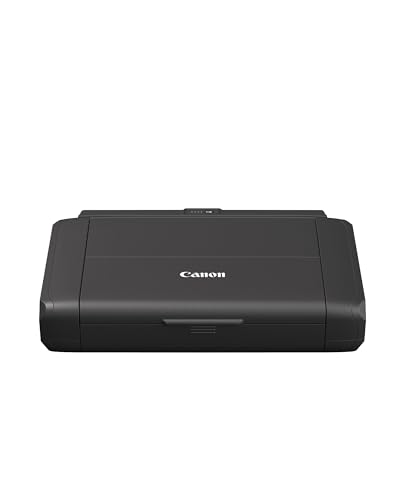
Canon PIXMA TR150 Wireless Portable Colour Inkjet Printer with Battery
£383.55 *View On Amazon* - Inkjet Printers
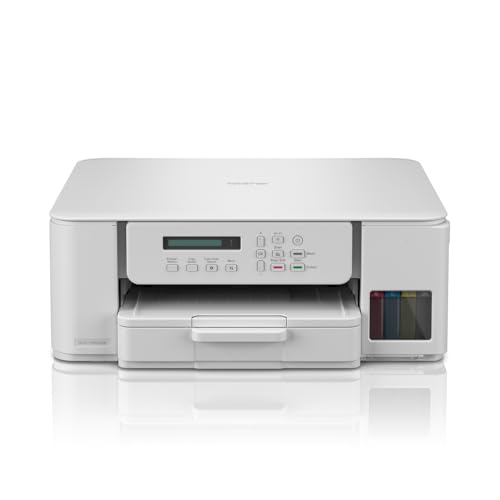
Canon PIXMA G650 Wireless 3-in-1 Refillable MegaTank Inkjet Photo Printer
£254.90 *View On Amazon* - Inkjet Printers
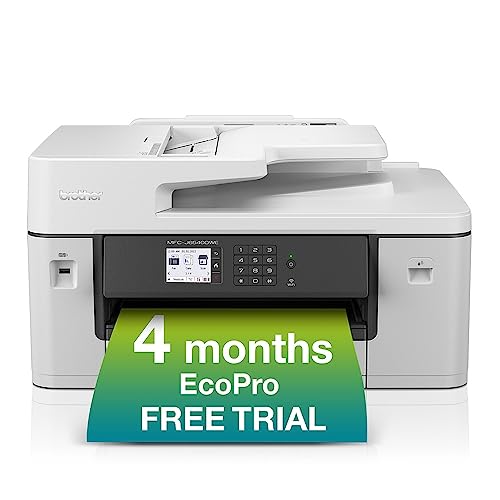
Brother MFC-J5340DWE Wireless Colour Inkjet 4-in-1 Printer with EcoPro
Original price was: £229.99.£199.97Current price is: £199.97. *View On Amazon* - Inkjet Printers
Epson WorkForce WF-110W A4 Portable Single Function Inkjet Printer
Original price was: £219.99.£184.79Current price is: £184.79. *View On Amazon* - Inkjet Printers
Canon PIXMA TS5350i Wireless Colour 3-in-One Inkjet Printer Bundle (Black) with PP-201 Glossy II Photo Paper, 20 sheets
Original price was: £94.99.£60.99Current price is: £60.99. *View On Amazon* - Inkjet Printers
Brother DCP-T780DW Wireless A4 Inkjet Printer with Tankbenefit, 3-in-1, ADF, 2-Sided Print, Photos, UK Plug
Original price was: £299.99.£259.97Current price is: £259.97. *View On Amazon* - Inkjet Printers
Canon PIXMA TS705a Single Function Inkjet Printer
Original price was: £72.99.£59.97Current price is: £59.97. *View On Amazon* - Inkjet Printers
HP Smart Tank 7005 All-in-One Printer
Original price was: £269.99.£189.00Current price is: £189.00. *View On Amazon* - Inkjet Printers
Epson Expression Premium XP-6100 A4 Wireless Inkjet Multifunction Printer
Original price was: £129.99.£125.15Current price is: £125.15. *View On Amazon* - Inkjet Printers
Epson Expression Home XP-2200 3-in-1 Ink Multifunction Printer, Scanner and Copier with WiFi, 1440dpi, A4
Original price was: £54.99.£44.99Current price is: £44.99. *View On Amazon*





What Are Inkjet Printers?
Inkjet printers are printers that use liquid ink to create text and images on paper. The ink is placed onto the page in very small droplets, allowing inkjet printers to produce everyday documents, colour pages and image based prints depending on the model.
Depending on the product, inkjet printers may include single function printing, all in one scanning and copying, wireless printing, mobile printing, photo printing, borderless printing, refillable ink tanks, cartridge systems or automatic double sided printing where listed.
Because inkjet printer features vary widely, always check the individual listing for supported paper sizes, ink system, connection options, print features and included accessories before buying.
What Are Inkjet Printers Used For?
Inkjet printers are used for letters, forms, homework, study notes, tickets, recipes, craft sheets, photos, colour documents, posters, labels, calendars, return forms and small business paperwork.
They are popular for households that need occasional colour printing as well as standard black text documents. They can also suit buyers who want to print photos, graphics or colourful school and hobby projects where the printer supports the right paper and settings.
Some inkjet printers are designed for light home use, while others are built for more regular printing with larger ink supplies or better paper handling where listed.
How To Choose The Right Inkjet Printer
Start by thinking about what you print most. If you mainly print letters and forms, a simple inkjet printer may be enough. If you print photos, creative projects or colourful school work, check print quality, colour support and paper compatibility where listed.
Next, consider how often you print. Occasional users may prefer a compact cartridge printer, while regular users may want to compare refillable ink tank models or printers with lower listed running costs.
Also check how you want to connect. Some inkjet printers connect by USB, while others support WiFi, mobile apps, cloud printing or Ethernet where listed. The printer should work with your computer, phone, tablet or network setup.
Key Features To Compare
When comparing inkjet printers, look at print quality, colour support, print speed, paper tray capacity, paper sizes, ink system, cartridge type, refill method, scanning features, connection options and operating system compatibility.
If you need scanning and copying, look for all in one inkjet printers where listed. If you only need printing, a single function model may be simpler.
Paper handling is also important. Check whether the printer supports photo paper, envelopes, labels, card or borderless printing if those features matter to you.
Inkjet Printers Compared With Laser Printers
Inkjet printers use liquid ink and are often chosen for mixed home printing, colour documents, photos and creative projects. They can be useful when you want flexible colour output from one device.
Laser printers use toner and are often chosen for regular document printing, office text pages and higher volume black and white printing where suitable.
The better choice depends on your routine. Inkjet printers are often more flexible for colour and images, while laser printers may suit buyers who print lots of text documents.
Inkjet Printers Compared With Photo Printers
Many inkjet printers can print images where suitable, but dedicated photo printers are designed more specifically for photo output, photo paper and image focused printing.
A general inkjet printer may be better if you need documents, forms, homework and occasional photos from one device. A dedicated photo printer may be worth comparing if photo quality and photo formats are your main priority.
Check paper support, colour ink system and print settings carefully before buying for photo use.
Inkjet Printers Compared With All In One Printers
Inkjet describes the print technology, while all in one describes the functions included. An all in one inkjet printer can print, scan and copy where listed.
A single function inkjet printer focuses mainly on printing. It may suit buyers who do not need scanning or copying.
If you often scan forms, copy documents or save paperwork digitally, an all in one inkjet printer may be more practical. If you only print, a simpler model may be enough.
Cartridge Inkjet Printers Compared With Ink Tank Printers
Cartridge inkjet printers use replaceable ink cartridges. They can be simple and familiar for occasional home printing, but running costs can vary depending on the printer and cartridge type.
Ink tank printers use refillable ink tanks where listed. They may suit buyers who print more regularly and want larger ink supplies, depending on the model and usage.
The right choice depends on print volume. Cartridge models may suit occasional use, while ink tank printers may be worth comparing for frequent colour or document printing.
Wireless Inkjet Printers Compared With USB Printers
Wireless inkjet printers can connect through WiFi or app based setup where listed. This can be useful for printing from laptops, phones, tablets and shared household devices.
USB inkjet printers connect directly to one computer by cable. They can be simple for a fixed desk setup, but may be less convenient for multiple users.
If several people need to print, wireless features may be useful. If one computer will use the printer, USB may be enough where supported.
Beginner, Regular User And Business Buyer Guidance
If you are buying your first inkjet printer, focus on simple setup, compatible ink, paper support and whether you need scanning or copying.
Regular users may want to compare ink costs, refill options, paper capacity, double sided printing, mobile printing and how easy the printer is to maintain.
Small business buyers should think about running costs, print speed, paper handling, document scanning and whether the printer can manage the type of paperwork, labels or customer facing documents they need.
Use Cases By Routine And Setting
For home offices, inkjet printers can be useful for invoices, forms, letters, returns paperwork, scanned documents, work notes and occasional colour pages.
For students, an inkjet printer can support homework, assignments, revision sheets, diagrams, project work and study notes.
For families, inkjet printers can help with school forms, activity sheets, recipes, tickets, travel documents, photos and household admin.
For hobbies and crafts, inkjet printers may be useful for designs, templates, stickers, cards and creative projects where the printer and paper are suitable.
Print Quality And Colour Output
Print quality matters when producing photos, graphics, charts, invitations, craft pages or documents that need to look neat. Inkjet printers can vary in colour detail, sharpness and supported print settings.
For standard text documents, clear readable output may be enough. For photos and creative work, paper type, ink system and print settings become more important.
Always check the product details for print quality information where shown, especially if colour accuracy or photo output matters to you.
Ink Cartridges, Ink Tanks And Refills
Inkjet printers need replacement ink. Some use individual cartridges, some use combined cartridges and some use refillable ink tanks where listed.
Individual colour cartridges may allow you to replace only the colour that runs out, depending on the model. Combined cartridges can be simpler but may need replacing when one colour is empty.
Ink tank systems may use bottles to refill larger tanks where listed. Check the ink type carefully because using the wrong ink or cartridge can cause problems.
Running Costs And Print Volume
Running costs are an important part of choosing an inkjet printer. The printer price is only one part of ownership. Ink, paper and replacement supplies can affect long term value.
If you print rarely, a simple printer may suit. If you print regularly, check ink yield, replacement ink prices and whether the printer is designed for higher use where listed.
Think honestly about your print habits. A printer that is cheap to buy may not be the best value if ink is costly for the way you use it.
Paper Sizes And Media Support
Most inkjet printers support standard paper sizes where listed, but not all support envelopes, photo paper, glossy paper, labels, card or borderless printing.
If you need to print photos, check supported photo paper sizes. If you need labels or thicker media, check the paper weight and feed method where listed.
Using unsuitable paper can cause jams, poor quality or feeding problems. Always match paper to the printer guidance.
Duplex Printing And Paper Saving
Duplex printing means printing on both sides of the paper where supported. This can be useful for reports, study notes, drafts, handouts and everyday documents.
Automatic duplex printing is more convenient than manually turning pages over. Some inkjet printers may offer automatic double sided printing where listed, while others may only support manual methods.
If you want to reduce paper use, check whether duplex printing is included before buying.
Scanning And Copying Features
Many inkjet printers are available as all in one models with scanning and copying features where listed. These can be useful for forms, receipts, school work, ID documents, letters and business paperwork.
Flatbed scanners are useful for single pages, books, photos and delicate documents. Automatic document feeders may be useful for scanning multiple pages where included.
If scanning is important, check scan features as carefully as print features.
Connectivity With Computers, Phones And Tablets
Inkjet printers may support USB, WiFi, Ethernet, mobile apps or cloud printing features where listed. The best option depends on the devices you use.
For laptops and phones, wireless printing can be convenient. For a desktop computer, USB may be simple and stable. For shared home or office use, network printing may be more practical.
Always check compatibility with Windows, Mac, phones, tablets or Chromebooks where relevant.
Setup, Drivers And Printer Software
Some inkjet printers need drivers, apps or setup software before all features work correctly. This can affect wireless printing, scanning, ink monitoring and maintenance tools.
Before buying, check whether the printer supports your operating system and whether setup looks suitable for your confidence level.
After setup, keep printer software updated where appropriate and follow the printer guidance for maintenance and ink replacement.
Size, Placement And Desk Space
Inkjet printers can take up more space than expected, especially when paper trays, output trays and scanner lids are open. Measure the area where the printer will sit before buying.
A compact inkjet printer may suit a bedroom, study desk or small home office. A larger all in one model may need a shelf, printer stand or dedicated workspace.
Also think about power socket access, WiFi signal, cable routing and how easy it is to load paper or change ink.
Inkjet Printers For Photos
Inkjet printers can be useful for photo printing where the printer supports suitable photo paper and settings. Some models may offer photo focused features where listed.
Photo results depend on the printer, ink, paper, settings and original image quality. A good photo file printed on unsuitable paper may not give the result you expect.
If photo printing is a priority, compare photo paper support, colour ink system and borderless printing carefully.
Inkjet Printers For Documents
Inkjet printers are commonly used for documents, forms, letters, invoices, study notes and household paperwork. For text documents, clarity, paper handling and ink cost may matter most.
If you print lots of black text, check black ink yield and running costs. If you print mixed documents with colour charts or images, compare colour ink use as well.
For regular document printing, paper tray capacity and double sided printing may improve daily convenience.
Inkjet Printers For Small Businesses
Small businesses may use inkjet printers for invoices, forms, labels, menus, signs, receipts, packing slips, marketing materials or customer paperwork where suitable.
The right printer depends on print volume, paper type, colour needs and running costs. A business that prints a few forms needs a different setup from one printing frequent colour materials.
If printing is important to daily operations, compare supply availability, scanning features, network support and maintenance needs carefully.
Inkjet Printers For Craft And Creative Projects
Inkjet printers can be useful for crafts, templates, art projects, stickers, cards, invitations, planners and hobby prints where the printer supports the chosen media.
Creative projects often need specific paper or settings. Check whether the printer supports the size, thickness and finish you want to use.
Always follow paper and ink guidance, especially when using specialist media.
Printer Maintenance And Ink Care
Inkjet printers need basic maintenance to keep them working properly. Ink can dry or clog if a printer is left unused for long periods, depending on the model and conditions.
Many printers include maintenance functions such as nozzle checks or cleaning cycles where listed. These may use some ink, but can help with print quality problems.
If you print rarely, consider whether the printer suits occasional use and follow the product guidance for storage and maintenance.
Paper Jams And Print Quality Issues
Paper jams can happen if paper is loaded incorrectly, trays are overfilled, unsuitable paper is used or sheets are damp or curled.
If a jam occurs, follow the printer instructions and remove paper gently. Forcing paper can damage internal parts.
If print quality drops, check ink levels, nozzles, paper type, print settings and cartridge installation before assuming the printer is faulty.
Safety And Electrical Considerations
Use inkjet printers with suitable power cables, sockets and supplies. Keep liquids away from the printer, ink area and power connections.
Place the printer on a stable surface with enough room for paper trays and ventilation. Do not use damaged cables, cracked plugs or printers that show signs of overheating or electrical faults.
Keep ink and small parts away from children and pets, and follow the product guidance when replacing cartridges or filling tanks.
Care, Cleaning And Storage
Follow the care instructions shown on the product listing or supplied information. Keep the printer clean, dry and free from dust where possible.
Store paper flat and dry to help avoid feeding problems. Keep ink cartridges or bottles in suitable conditions according to the product guidance.
If the printer will not be used for a while, check the manufacturer guidance for storage and maintenance.
Useful Accessories To Consider
Inkjet printers work well with practical printing and computer accessories. Useful items may include printer paper, photo paper, ink cartridges, ink bottles, labels, USB cables, Ethernet cables, printer stands, cable organisers and cleaning supplies where suitable.
For home offices, a scanner, shredder, laptop stand, external monitor, keyboard and mouse may also be useful depending on the setup.
Choose accessories based on the exact printer model and intended use, especially when buying ink or specialist paper.
Why Buy From YPC?
At YPC, we understand active lifestyles and the need for practical products that work in real use. Inkjet printers should be compatible, easy to use and suitable for the documents, photos, labels, projects or business tasks you actually need to produce.
This category helps you compare print quality, ink system, running costs, paper handling, scanning features, connectivity, size, setup needs and listed compatibility without overcomplicating the choice. Browse the inkjet printers at YPC, compare the available options and choose the printer that suits your home, office, study space, creative work or everyday printing routine.
FAQs
What are inkjet printers used for?
Inkjet printers are used for documents, colour pages, photos, homework, forms, labels, craft projects and everyday home or office printing.
Are inkjet printers good for home use?
Yes, inkjet printers can be useful for home use because they can handle documents and colour printing depending on the model. Check running costs and ink requirements before buying.
What is the difference between inkjet and laser printers?
Inkjet printers use liquid ink, while laser printers use toner. Inkjet printers are often chosen for colour and photo use, while laser printers may suit regular text document printing.
Do inkjet printers print photos?
Many inkjet printers can print photos where suitable, but results depend on the printer, ink, paper and settings. Check photo paper support and print features before buying.
What is an all in one inkjet printer?
An all in one inkjet printer usually combines printing, scanning and copying in one device where listed. Some models may include extra features depending on the product.
Are ink tank printers better than cartridge printers?
Ink tank printers may suit people who print regularly, while cartridge printers may suit occasional users. The best choice depends on print volume, running costs and convenience.
Can inkjet printers print wirelessly?
Some inkjet printers support WiFi or mobile printing where listed. Check compatibility with your computer, phone, tablet or network before buying.
How do I look after an inkjet printer?
Use suitable ink and paper, follow maintenance guidance, keep the printer clean and dry, run checks when print quality drops and avoid leaving damp or curled paper in the tray.
Find out more with our Inkjet Printer Buyers Guide.
 Getting ready for Summer? View our Home and Garden Products

Heading outdoors this winter? Take a look at our Outdoor Clothing.
