Quick Summary
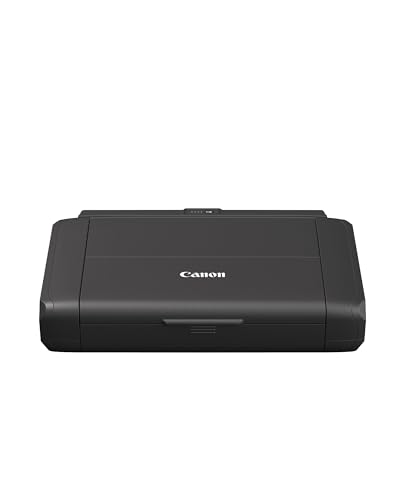
The Canon PIXMA TS705a is a single function inkjet printer for A4 printing only. It supports WiFi and Ethernet connectivity, and the 350-sheet input capacity is a useful detail for buyers who want fewer paper top-ups during regular use.
The printer also offers auto 2-sided printing, uses 5 individual inks, and includes an LCD for checking ink levels at a glance.
Who It Is Best For
This printer suits buyers who want an A4 print-only device with wired or wireless connection options. It is also relevant if you want automatic double-sided printing, a larger paper input, or a printer that uses separate ink cartridges so only the empty cartridge needs replacing.
Key Details
| Detail | Verified information and buyer relevance |
|---|---|
| Product type | Single function inkjet printer for A4 printing only. |
| Connectivity | WiFi and Ethernet connectivity are included for connection to a laptop, PC or smart device. |
| Automatic double-sided printing | Auto 2-sided print is included, which reduces the need to turn pages manually. |
| Paper input capacity | 350-sheet input capacity, useful if you want a larger plain paper supply. |
| Ink system | 5 individual inks, so only the empty cartridge needs replacing. |
| Ink status display | LCD shows ink status at a glance. |
| Included items | Set-up ink tanks, power cord, setup CD-ROM, manuals and other documents are included. |
Why Buyers Choose It
- WiFi and Ethernet connectivity give you two connection options for printing from compatible devices.
- Auto 2-sided printing reduces manual page turning when printing on both sides of the paper.
- Five individual inks mean only the empty cartridge needs replacing, which is useful for straightforward ink changes.
- The 350-sheet input capacity supports longer print runs before refilling paper.
How It Works
- Connect the printer by Ethernet or set it up for wireless use.
- Print from a laptop, PC or smart device using Canon PRINT, AirPrint on iOS, Mopria on Android or Windows 10 Mobile.
- Check ink status on the LCD when you need a quick update.
- Use auto 2-sided printing when you want to print on both sides of the paper.
Real World Use
The PIXMA TS705a is set up for everyday A4 document printing, with support for business-looking text and colour output. It also works with creative paper types mentioned in the listing, including restickable, magnetic and square photo paper, and can be used for custom nail sticker printing.
What To Know Before You Buy
Confirm that you only need print functions, as this is a single function printer. Check that A4 printing, WiFi or Ethernet connectivity, and the 350-sheet input capacity match the way you plan to use it. If you want creative printing on specialist media, make sure the paper type suits your intended project.
Common Buyer Questions
Can it connect wirelessly?
Yes. WiFi connectivity is included, along with Ethernet for wired networking.
Does it print on both sides automatically?
Yes. Auto 2-sided print is included.
What comes in the box?
Canon PIXMA TS705 printer, set-up ink tanks, power cord, setup CD-ROM, manuals and other documents are included.
Can it be used with mobile devices?
Yes. The listing mentions Canon PRINT, AirPrint for iOS, Mopria for Android and Windows 10 Mobile.
Final Buying View
If you want an A4 print-only Canon inkjet printer with WiFi, Ethernet and auto double-sided printing, the TS705a covers those needs clearly. Check the connectivity option, paper capacity and print-only format before ordering so it matches your setup.