

Quick Summary
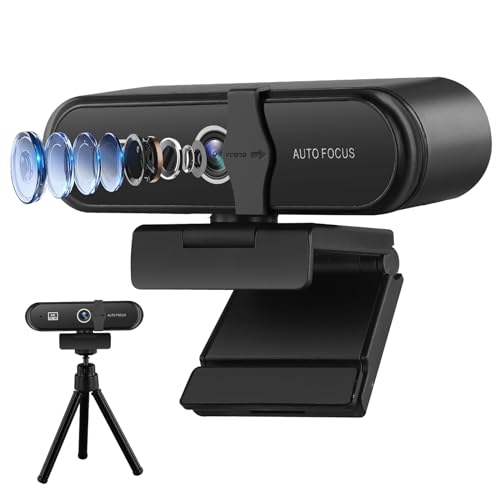
This 4K webcam for PC is a USB webcam with a built-in microphone, 110° wide angle, auto-zoom, software control, a privacy cover and a tripod. It is presented for recording, conferencing and live streaming, with plug and play setup mentioned in the title.
The camera also supports autofocus and includes up and down adjustment, which gives you more flexibility when setting the viewing angle for different uses.
Who It Is Best For
This webcam suits buyers who want a PC camera for video calls, live streaming or recording and want the listed extras in one unit. It is also relevant if you want a wider view, microphone support and a tripod for placement on a desk or monitor.
Key Details
| Detail | Verified information and buyer relevance |
|---|---|
| Product type | USB webcam for PC use, with recording, conferencing and live streaming mentioned. |
| Image detail | 4K HD is stated, which identifies the resolution level claimed for the camera. |
| Microphone | Built-in microphone is included, so the camera also handles audio capture. |
| Viewing angle | 110° wide angle is stated, which affects how much of the scene the camera can capture. |
| Adjustment | Autofocus and auto-zoom are stated, along with up and down 60 degrees adjustment. |
| Included or stated extras | Privacy cover and tripod are both mentioned, along with software control and plug and play. |
Why Buyers Choose It
- 4K HD and a built-in microphone are both stated, so the camera is set up for video and audio in one device.
- 110° wide angle may suit wider framing needs for meetings, streaming or recording.
- Autofocus and auto-zoom reduce the need for manual adjustment while the camera is in use.
- The tripod and monitor placement options give more choice over positioning.
How It Works
The webcam is described as plug and play, and software control is also mentioned.
- Connect the webcam by USB.
- Position it on the desktop or fix it to a monitor, or use the included tripod.
- Adjust the angle as needed, using the stated up and down 60 degrees movement.
- Use autofocus and auto-zoom during use.
- Use the privacy cover when you want to block the camera lens.
Real World Use
The camera is listed for meetings, live broadcasting and recording video. The 110° angle and tripod make positioning important, especially if you want a wider view or a stable setup on a desk or screen.
What To Know Before You Buy
Check that you want a USB webcam for PC use and that the listed features suit your setup. The webcam includes a built-in microphone, privacy cover and tripod, so you can check whether those extras match your needs before ordering. If you are comparing variants, confirm the selected option against the exact list of stated features.
Common Buyer Questions
Does it include a microphone?
Yes. A built-in noise-cancelling microphone is stated.
Can it be placed on a monitor?
Yes. Monitor mounting is mentioned alongside desktop placement.
Does it support live streaming and conferencing?
Yes. Recording, conferencing and live streaming are all mentioned.
Is a tripod included?
Yes. A tripod is mentioned in the title and description.
Final Buying View
This webcam is a straightforward choice if you want a USB PC camera with the listed extras of 4K HD, a microphone, wide-angle viewing, privacy cover and tripod support. Before ordering, confirm that the feature set matches your intended use and that the selected variation is the one you want.


