




Quick Summary
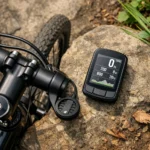
This adjustable, black bike stem GPS computer mount is named for the Garmin Edge Explore and is also listed as compatible with Bryton, Wahoo and CATEYE computers. It weighs 17 g and has a 6061 T6 aluminium alloy body.
Key Details
| Detail | Product information and buyer relevance |
|---|---|
| Mount type | Bike stem GPS computer mount, described as an out-front mount. |
| Weight | 17 g for the mount. |
| Body and finish | 6061 T6 aluminium alloy with an anodised surface finish. |
| Colour | Black. |
| Adjustability | Described as adjustable, but no adjustment range or mechanism is specified. |
What to Compare Before Buying
- Computer model: Check that the mount and the relevant adapter insert fit your exact GPS computer. Compatibility is listed by brand, but not by model for Bryton, Wahoo or CATEYE.
- Bike stem: Check that the mount’s installation requirements suit your bike stem. The source does not specify a stem size or mounting dimensions.
- Screws: The two supplied installation screws are stated as suitable for Garmin, Bryton and Wahoo. CATEYE is not named for the screws, so check the fitting requirements for your setup.
Compatibility, Size and Fit
The listed computer brands are Garmin, Bryton, Wahoo and CATEYE. The product title names Garmin Edge Explore; for other computers, confirm the exact model and insert rather than assuming that compatibility with a brand covers its whole range. No dimensions or adjustment details are provided, so check these against your intended setup.
What Is Included
The package contents are listed as a plastic Garmin adapter insert, installed on the mount, plus separate plastic inserts for Bryton, Wahoo and CATEYE. It also includes two installation screws, specified for Garmin, Bryton and Wahoo, and a small Allen wrench for installing and removing the plastic inserts.
Before You Decide
Confirm your computer model and the correct insert, check that the mount suits your bike stem, and consider the stated screw compatibility. If adjustability is important to your setup, check the adjustment details before choosing.
Position and Clearance
When checking the intended mounting position, make sure the fitted computer clears the handlebar, stem and cables, and does not obstruct access to the controls.


