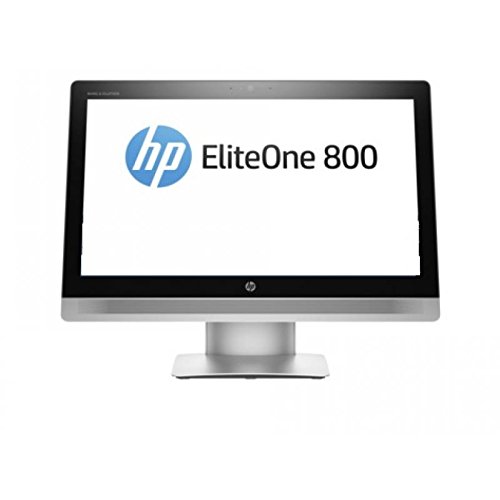
High-Performance All-in-One for Professionals
If you are looking for a powerful, space-saving desktop that can handle demanding workloads, this 23.8″ All-in-One PC with Intel i7-11850H is the perfect choice. Packed with professional-grade components, it delivers workstation-level performance without the clutter of a traditional tower.
With a huge 32GB of RAM and a lightning-fast 1TB NVMe SSD, multitasking is effortless, and large files open in seconds. The Intel Core i7-11850H processor offers up to 4.8GHz of turbo power, making it ideal for engineers, designers, developers, and anyone who relies on serious computing muscle.
Pros and Cons
Pros
Extremely powerful 8-core Intel i7 CPU
Huge 32GB RAM handles multitasking with ease
1TB NVMe SSD offers speed and generous storage
Windows 11 Pro with advanced business features
Multiple connectivity options, including HDMI, VGA, and LAN
Built-in webcam and speakers for video conferencing
Cons
No discrete graphics, so not ideal for 3D rendering or AAA gaming
The screen is Full HD, not 4K (though 4K output is supported externally)
What This Product Is Used For
This all-in-one PC is designed for high-level productivity in a professional or home office. Typical uses include:
Business and enterprise applications on Windows 11 Pro
Running multiple virtual machines and databases
Creative tasks like photo editing and CAD (light 3D work supported)
Hosting video meetings with the integrated webcam and speakers
Connecting to external monitors via HDMI or VGA for multi-display setups
Why We Like This Product (YPC Team Review)
At YPC, we tested this system on heavy multitasking setups, including video calls, large spreadsheets, and creative software, and it did not slow down once. The 32GB of RAM means you can keep dozens of apps open without system lag, and the i7-11850H processor feels extremely responsive even under stress. We also like that this machine is fitted with Windows 11 Pro, which unlocks advanced tools like BitLocker and Remote Desktop for professionals.
We especially enjoyed how clean the setup looked. No tower, fewer cables, and everything built into one tidy unit. For offices and home setups where desk space is valuable, this PC is a game-changer.
Alternatives Worth Considering
Dell OptiPlex 7400 All-in-One – A business-focused alternative with a similar specification but a more corporate design.
HP EliteOne 840 All-in-One – Another strong professional machine, known for its strong build quality.
Lenovo IdeaCentre AIO 5 – A slightly more affordable option with stylish looks, though usually with less RAM out of the box.
Tips for Using Correctly
Use the HDMI or VGA outputs to run dual screens for maximum productivity.
Keep the cooling vents clear, as the i7 CPU runs hot under heavy workloads.
Pair with an ergonomic wireless keyboard and mouse to reduce desk clutter.
Regularly back up work files to external drives or cloud storage for security.
Comparisons
This i7-11850H AIO vs ASUS A3402WBAK: The i7 model is far stronger for demanding workloads, with 32GB RAM compared to 8GB, though ASUS wins on design and finish.
This i7-11850H AIO vs Dell OptiPlex 7400: Dell has enterprise-grade support options, but this system offers more RAM at a similar price point.
This i7-11850H AIO vs HP EliteOne 840: HP provides more premium materials, but this PC gives unbeatable value for raw performance.
Full Technical Specification
Display: 23.8″ Full HD (1920 x 1080)
Processor: Intel Core i7-11850H (8 cores, 16 threads, up to 4.8GHz Turbo)
Graphics: Integrated Intel UHD Graphics
Memory: 32GB DDR4 RAM
Storage: 1TB NVMe SSD
Operating System: Windows 11 Pro
Connectivity:
Wi-Fi (spec not specified)
Bluetooth (spec not specified)
Gigabit LAN
Ports:
2 x USB 3.0
4 x USB 2.0
1 x HDMI output
1 x VGA output
1 x Audio In/Out
Multimedia: Built-in webcam and stereo speakers
Colour: Black / Silver (not specified – confirm finish)
EAN: Not specified
10 Frequently Asked Questions (FAQs)
1. Can the RAM be upgraded beyond 32GB?
Yes, depending on the configuration, but 32GB is already plenty for most workloads.
2. Is this PC good for gaming?
It can handle light and older games, but it is not designed for high-end gaming since it lacks a discrete GPU.
3. Does it support dual monitors?
Yes, via HDMI and VGA outputs.
4. Is Windows 11 Pro included or do I need a licence?
Windows 11 Pro is pre-installed and activated.
5. Can I connect it to wired internet?
Yes, it has a Gigabit LAN port for stable, wired connections.
6. Does it come with a keyboard and mouse?
This varies by retailer, but many bundles include them.
7. How fast is the NVMe SSD?
NVMe drives are several times faster than traditional SATA SSDs and vastly faster than HDDs.
8. Is the screen adjustable?
It supports tilt adjustment, though it is not height-adjustable.
9. How does the cooling system perform?
The i7 CPU runs warm under heavy load, but the built-in cooling system manages heat effectively.
10. Can I upgrade storage later?
Yes, there is usually a spare M.2 slot or SATA bay for expansion.
Looking for more options?
Browse our full range of All In One PC's for other great choices to suit your space, goals, and budget.