

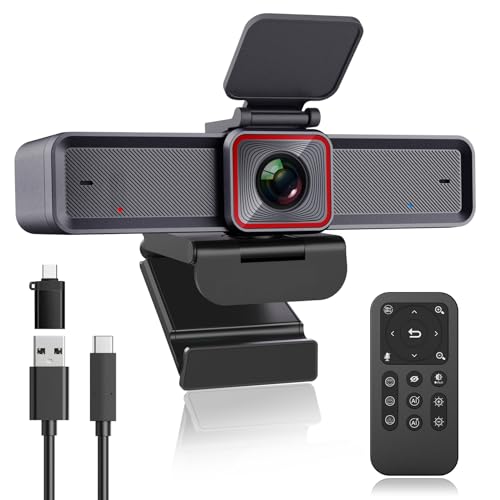
Quick Summary
The Angetube 4K streaming webcam combines AI tracking, HDR and dual AI noise-cancelling microphones for video calls, meetings and live streaming. It features a CMOS sensor with up to 3840 x 2160 UHD resolution at 30 frames per second, plus a remote for turning the webcam off and adjusting zoom and viewing angle.
The webcam also includes three field of view presets at 70°, 85° and 90°, along with AI backlight compensation and AI face detection. It connects by USB3.0 and is stated to support plug and play use with no additional drivers required.
Who It Is Best For
This webcam is aimed at buyers who want a camera for laptop use, meetings, conference calls or live streaming and need remote control over the view. The AI tracking and preset perspectives are useful when the framing needs to change between one person, full-body and conference-style views.
Key Details
| Detail | Verified information and buyer relevance |
|---|---|
| Brand | Angetube. |
| Product type | 4K streaming webcam for meetings, conference use and live streaming. |
| Video resolution | Up to 3840 x 2160 UHD at 30 frames per second, which identifies the stated image output. |
| Sensor | CMOS sensor. |
| AI features | AI tracking, AI backlight compensation and AI face detection. |
| Audio | Dual AI noise-cancelling microphones that are stated to pick up voice within a distance of 5 m. |
| Field of view presets | 70°, 85° or 90° using the remote. |
| Controls | Remote control for turning the webcam off, zooming and changing the view. |
| Connection | USB3.0, stated as plug and play with no additional drivers required. |
| Compatibility | Mac OS X 10.7 and higher, Windows 7/8/10/11, Android 4.0 or higher, Linux 2.6.24, Chrome OS 29.0.1547 and Ubuntu 10.04 or above. |
Why Buyers Choose It
- AI tracking and auto-framing help keep participants centred in the frame.
- HDR, AI auto exposure and backlight compensation are stated for use in difficult lighting.
- The remote adds direct control over power, zoom and view selection.
- Three field of view presets make it easier to switch between portrait, full-body and conference-style framing.
What To Know Before You Buy
Check that your device meets one of the stated compatibility options before ordering. The webcam uses USB3.0 and is described as plug and play, so it is intended for straightforward connection without extra drivers. Review the 70°, 85° and 90° view presets to make sure the framing matches your intended use.
Pros: AI tracking, HDR and the remote give you more control over framing and viewing options.
Cons: The wide compatibility list should still be checked against your exact device and operating system.
Common Buyer Questions
Can I change the viewing angle?
Yes. The remote lets you switch between 70°, 85° and 90° field of view presets.
Does it support video calls on different systems?
It is stated to support Mac OS X 10.7 and higher, Windows 7, 8, 10 and 11, Android 4.0 or higher, Linux 2.6.24, Chrome OS 29.0.1547 and Ubuntu 10.04 or above.
What audio features does it have?
It includes dual AI noise-cancelling microphones and is stated to pick up voice within a distance of 5 m.
Does it need extra software?
No additional drivers are stated to be required, with plug and play use over USB3.0.
Final Buying View
This Angetube webcam suits buyers who want a 4K USB camera with AI tracking, remote framing controls and broad stated compatibility. Confirm your device and operating system before ordering, then match the view preset and connection type to your setup.


