




Quick Summary
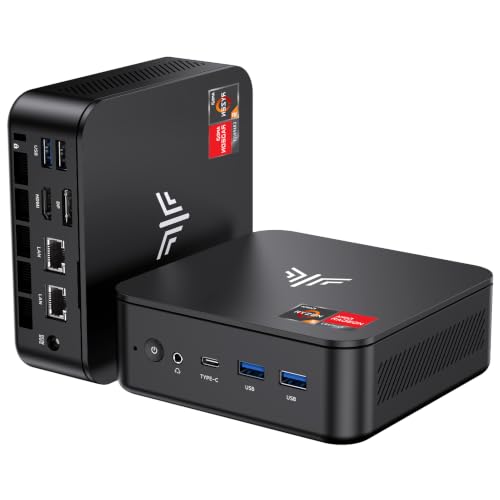
The Beelink EQi12 Mini PC is a compact computer built around an Intel Core i5-12450H processor, 16GB DDR4 memory and a 500GB M.2 PCIe 4.0 SSD. It also supports 4K dual display output, WiFi 6, Bluetooth 5.2 and dual Gigabit LAN, so it is set up for desk use where wired and wireless connections both matter.
The stated processor has 8 cores and 12 threads, with boost speeds up to 4.4 GHz. The machine uses an integrated 85W power supply and two HDMI ports are named in the product details.
Key Details
| Detail | Verified information and buyer relevance |
|---|---|
| Product type | Mini PC for general desktop computing and multi-display use. |
| Processor | Intel Core i5-12450H, with 8C/12T and up to 4.4 GHz boost speed. |
| Memory | 16GB DDR4 memory. This affects how much work the system can keep active at once. |
| Storage | 500GB M.2 PCIe 4.0 SSD. |
| Display output | 4K dual display support with HDMI and Type-C mentioned in the product name, plus two HDMI ports in the details. |
| Networking | WiFi 6, Bluetooth 5.2 and dual Gigabit LAN. |
| Power | Integrated 85W power supply with one AC cable for power. |
| Certification | CE certification is stated. |
What to Compare Before Buying
- Processor: The Core i5-12450H is the main performance identifier here. Compare it with the type of work you plan to do.
- Memory: 16GB DDR4 is a useful starting point for everyday multitasking. Check whether that amount suits your workload.
- Storage: The 500GB SSD gives the main storage figure. Compare it with the amount of files and software you expect to keep on the machine.
- Display setup: Dual display support is highlighted, so confirm the HDMI and Type-C arrangement matches your monitors.
- Network connections: WiFi 6, Bluetooth 5.2 and dual Gigabit LAN are included in the stated connection set. Check that these suit your desk setup.
What Else You May Need
A monitor, keyboard, mouse and the usual cables or adapters for your chosen display setup will be needed to use it as a desktop system. If you plan to use both displays, check that each screen has a suitable input connection.
Before You Decide
Check the processor, memory and storage against the way you plan to use the mini PC. Confirm that the dual display arrangement matches your monitors and that the available network connections suit your setup. If extra storage is important, compare the stated SSD configuration with your needs before choosing an offer.


