

Quick Summary
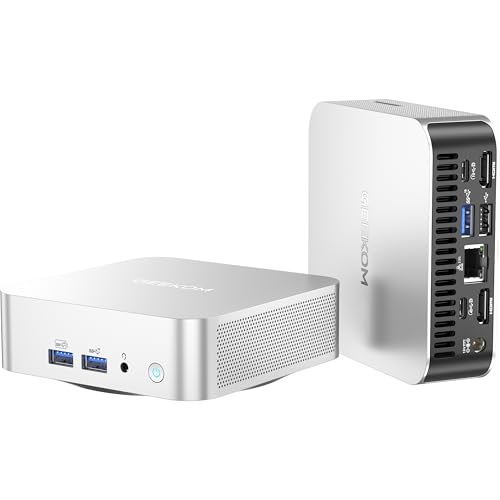
The Blackview MP100 is a mini PC with Windows 11 Pro, an AMD Ryzen 7 7430U processor, 16GB RAM and a 512GB SSD. It is described as supporting up to three displays through HDMI, DP and Type-C, with 4K and 144Hz mentioned for display output.
It is also described as a mini desktop PC for video editing, with WiFi 6, Bluetooth 5.2, USB 3.2, Gigabit Ethernet and a clip-on design for mounting to the back of a monitor.
Key Details
| Detail | Verified information and buyer relevance |
|---|---|
| Product type | Mini PC / mini desktop PC for a compact desktop setup. |
| Operating system | Windows 11 Pro is pre-installed. |
| Processor | AMD Ryzen 7 7430U is stated, which is the key specification to compare for everyday workload and editing needs. |
| Memory | 16GB RAM is stated. |
| Storage | 512GB SSD is stated. |
| Display support | Support for up to 3 displays is stated, using HDMI, DP and Type-C connections. |
| Connectivity | WiFi 6, Bluetooth 5.2 and Gigabit Ethernet are stated. |
| USB | USB 3.2 is stated, along with 2 USB 3.2 ports and 1 USB 2.0 port in the description. |
| Mounting | A clip-on design for monitor-back mounting is stated. |
What to Compare Before Buying
- Display setup: This model is described as supporting up to 3 displays. Check whether your monitors use HDMI, DP or Type-C before choosing a system.
- Memory and storage: 16GB RAM and a 512GB SSD are stated. Compare those figures with the size of the files and apps you plan to use.
- Connection needs: WiFi 6, Bluetooth 5.2, Gigabit Ethernet and USB 3.2 are listed. Match these to the devices and network setup you already have.
- Mounting space: The clip-on design is meant for monitor-back mounting, so check the space and layout behind your display.
- Use case: The product is described for video editing, so compare its stated processor and memory against the work you want it to handle.
What Else You May Need
If you want to use the display outputs, you will need suitable monitor connections and the correct cables for your screens. If you plan to mount it behind a monitor, confirm that your display arrangement works with a clip-on mini PC design.
Before You Decide
Confirm the exact MP100 version, the stated memory and storage, and the display connections you need. If you want a neat desktop setup, check that the clip-on mounting style suits your monitor and workspace.