

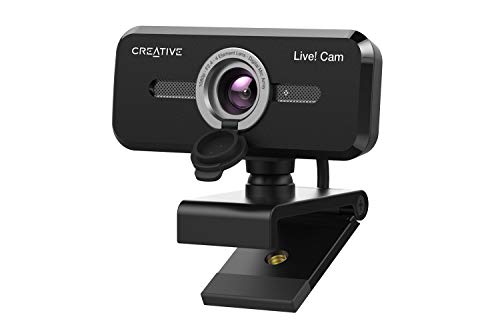
Quick Summary
Creative Live! Cam Sync 1080p V2 is a Full HD USB webcam for video calls, with a wide 77° field of view and built-in dual microphones. It also includes automatic mute functions, noise cancelling features, and a built-in lens cover.
The camera connects through USB-A and is UVC compatible, so it does not require additional driver installation. It can be rotated 360° horizontally and tilted 30° vertically, and it includes a universal mounting bracket.
Who It Is Best For
This webcam suits people who want a connected camera for calls on PC or Mac, especially where wider framing, simple USB setup, and an integrated lens cover are useful. It also suits users of common video conferencing apps, including Zoom, Skype, Microsoft Teams, Cisco WebEx and Google Meet.
Key Details
| Detail | Verified information and buyer relevance |
|---|---|
| Product | Creative Live! Cam Sync 1080p V2 webcam. |
| Video | Full HD video with a 77° wide field of view for broader framing during calls. |
| Microphones | Improved built-in dual microphones for voice pickup during video calls. |
| Audio features | Automatic mute and noise cancelling functions are included. |
| Connection | Connects to a free USB-A port and is UVC compatible. |
| Compatibility | Works with PC and Mac, and is stated to support Zoom, Skype, Microsoft Teams, Cisco WebEx and Google Meet. |
| Adjustment | Camera rotates 360° horizontally and tilts 30° vertically. |
| Mounting | Includes a universal mounting bracket. |
| Cable length | Includes a 1.8 m cable for setup flexibility. |
| Lens cover | Built-in lens cover adds privacy when the camera is not in use and helps protect the lens from dust. |
Why Buyers Choose It
- The 77° field of view gives a wider image, which is useful when you want to include more than one person in frame.
- USB-A connection and UVC compatibility keep setup simple on supported computers.
- The built-in dual microphones and noise cancelling features support clearer voice pickup during calls.
- The lens cover gives you a physical way to cover the camera when it is not in use.
How It Works
Connect the webcam to a free USB-A port on your PC or Mac, then use it with supported conferencing apps. The SmartComms kit includes VoiceDetect, which automatically cancels mute when you talk, and NoiseClean-out, which suppresses static background noise during a call. The kit can be downloaded from Windows 10 platforms.
The camera can also be positioned using the universal mounting bracket, with 360° horizontal rotation and 30° vertical tilt to help you angle the frame.
Real World Use
For everyday video calls, the webcam gives you a Full HD image with a wider view than a standard narrow camera, so it is easier to frame yourself or a small group. The 1.8 m cable gives extra reach between the camera and your computer, while the lens cover is useful when the camera is left connected between calls.
What To Know Before You Buy
Check that your device has a free USB-A port and that you are using a compatible PC or Mac before ordering. If you want to use the SmartComms kit, note that it can be downloaded from Windows 10 platforms. Review the 77° field of view and the mounting and tilt options to make sure they suit your intended setup.
Common Buyer Questions
Does it work with video conferencing apps?
Yes. It is stated to work with Zoom, Skype, Microsoft Teams, Cisco WebEx, Google Meet and more.
Does it need extra drivers?
No. It is UVC compatible, so it does not require additional driver installation.
Can I adjust the angle?
Yes. The camera rotates 360° horizontally and tilts 30° vertically.
Does it include privacy protection?
Yes. It includes a built-in lens cover that can be closed when the webcam is not in use.
Final Buying View
This is a USB webcam for buyers who want Full HD video, a wide 77° view, built-in dual microphones and simple PC or Mac connectivity. Confirm your USB-A connection, preferred app use and mounting setup before choosing.


