




What This All in One PC Is Used For
This Dell 27 inch All in One desktop is built for users who want a modern, powerful and visually comfortable workstation without a separate tower. It is ideal for home offices, professional study, media consumption, hybrid working and light content creation where screen quality, speed and desk organisation all matter.
With a large colour accurate display, a current generation Intel Core 7 processor and fast DDR5 memory, it suits users who expect strong multitasking performance and a refined everyday experience.
Performance and Real World Use
At the heart of this system is the Intel Core 7 150U processor. With 10 cores and boost speeds up to 5.4GHz, it is designed to handle demanding productivity workloads efficiently. In real world use, this means smooth multitasking across office software, browsers, communication tools and light creative applications.
The system is described as AI ready, reflecting the processor’s modern architecture and efficiency features that support current and emerging workloads. While this is not a dedicated AI workstation, it is well positioned for modern software that benefits from newer CPU capabilities.
With 16GB of DDR5 memory running at 5200 MT per second, responsiveness remains strong even with multiple applications open. The 1TB PCIe NVMe solid state drive delivers fast boot times, quick file access and generous storage capacity for documents, photos and media.
Display Quality and Visual Comfort
The 27 inch Full HD IPS display delivers crisp visuals with wide viewing angles and accurate colour reproduction. With 99 percent sRGB coverage and higher contrast than standard panels, it is well suited to productivity, media viewing and colour sensitive everyday work.
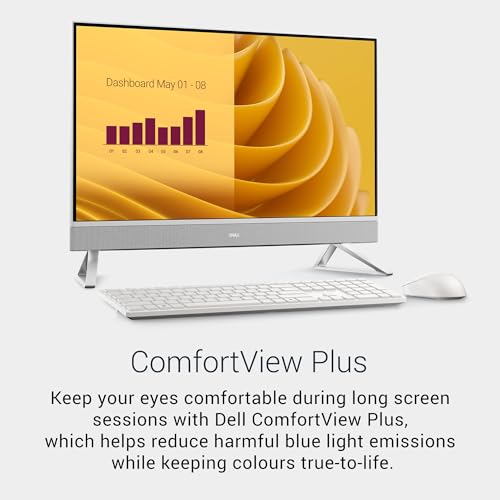
Dell’s ComfortView Plus technology reduces blue light without significantly affecting colour accuracy, making the display more comfortable for long sessions. The narrow bezel design enhances immersion and makes the screen feel more expansive on the desk.
Design, Build and Space Optimisation
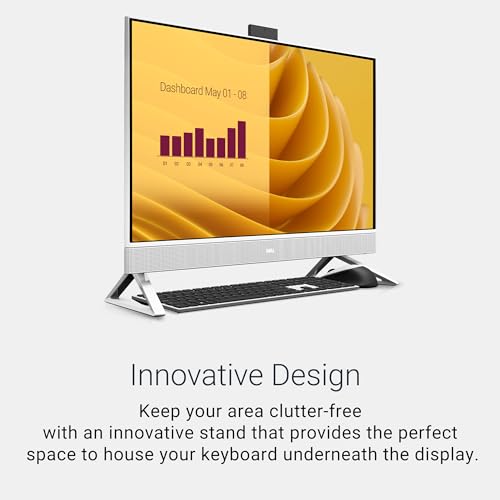
This model features a clean, modern white chassis with a fabric speaker grille and an isosceles stand that keeps the footprint compact. Dell has clearly focused on desk organisation, including the ability to store the keyboard neatly under the display when not in use.
The All in One layout removes the need for a separate PC tower, resulting in a tidy and professional workspace that works well in both home and office environments.
Connectivity and Device Flexibility
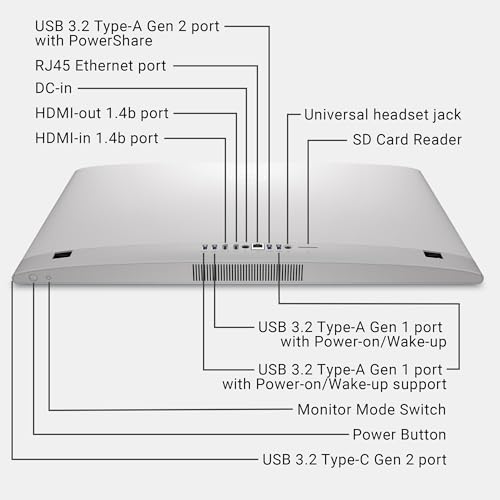
Connectivity is a strong point of this system. It includes USB C, five USB 3.2 ports, HDMI input and output, an SD card reader and RJ45 Ethernet. This allows easy connection of peripherals, external storage and additional monitors.
The HDMI input also allows the display to be used as a screen for another device, adding flexibility that is not always available on All in One PCs.
Video Calls, Audio and Security
For communication, the Dell includes a 5MP HDR pop up IR camera that provides clear image quality for video calls while remaining hidden when not in use. A physical privacy mechanism helps maintain security.
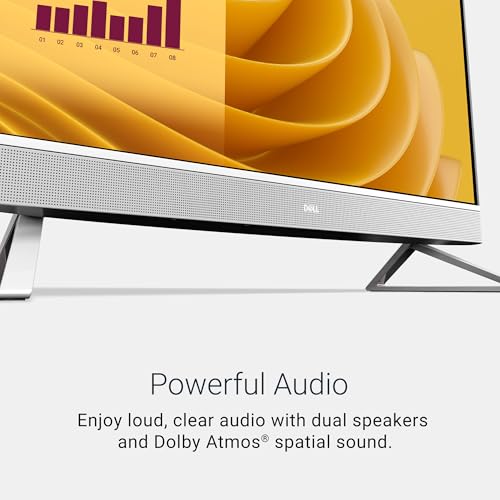
Audio is handled by dual speakers with Dolby Atmos support, delivering clearer dialogue and a more immersive sound experience than standard built in speakers. This makes a noticeable difference during calls and media playback.
Pros and Cons
Pros
Large 27 inch Full HD IPS display with strong colour accuracy
Intel Core 7 150U offers excellent productivity performance
Fast 16GB DDR5 memory improves multitasking
Spacious and quick 1TB NVMe SSD
Extensive connectivity including HDMI in and out
High quality 5MP pop up camera with privacy focus
Clean, space efficient All in One design
Cons
Integrated graphics limit gaming and advanced 3D workloads
Full HD resolution may feel limited to some users at 27 inches
Refresh rate specification not clearly stated
Why We Like This Product at YPC Outdoors
At YPC Outdoors, we like this Dell All in One because it focuses on real usability rather than gimmicks. The combination of a comfortable display, strong modern CPU and fast DDR5 memory makes it feel responsive and well balanced in everyday use.
We also appreciate the attention to desk organisation and connectivity. Features like HDMI input, the pop up camera and thoughtful design details make it a practical choice for people who rely on their PC daily.
Alternatives Worth Considering
Acer Aspire C27 All in One PC
Similar screen size with different processor options and higher refresh rate panels on some models.Lenovo IdeaCentre AIO 3 27 Inch
Available with both Intel and AMD processors, often at different price points.Apple iMac
Excellent display and build quality, but significantly higher cost and macOS rather than Windows.
Comparisons With Similar Models
Compared to older Core i5 based All in One PCs, the Core 7 150U offers improved efficiency and multitasking headroom. Against AMD Ryzen 7 alternatives, Intel’s single core performance helps keep everyday tasks feeling very responsive. Compared to budget All in One systems, the display quality, memory speed and connectivity clearly place this model in a higher tier.
Tips on Using This PC Correctly
Enable ComfortView Plus for long working sessions
Use HDMI input to maximise the display’s versatility
Pair with a second monitor if additional workspace is needed
Keep Windows and Dell updates installed for best performance
Use the NVMe SSD for active files and cloud storage for backups
Full Tech Specification
Brand Dell
Product Type All in One Desktop PC
Processor Intel Core 7 150U up to 5.4GHz
Cores 10
Memory 16GB DDR5 5200 MT per second
Storage 1TB PCIe NVMe SSD
Graphics Intel integrated graphics
Display Size 27 inch
Resolution Full HD
Panel Type IPS
Colour Gamut 99 percent sRGB
Eye Comfort ComfortView Plus
Operating System Windows 11 Home
Camera 5MP HDR pop up IR camera
Audio Dual speakers with Dolby Atmos
Connectivity USB C, USB 3.2 x5, HDMI in, HDMI out, SD card reader, RJ45 Ethernet
Colour White
Frequently Asked Questions
Is this suitable for working from home?
Yes, it is very well suited thanks to its performance, display comfort and video call features.
Can it handle heavy multitasking?
Yes, the Core 7 processor and 16GB DDR5 RAM support demanding everyday workloads.
Is this PC good for gaming?
It supports light and casual gaming, but not demanding modern titles.
Does it support external monitors?
Yes, it includes HDMI output and can also accept HDMI input from another device.
Is the camera secure?
Yes, the camera pops up only when in use and includes privacy focused design.
Is the display comfortable for long sessions?
Yes, ComfortView Plus helps reduce eye strain.
Does it include fast storage?
Yes, the NVMe SSD provides quick boot and file access.
Is this suitable for creative work?
It works well for light content creation, though not for heavy 3D or video workloads.
Is Ethernet included?
Yes, an RJ45 Ethernet port is built in.
Is this a good long term desktop choice?
Yes, the modern CPU and DDR5 memory make it well positioned for future software.
Buyer’s Guide
When choosing a large All in One PC, prioritise display comfort, processor generation and memory speed. Modern CPUs and DDR5 RAM improve longevity, while good connectivity and camera quality make a real difference in daily use.
Looking for more options?
Browse our full range of Computers and Accessories for other great choices to suit your space, goals, and budget.


