


Quick Summary
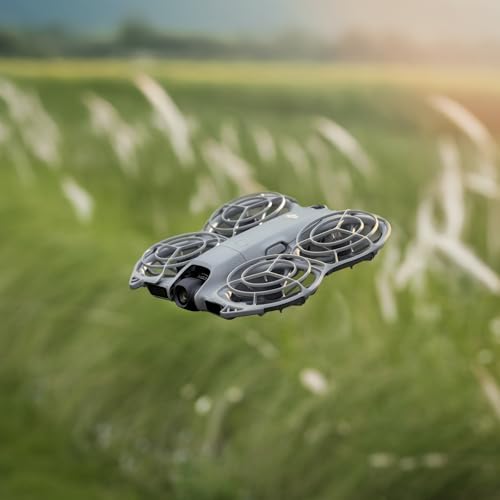
The DJI Neo 2 is a lightweight, foldable camera drone designed for quick personal filming, hands free capture and simple everyday flying. It includes palm takeoff and landing, gesture control, ActiveTrack and omnidirectional obstacle sensing, making it a practical choice for casual creators who want fast, accessible footage.
Who It Is Best For
This drone suits travellers, casual creators and anyone who wants easy aerial photos and video without getting into complex manual controls. It is a good fit if you want to capture selfies, short clips and relaxed everyday footage with less setup and less effort.
What To Know Before You Buy
The DJI Neo 2 is built around assisted flight rather than advanced manual control, so it is best for convenience rather than cinematic flying styles. The listing is for the drone only. It is described as including one intelligent flight battery and propeller guards.
Pros: Lightweight, foldable and designed for quick hands free use with palm takeoff, gesture control and automated tracking.
Cons: It is not aimed at buyers who want advanced manual flight control or cinematic filming tools.
Common Buyer Questions
Is the DJI Neo 2 easy to carry?
Yes. It is described as lightweight and foldable, which makes it easy to take out for casual flying.
Can it take off and land from your hand?
Yes. Palm takeoff and palm landing are included.
Does it record in 4K?
Yes. The camera is capable of 4K video recording.
Does it track subjects automatically?
Yes. ActiveTrack is included to keep your subject in frame during movement.
Is it suitable for beginners?
Yes. It is designed to be approachable and simple to use.
What comes with this listing?
This is the drone only configuration, and it is described as including one intelligent flight battery and propeller guards.
Key Details
| Detail | What it means in use |
|---|---|
| DJI Neo 2 | The drone model name for easy identification. |
| Drone only | This listing is for the drone only configuration. |
| Lightweight and foldable | Easy to carry and convenient for quick outings. |
| 4K camera | Suitable for capturing detailed video. |
| Palm takeoff and landing | Designed for simple launch and recovery. |
| Gesture control | Supports hands free control for easier capture. |
| ActiveTrack | Helps keep a subject framed automatically. |
| Omnidirectional obstacle sensing | Supports obstacle awareness during flight. |
Final Buying View
The DJI Neo 2 is a strong choice if you want a lightweight, foldable drone that makes casual filming feel simple and accessible. With palm takeoff and landing, gesture control, ActiveTrack and a 4K camera, it is set up for quick, easy use rather than advanced manual flying. If that matches how you want to fly, it is a practical option to consider.


