Quick Summary
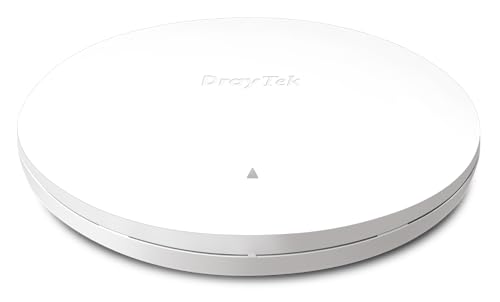
The DrayTek VigorAP 962C is a wireless access point with AX3000 Wi-Fi 6, a range extender function and mesh support. It is described as a ceiling or wall mounted unit with a 2.5Gb PoE uplink, so it is aimed at network setups that need a neat wired power and data connection.
The product title and description also indicate mesh use with up to 8 x AP962C, plus management of up to eight compatible mesh VigorAPs and as many as 20 access points through the Wireless Virtual Controller module.
Who It Is Best For
This unit suits buyers who want a DrayTek access point for a network that uses Wi-Fi 6 and may need mesh or range extension support. It is also relevant where ceiling or wall mounting is preferred and where a 2.5Gb PoE uplink is part of the setup.
If you are comparing options, check that the mounting style, uplink type and mesh arrangement match your intended installation before ordering.
Key Details
| Detail | Verified information and buyer relevance |
|---|---|
| Brand | DrayTek. |
| Model | VigorAP 962C. |
| Product type | Wireless access point with range extender and mesh support. |
| Wireless standard | AX3000 Wi-Fi 6. |
| Management | Can manage up to eight compatible mesh VigorAPs and as many as 20 access points through the Wireless Virtual Controller module. |
| Security | WPA3-Personal or 802.1x Enterprise are mentioned, with mixed WPA3/WPA2 support. |
| Power and uplink | 2.5Gb Ethernet interface using IEEE 802.3at PoE+ for power. |
| Client support | Up to 256 clients are stated, which is useful when comparing it with higher-traffic installations. |
| Mounting | Ceiling or wall mounted, with a ceiling mounting plate and clips for suspended ceilings. |
Why Buyers Choose It
- AX3000 Wi-Fi 6 is stated, giving a clear identifier for buyers comparing wireless standards.
- Mesh support with up to 8 x AP962C is specified, which matters if you are planning a multi-access-point layout.
- The 2.5Gb PoE uplink allows both power and network connection through the Ethernet interface, reducing the need for separate power cabling.
- Ceiling or wall mounting gives flexibility over where the access point is installed.
How It Works
- Connect the unit through its 2.5Gb Ethernet interface.
- Use IEEE 802.3at PoE+ for power where the installation provides it.
- Mount the access point on a ceiling or wall, using the supplied ceiling mounting plate and clips where suitable.
- Use the Wireless Virtual Controller module to manage compatible mesh VigorAPs or access points.
- Set security options to match the network, including WPA3-Personal, 802.1x Enterprise, or mixed WPA3/WPA2 where needed.
Real World Use
The VigorAP 962C is positioned for network installations that need a mounted access point and a tidy PoE-based connection. Its mesh support and controller management make it relevant when more than one access point is being used in the same network.
The stated support for up to 256 clients is a useful check for buyers who need to compare it with their expected network demand.
What To Know Before You Buy
Check that your installation can support IEEE 802.3at PoE+ and a 2.5Gb Ethernet uplink. If you plan to use mesh, confirm that your other units are compatible VigorAP models and that the number of access points fits within the stated management limits.
Review the chosen mounting position before ordering, especially if you need ceiling installation or suspended-ceiling clips.
Common Buyer Questions
Can this be mounted on a wall or ceiling?
Yes. It is described as ceiling or wall mounted, and ceiling mounting plate and clips are mentioned.
Does it support mesh networking?
Yes. Mesh support is stated, with up to 8 x AP962C mentioned in the title and up to eight compatible mesh VigorAPs in the description.
What power connection does it use?
It uses IEEE 802.3at PoE+ through a 2.5Gb Ethernet interface.
How many clients are stated?
Up to 256 clients are mentioned.
Final Buying View
If you need a DrayTek Wi-Fi 6 access point with mesh support, PoE power and ceiling or wall mounting, the VigorAP 962C matches that brief. Compare your network layout, uplink requirements and mesh plan with the stated specification before you choose it.