




Quick Summary
The DreamQuest Mini PC is a mini desktop computer with Windows 11 Pro, an Intel N95 processor, 16GB RAM and a 512GB M.2 SSD. It is built for everyday office and home computing, with a compact format and a set of modern connections.
The stated connections include 4× USB 3.2 ports, WiFi 6, Bluetooth 5.3, 4K HDMI and dual Gigabit Ethernet. That mix makes it worth checking how many peripherals, displays and network connections you want to use at once.
Key Details
| Detail | Verified information and buyer relevance |
|---|---|
| Operating system | Windows 11 Pro. |
| Processor | Intel N95, stated up to 3.4 GHz. |
| Memory | 16GB RAM for general multitasking. |
| Storage | 512GB M.2 SSD. |
| USB ports | 4× USB 3.2 ports for peripherals and accessories. |
| Wireless | WiFi 6 and Bluetooth 5.3. |
| Video output | 4K HDMI. |
| Network ports | Dual Gigabit Ethernet. |
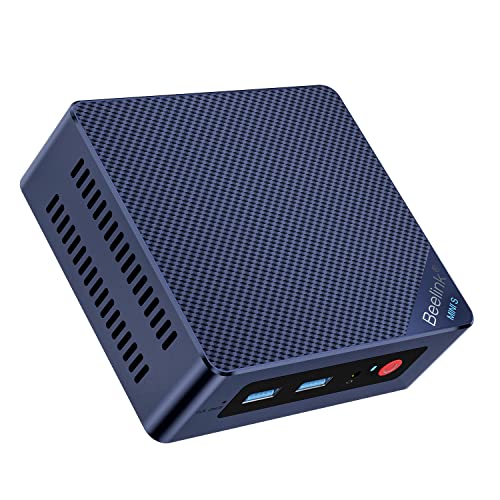
| Size | 139 mm x 139 mm x 39 mm, useful for checking desk space. |
What to Compare Before Buying
- Processing needs: The Intel N95 is the stated processor, so compare it with the kind of work you plan to run.
- Memory and storage: 16GB RAM and 512GB SSD are the main headline specs, so check whether that suits your apps and files.
- Connections: Count the USB ports, HDMI output and Ethernet ports against your monitor, networking and accessory setup.
- Space: The 139 mm x 139 mm x 39 mm size helps you judge desk or shelf space before choosing an offer.
Compatibility, Size and Fit
This mini PC is relevant if you need a compact Windows desktop with a small footprint and multiple connection types. Check that your display supports HDMI and that your wired network, wireless devices and USB accessories match the available ports.
If you want to use two Ethernet connections, the dual Gigabit Ethernet ports are part of the specification to confirm against your setup.
Before You Decide
Confirm the Windows 11 Pro system, the Intel N95 processor, and the 16GB RAM / 512GB SSD configuration before choosing an offer. Also check the 139 mm x 139 mm x 39 mm size against your available space and make sure the HDMI, USB and Ethernet connections suit your setup.


