

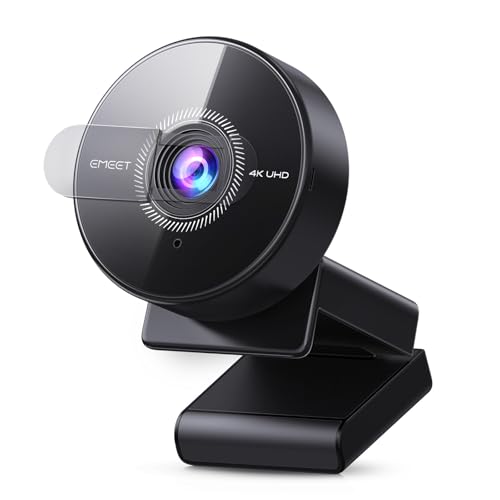
Quick Summary
The EMEET C950 is a 4K webcam for PC with an 8 megapixel UHD camera, PDAF autofocus, a noise-cancelling microphone and a 73° field of view. It also supports 1080P at 60FPS, USB 2.0 plug and play use and a physical privacy cover.
It is set up for video calls and online meetings, with a focus on clear picture, straightforward connection and basic privacy control.
Who It Is Best For
This webcam suits buyers who want a PC camera for remote meetings, online education, live streaming or game broadcasting. It is also relevant if you want a camera that can focus on one person or a small meeting rather than a wide background.
Key Details
| Detail | Verified information and buyer relevance |
|---|---|
| Model | EMEET C950 for clear product identification. |
| Camera specification | 8 megapixels UHD, with 4K support for higher-detail video. |
| Frame rate | Supports 4K at 30FPS and 1080P at 60FPS, which affects the available video mode. |
| Autofocus | PDAF autofocus is listed for faster, more stable focusing in different scenes. |
| Field of view | 73° FOV, which keeps the frame more focused on the user and nearby participants. |
| Microphone | Built-in noise-cancelling microphone for voice capture during calls. |
| Connection | USB 2.0 plug and play for straightforward connection. |
| Privacy feature | Physical privacy cover to block the lens when not in use. |
| Compatibility | Listed for Zoom, Microsoft Teams, Google Meet, Cisco Webex, Facetime, GoToMeeting, Lifesize, Slack, Line and TrueConf, plus Windows, macOS, Android TV and Linux. |
Why Buyers Choose It
- 8 megapixels UHD and 4K support give you a higher-resolution camera option for calls and recorded video.
- 1080P at 60FPS gives a smoother lower-resolution mode for supported software and uses.
- PDAF autofocus is useful when the camera needs to keep attention on the subject during movement or changes in position.
- The 73° FOV is a tighter view that suits individual use or a small meeting space.
- The physical privacy cover gives a simple way to block the lens when the webcam is not in use.
How It Works
Connect the webcam through USB 2.0 and use it in plug and play mode. The camera is listed as working in UVC mode, and EMEETLINK can be used to customise image settings and upgrade firmware.
Video resolution depends on the built-in camera software or apps such as PotPlayer and OBS, so the selected app affects the available output mode.
Real World Use
The C950 is set up for desktop use in busy offices or home workspaces, and the built-in microphone is described for communication up to 6 feet away. The flexible bracket allows a 15° ±3° vertical forward angle and a 90° ±3° vertical backward angle, which gives some room to adjust the viewing direction.
What To Know Before You Buy
Check that your intended platform is included among the listed compatibility options before ordering. If you want 4K use, confirm that your software supports the required video mode. The tighter 73° field of view is better suited to one person or a small meeting than a wide room view.
Review the software, system and connection requirements for your setup, especially if you plan to use image controls or firmware updates through EMEETLINK.
Common Buyer Questions
Does it support 4K video?
Yes. It supports 4K at 30FPS and also 1080P at 60FPS.
Does it work with common meeting apps?
Yes. It is listed for Zoom, Microsoft Teams, Google Meet, Cisco Webex, Facetime, GoToMeeting, Lifesize, Slack, Line and TrueConf.
Is there a privacy feature?
Yes. It includes a physical cover to block the lens.
What kind of connection does it use?
It uses USB 2.0 with plug and play setup.
Final Buying View
If you want a 4K PC webcam with a tighter 73° view, PDAF autofocus, a built-in microphone and a privacy cover, the EMEET C950 is set up around those needs. Compare the listed platform compatibility and video mode support with your own setup before choosing.


