Quick Summary
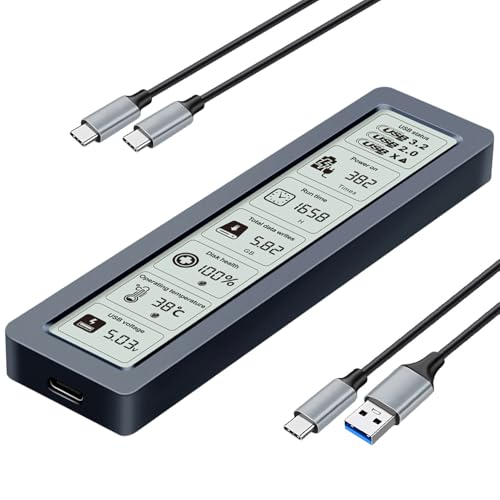
The FIDECO M.2 NVMe Enclosure is a USB 3.2 Gen 2 enclosure for M.2 NVMe SSDs with M and M+B Key support. It is described with a 10Gbps transfer speed, a full aluminium alloy body, and a sandwich-style design with tool-free installation.
It is intended for buyers who need an enclosure for supported NVMe SSD sizes and who want a USB-C based connection, with a USB C to USB C cable and attached USB A adapter included.
Who It Is Best For
This enclosure suits buyers with an M.2 NVMe SSD in a supported size who want to place it in a USB enclosure for use with a computer. It also suits anyone who wants to check SSD key type and avoid SATA or AHCI drives, since those are not supported.
Key Details
| Detail | Verified information and buyer relevance |
|---|---|
| Brand | FIDECO, helping identify the exact enclosure. |
| Product type | M.2 NVMe enclosure and PCIe adapter for supported SSDs. |
| Interface | USB 3.2 Gen 2 with support for UASP. |
| Stated speed | 10Gbps maximum speed in theory, so the connection standard is clearly defined. |
| Supported SSD key type | M and M+B Key. |
| Supported SSD sizes | 2230, 2242, 2260 and 2280. |
| Body material | Full aluminium alloy body. |
| Design | Sandwich-style design with tool-free installation. |
| Included cable | USB C to USB C cable with an attached USB A adapter. |
| System compatibility | Windows, Mac OS and Linux. |
Why Buyers Choose It
- USB 3.2 Gen 2 and UASP support are stated, which gives a clear connection specification for buyers comparing enclosures.
- The full aluminium alloy body is described as better for heat dissipation, so buyers can weigh the casing construction alongside the fit for their SSD.
- The sandwich-style design is paired with tool-free installation, which simplifies the stated fitting method.
- The included USB C to USB C cable and attached USB A adapter give buyers a clearer picture of the connection options in the box.
How It Works
- Fit a supported M.2 NVMe SSD with M or M+B Key into the enclosure.
- Use the sandwich-style design to install the SSD without tools.
- Connect the enclosure using the supplied USB C to USB C cable, with the attached USB A adapter if needed.
- Use it with Windows, Mac OS or Linux as listed.
A new SSD needs to be initialised before it can be recognised by a computer.
Real World Use
The enclosure is designed for portable use and is described as mini and pocket-sized. That makes it easier to carry with the stated cable arrangement when you need to connect a supported NVMe SSD away from a fixed desk setup.
The aluminium alloy body and sandwich-style layout are relevant if you want a compact enclosure with a construction that is stated to support better heat dissipation and closer contact with the thermal pad.
What To Know Before You Buy
Check that your drive is an M.2 NVMe SSD with M or M+B Key before ordering. This enclosure does not support SATA or AHCI SSDs.
Review the SSD size carefully and make sure it is one of the supported formats: 2230, 2242, 2260 or 2280. Also confirm that your computer setup suits the included USB C to USB C cable or the attached USB A adapter.
Common Buyer Questions
Which SSDs does it support?
It supports M.2 NVMe SSDs with M and M+B Key in 2230, 2242, 2260 and 2280 sizes.
Does it work with SATA SSDs?
No. The enclosure does not support SATA or AHCI SSDs.
What systems is it compatible with?
It is listed as compatible with Windows, Mac OS and Linux.
What is included for connection?
A USB C to USB C cable is included, with an attached USB A adapter.
Final Buying View
If you need an enclosure for a supported M.2 NVMe SSD and want a tool-free USB-C option, this FIDECO model gives you a clear specification set to compare against your drive. Confirm the SSD key type, size and connection needs before ordering.