




Quick Summary
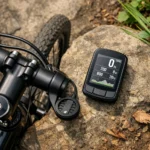
The GEOID CC700 is a wireless bike computer with a 2.8-inch colour screen, GPS positioning, route navigation and indoor training support. It also includes WiFi, Bluetooth and ANT+ connectivity, plus support for data export and app-based syncing.
The screen is designed for cycling data and navigation, while the navigation functions include turn reminders and automatic re-routing. The unit also supports multiple satellite systems, AGNSS syncing and a three-button control layout.
Key Details
| Detail | Verified information and buyer relevance |
|---|---|
| Product type | Wireless bike computer for cycling data, navigation and indoor training support. |
| Screen | 2.8-inch colour screen for route and ride information. |
| Controls | Three-button design for operating the device. |
| Connectivity | WiFi, Bluetooth and ANT+ are supported for syncing and device connections. |
| Positioning | GPS positioning is supported, with 5-second positioning stated when AGNSS data is synced. |
| Navigation | Route navigation includes turn reminders, GPX upload and automatic re-routing. |
| Data support | Up to 10 pages, 10 displayed data items per page, 29 display layouts and 108 supported data items are stated. |
| Languages | 11 languages are supported, including English. |
What to Compare Before Buying
- Screen size: The CC700 uses a 2.8-inch screen, so compare that with how much data you want to view at once.
- Connectivity: Check whether WiFi, Bluetooth and ANT+ match the devices and apps you plan to use.
- Navigation needs: Consider whether GPX upload, turn reminders and re-routing are the features you need for your rides.
- Training use: If you plan to use an indoor smart trainer, check that its controls and setup suit your training routine.
- Data layout: Review the supported pages, layouts and data-item count if you like a detailed screen layout.
Using It in Practice
The CC700 is built around ride tracking and route guidance. For outdoor rides, the navigation features help you follow a planned route, while the app connection supports importing GPX files and exporting ride data. For indoor sessions, the trainer support adds another use case when you want to work with power targets, resistance levels and gradients.
If screen layout matters, the available chart and dial styles give you several ways to organise the displayed data. That makes it worth checking which data fields you want visible before setting up the pages.
Before You Decide
Confirm that the 2.8-inch screen, wireless connections and navigation features match the way you plan to ride. If you want indoor trainer support, make sure that is part of the setup you need. It is also sensible to check the supported language and the data layout options before choosing an offer.