

Quick Summary
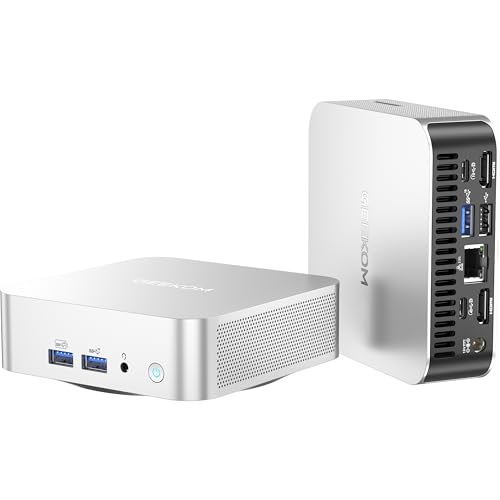
The GMKtec G10 is a mini PC built around a Ryzen 5 3500U processor, with 16GB DDR4 RAM and a 512GB PCIe 3.0 x4 SSD. It is presented as a compact desktop computer for office use and light gaming.
The connection set includes WiFi 5, Bluetooth 5.0, USB 3.2, USB-C, DisplayPort and HDMI. The product text also states support for triple-display output and mentions 2.5GbE Ethernet.
Key Details
| Detail | Verified information and buyer relevance |
|---|---|
| Processor | Ryzen 5 3500U with 4 cores / 8 threads and boost up to 3.7 GHz. This is the core specification to compare if processing power matters. |
| Memory | 16GB DDR4 RAM. The memory spec matters if you plan to keep several apps or browser tabs open. |
| Storage | 512GB PCIe 3.0 x4 SSD. Check whether this capacity is enough for your files and software. |
| Wireless | WiFi 5 and Bluetooth 5.0. Compare these against the connections you need for your network and accessories. |
| Video outputs | HDMI, DisplayPort and USB-C are stated, with triple-display support mentioned. Check your monitor inputs before choosing an offer. |
What to Compare Before Buying
- Processor: The Ryzen 5 3500U is the stated CPU. Compare it with the level of multitasking or workload you expect.
- Memory and storage: 16GB RAM and a 512GB SSD are included in the stated configuration. Compare both with your app and file needs.
- Display connections: HDMI, DisplayPort and USB-C are listed, along with support for three screens. Check that your monitor setup matches the available ports.
- Network and peripherals: WiFi 5 and Bluetooth 5.0 are included, so it is worth checking whether that suits your router and accessories.
- Expansion: The description mentions dual M.2 2280 PCIe 3.0 slots and support for up to 32GB RAM. Confirm whether expansion is important to your purchase.
What Else You May Need
Check whether your monitor cables, keyboard, mouse and any extra storage or networking accessories match the ports and connections you plan to use.
Before You Decide
Confirm the exact G10 configuration, especially the memory and storage arrangement, before choosing an offer. It is also worth checking that the available display inputs, wireless standard and expansion options fit the setup you want to build.