



Quick Summary
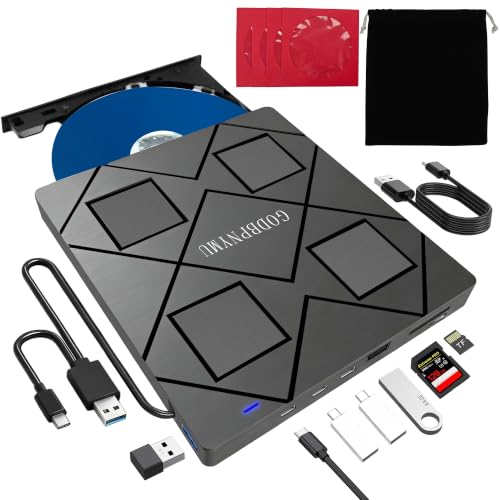
The GODBPNYMU 8-in-1 external Blu-ray drive combines disc reading and writing with USB hub and card reader functions in one unit. It supports BD, DVD and CD discs, and includes USB-C and USB-A connection options for use with a laptop or desktop.
It is a compact external drive with multiple ports, so the main buying checks are disc-format support, port layout, computer compatibility and whether you need the card slot as well as the optical drive.
Key Details
| Detail | Verified information and buyer relevance |
|---|---|
| Product type | External Blu-ray drive with USB hub and card reader functions. |
| Disc support | Supports BD, DVD and CD discs, including read and write functions for several listed formats. |
| Connection | USB-C and USB-A connection options are mentioned, which helps when matching the drive to your computer ports. |
| Hub ports | Includes 2 USB-C ports, 1 USB 3.0 port, 1 USB 2.0 port and 1 TF/SD card slot. |
| Compatibility | Works with Windows 11/10/8.1/7/XP/ME/2000 and macOS 10.6 and later. |
| Included items | Drive, pouch, 4 disc sleeves, USB-A to DC 5V power cable and user manual. |
| Size and weight | Weighs 300 g and measures 5.5 x 5.5 x 0.35 inches, which helps with bag and desk-space checks. |
What to Compare Before Buying
- Disc format support: Check the BD, DVD and CD formats you need, including whether you need read, write or both functions.
- Computer connection: Compare the available USB-C and USB-A options with your laptop or desktop ports.
- Card slot use: The TF and SD slot is useful if you want card access as well as an optical drive, but the two card types cannot be read at the same time.
- Software for Blu-ray playback: Blu-ray playback needs third-party software, so this matters if you plan to watch discs on your computer.
- Space and portability: The stated size and 300 g weight are useful if you plan to move the drive between rooms or carry it in a bag.
What Is Included
- 1 external Blu-ray burner
- 1 drive pouch
- 4 CD/DVD disc sleeves
- 1 USB-A to DC 5V power cable
- 1 user manual
Before You Decide
Check that your computer has the right USB connection, and confirm that the disc formats and card functions match what you need. If Blu-ray playback matters, remember that extra software is required. The TF and SD card slot cannot be used at the same time.