



Quick Summary
The HEIGAOLAPC Fanless Mini PC is a compact mini computer with a 12th Gen N100 processor, 8GB RAM and 128GB eMMC storage. It is fanless, so it is described as a quiet system for home server use, and it supports dual display at 4K 60Hz.
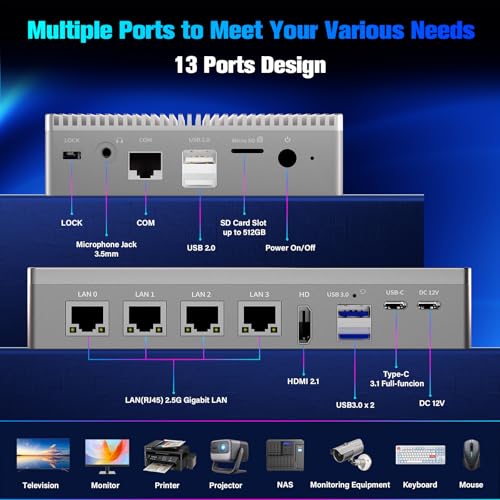
It also includes four 2.5GbE LAN ports, WiFi 5.2, Bluetooth 5.2, and a range of physical connections including USB-C, USB 3.2, USB 2.0, HDMI, a 3.5mm microphone jack and an SD card slot.
Who It Is Best For
This mini PC suits buyers who want a small, fanless computer for tasks such as a home server, mini server, firewall appliance or general desktop use. The four 2.5GbE LAN ports and support for multiple operating systems will matter most to buyers planning network-focused use or system flexibility.
It is also worth considering if you need a compact device for use with displays, projectors, televisions, monitoring equipment or office equipment, and if you want a machine that can be hidden behind a monitor using a VESA mount.
Key Details
| Detail | Verified information and buyer relevance |
|---|---|
| Brand | HEIGAOLAPC, making the product identity clear for shoppers comparing similar mini PCs. |
| Processor | 12th Gen N100 with a burst speed up to 3.4GHz, which is the main stated processor specification. |
| Memory and storage | 8GB RAM and 128GB eMMC storage, so buyers can check the stated internal specification before ordering. |
| Cooling design | Fanless design with an aluminium shell, which is presented as a quiet setup for use where fan noise is unwanted. |
| Networking | Four 2.5GbE LAN ports plus WiFi 5.2 and Bluetooth 5.2, making network connections a key buying point. |
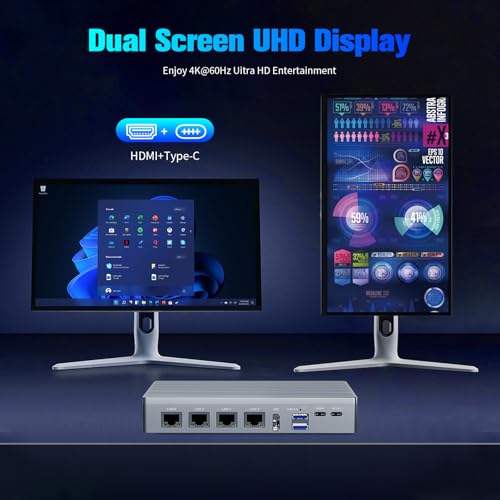
| Display support | Dual display support with HDMI at 4K 60Hz, useful for buyers planning a multi-screen setup. |
| Connections | USB-C, DC In, USB 3.2 x2, USB 2.0 x2, HDMI, 3.5mm microphone jack and SD card slot are listed. |
| Operating system support | Comes with Win 11 Pro and also supports Ubuntu and Linux, which is relevant if you plan to use an alternative system. |
Why Buyers Choose It
- Fanless construction and aluminium housing are stated, which may appeal to buyers looking for a quieter mini computer setup.
- Four 2.5GbE LAN ports make it a stronger fit for network-heavy uses such as a firewall appliance or home server.
- Dual display support at 4K 60Hz gives a clear check for buyers who want two screens from one compact device.
- WiFi 5.2 and Bluetooth 5.2 provide both wireless networking and peripheral connectivity in the same unit.
Real World Use
In day-to-day use, this mini PC can sit as a compact desktop machine or be used as a small server-style device. The VESA mount reference means it may be placed behind a monitor or HDTV to reduce visible desk clutter.
The range of ports supports connection to displays and peripherals, while the four LAN ports make it especially relevant for networked setups where wired connectivity matters.
What To Know Before You Buy
Check whether the 8GB RAM and 128GB eMMC specification matches your intended use, especially if you need more local storage or memory. If you are planning firewall, NAS or server use, the four 2.5GbE LAN ports are a key feature to confirm against your network plan.
Review the connection list carefully before ordering so the USB-C, HDMI, USB and audio connections suit the equipment you want to attach. Also confirm the operating system setup you want to use, since Win 11 Pro is included and Ubuntu or Linux support is also mentioned.
Common Buyer Questions
Does it support two displays?
Yes. Dual display support is listed, with HDMI 2.0 supporting 4K at 60Hz.
How many wired network ports does it have?
It has four 2.5GbE LAN ports, which is a major point for network-focused use.
Does it run quietly?
It is fanless, so it is presented as a quiet mini PC without a fan.
Which operating systems are mentioned?
Win 11 Pro is included, and Ubuntu and Linux are also mentioned as supported systems.
Final Buying View
This HEIGAOLAPC mini PC is best considered by buyers who want a compact, fanless computer with strong wired networking and dual display support. Confirm the RAM, storage and connection layout against your intended setup before choosing it.


