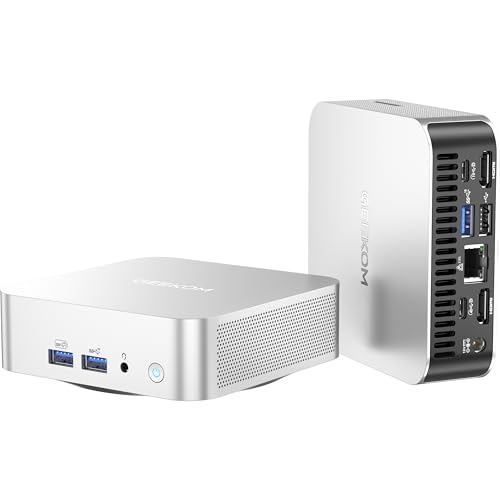
Quick Summary
The HUNSN BY02 is a compact 4K mini PC built around an Intel Xeon E-2176M 6-core, 12-thread processor. It is described for use as a HTPC, small server, and virtualisation platform, and it supports Windows 11 or Linux Ubuntu, with mention of Proxmox, VMware, ESXi and KODI.
It also includes DisplayPort, HDMI, Type-C and 2 x LAN connections, along with 32GB RAM and a 512GB SSD. The compact chassis and low-power, low-heat description make it a practical option for buyers who want a small desktop-style system with multiple connection options.
Who It Is Best For
This mini PC suits buyers looking for a small computer for home media use, office tasks, touch devices, car repair shops, security, education, business or virtualisation-related use. It will also appeal to buyers who need a compact system with dual network ports and a range of display connections.
Check the operating system choice, connection needs and storage or memory specification before ordering, as the listed configuration is part of the product variation.
Key Details
| Detail | Verified information and buyer relevance |
|---|---|
| Model | BY02, which identifies the specific mini PC version. |
| Processor | Intel Xeon E-2176M with 6 cores and 12 threads, as stated in the title and description. |
| Memory | 32GB RAM, which is useful to confirm against your expected workload. |
| Storage | 512GB SSD, so the included storage size should be checked against your needs. |
| Display connections | DisplayPort, HDMI and Type-C are listed for video output and connection planning. |
| Network ports | 2 x LAN ports are listed, which is relevant for network-heavy setups. |
| Operating systems | Windows 11 or Linux Ubuntu are mentioned, with support also stated for Proxmox, VMware, ESXi and KODI. |
| Included power supply | 100W 20V 5A power supply with power cord is mentioned. |
| Size | 134 x 144 x 64mm, helping buyers check space and placement. |
| Weight | 1.05kgs, which may matter if portability or shelf loading is a concern. |
| Ports | 4 x USB 3.0, 2 x USB 2.0, mic-in and headphone-out are listed alongside the display and network connections. |
How It Works
The system is described as ready to run straight out of the box with Windows 11 Pro (64 bit) installed. Buyers choosing a different operating system will need to match their intended setup to the listed Windows 11 or Linux Ubuntu support.
Its connection layout includes USB, display, network and audio ports, so it can be planned as a small desktop or server-style system around the ports you actually need.
Real World Use
The BY02 is described for use in home HTPC setups, business environments, virtualisation platforms and specialist settings such as security, education and car repair shops. Its compact chassis and stated low heat output make it easier to place on a desk, in a media area or inside a setup where space is limited.
Because the system includes 2 x LAN and several display outputs, it may suit buyers who need both network connectivity and flexible screen connection options in a small enclosure.
What To Know Before You Buy
Check that the BY02 model, Intel Xeon E-2176M processor, 32GB RAM and 512GB SSD configuration matches what you need before ordering. The variation also matters because the title and description refer to Windows 11 or Linux Ubuntu support, while the description specifically mentions Windows 11 Pro (64 bit) being installed.
Review the available ports, display connections, network requirement and physical size if you are planning a media, office or virtualisation setup. The included 100W 20V 5A power supply and power cord are part of the described package.
Common Buyer Questions
Does it include Windows?
Yes, the description says Windows 11 Pro (64 bit) is installed.
What display connections does it have?
It lists DisplayPort, HDMI and Type-C.
How many network ports are included?
It lists 2 x LAN ports.
What storage and memory are listed?
32GB RAM and a 512GB SSD are stated.
Final Buying View
The HUNSN BY02 is a small PC with the listed processor, memory, storage and connection set, so it is worth comparing carefully with your planned use before choosing it. Confirm the exact operating system setup and port requirements, then check the size and included configuration against your space and workload.
Review the selected variation carefully before ordering.