



Quick Summary
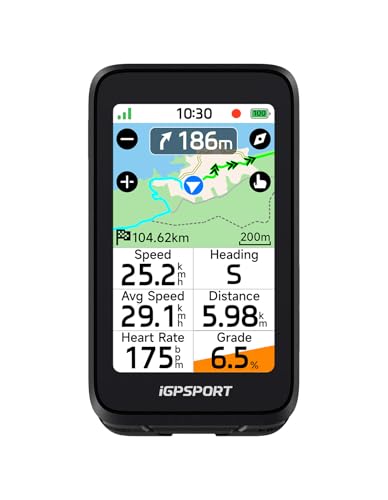
The iGPSPORT BiNavi is a wireless GPS bike computer with a touch screen, map navigation, music control and climb tips. It is presented as a black cycling computer for riders who want route guidance and ride data in one unit.
Key functions include route planning, saved point navigation, continue-last-ride support and hill-climbing planning. If those features matter, check the exact app and phone pairing requirements before choosing an offer.
Key Details
| Detail | Verified information and buyer relevance |
|---|---|
| Brand | iGPSPORT. Useful for matching the product to the right cycling computer range. |
| Model | BiNavi. Important for confirming the exact unit. |
| Product type | Wireless GPS bike computer. This identifies the main function and the type of device. |
| Colour | Black. Check the selected finish if appearance matters. |
| Navigation | Map navigation, route planning and saved point navigation are stated features. |
| Connectivity | Route import from the iGPSPORT app and some third-party road books is stated. |
| Ride features | Music control, continue-last-ride support and climb tips are listed. |
| Positioning | Dual-band GPS and support for GPS, Beidou, GLONASS, Galileo and QZSS are stated. |
What to Compare Before Buying
- Navigation setup: Check whether the route import and road-book support suit the apps and files you already use.
- Phone pairing: Music control depends on pairing with a phone, so confirm that this matches how you ride.
- Training features: The climb tips and training analysis are useful only if you want those extra ride-planning tools.
- GPS functions: Dual-band positioning and multi-satellite support are key if navigation accuracy matters to you.
Before You Decide
Confirm that the BiNavi is the exact iGPSPORT bike computer you want, then check app compatibility, phone pairing for music control and the navigation features you plan to use. If climb tips and route planning are central to your rides, this is the main feature set to compare.
Further Checks Before Choosing
- Consider whether the screen size and stated display details will be easy for you to read in the conditions where you ride.
- Check the stated battery life against the length of your usual rides, and look for the charging method if that affects your setup.
- Confirm how the computer mounts to your bike and whether the selected configuration includes the mount you need.
- If you plan to use external sensors, check which sensor types and connection standards are supported rather than assuming compatibility.
- For wet-weather riding, look for an explicit water-resistance rating and understand its stated limits; the navigation features alone do not establish weather protection.


