

Quick Summary
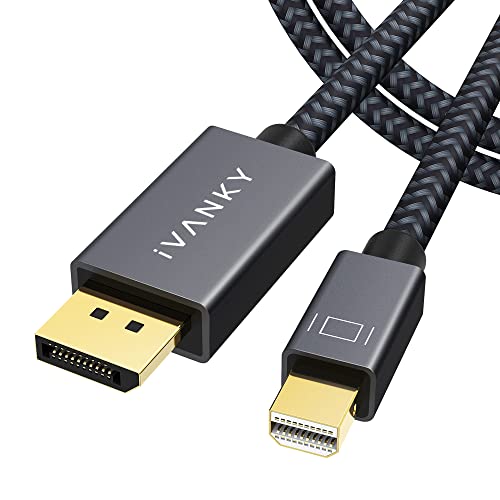
The iVANKY Mini DisplayPort to DisplayPort Cable is a 2 m cable for connecting devices with Mini DP/DP ports to external displays, TVs or projectors with DisplayPort or Mini DisplayPort inputs. The product is presented as bidirectional and is described as supporting 8K at 60 Hz.
It is also described as Thunderbolt compatible and as a Mini DP to DP cable rather than HDMI. If the connection type matters, check that your device and display use the right Mini DisplayPort or DisplayPort ports.
Key Details
| Detail | Verified information and buyer relevance |
|---|---|
| Brand | iVANKY. Useful for matching the exact cable family. |
| Product type | Mini DisplayPort to DisplayPort cable. Check the port type on both devices before buying. |
| Length | 2 m. This helps with desk layout and how far apart the devices can sit. |
| Video support | Described as supporting 8K at 60 Hz. Compare this with the display setup you plan to use. |
| Connection direction | Described as bidirectional, with Mini DP to DP and DP to Mini DP use mentioned. |
| Compatibility | Described as Thunderbolt compatible. Check the exact port and device version before choosing an offer. |
| Construction | Nylon braided jacket and gold-plated connectors are mentioned. |
What to Compare Before Buying
- Port type: This cable is for Mini DisplayPort and DisplayPort connections, not HDMI. Check both ends of your setup.
- Length: The cable is 2 m long. Compare that with the distance between your device and screen.
- Display requirement: It is described as supporting 8K at 60 Hz. Make sure your display and device setup match the resolution you want to use.
- Direction of use: Bidirectional use is stated, so check which way round you need the connection.
- Compatibility: Thunderbolt compatibility is mentioned, so confirm the exact device ports before choosing.
Who This Product May Suit
This cable may suit buyers who need a 2 m Mini DisplayPort to DisplayPort lead for linking a compatible laptop or computer to a display, TV or projector. It is relevant where the setup needs Mini DP or DP rather than HDMI, and where a bidirectional connection is useful.
What Else You May Need
You will need a compatible source device and a display with the matching Mini DisplayPort or DisplayPort input. If you are building a multi-monitor setup, check that the rest of your equipment supports the arrangement you want to use.
Before You Decide
Confirm the port type on both devices, the 2 m length, and the direction you need before choosing an offer. If your setup depends on 8K at 60 Hz or Thunderbolt compatibility, check that the connected devices support those requirements.