
Computer Video Cables
Computer video cables are essential for connecting your PC, laptop, or workstation to external displays, whether it’s a monitor, projector, or TV. The right cable ensures clear visuals, smooth refresh rates, and full compatibility with your devices. Since 1988, we’ve helped customers choose the best-quality video cables for their setup, from the latest high-speed DisplayPort and HDMI standards to legacy connectors like VGA and DVI.
Whether you’re gaming in 4K, presenting in the office, or setting up a dual-monitor workspace, our wide range of computer video cables ensures reliable signal transmission and crisp display quality, every time.
- Computer Video Cables
Multibao Display Port DP Male to DVI-D & DVI-I Female Adapter Cable Converter Lead 4K HD
£4.98 *View On Amazon* - Computer Video Cables
La Brodée DisplayPort (DP) to DVI Cable, 2M Display Port to DVI Adapter Male to Male Converter Cord Gold-Plated Connector for Computer, DVD, HDTV, Projector, PS3 and More
Original price was: £5.59.£4.47Current price is: £4.47. *View On Amazon* - Computer Video Cables
HDMI DVI adapter cable with A.I.S. shielding – 1m (bi-directional monitor cable, 24+1 Pin, connect HDMI device to DVI monitor or vice versa, Full HD/1080p, white) – by CableDirect
Original price was: £7.69.£6.55Current price is: £6.55. *View On Amazon* - Computer Video Cables
HDMI DVI adapter cable with A.I.S. shielding – 2m (bi-directional monitor cable, 24+1 Pin, connect HDMI device to DVI monitor or vice versa, Full HD/1080p, white) – by CableDirect
Original price was: £7.99.£6.97Current price is: £6.97. *View On Amazon* - Computer Video Cables
StarTech.com 6ft HDMI to DVI-D Cable- M/M – Computer Monitor Adapter Cable
£10.47 *View On Amazon* - Computer Video Cables
kenable DVI to HDMI 18+1 Video Lead for TV Monitor PC Games Console DVR NVR 2m
£4.21 *View On Amazon* - Computer Video Cables
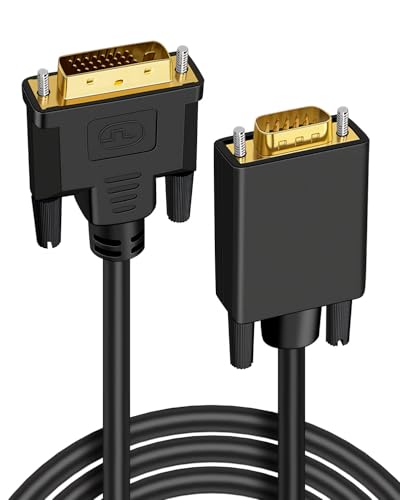
Jesiah DVI to VGA Cable, 1.8M Male to Male Gold-Plated 24+1 Pin Active DVI-D to VGA Cord Compatible with PC Laptop Monitor Projector HDTV
Original price was: £5.99.£5.69Current price is: £5.69. *View On Amazon* - Computer Video Cables
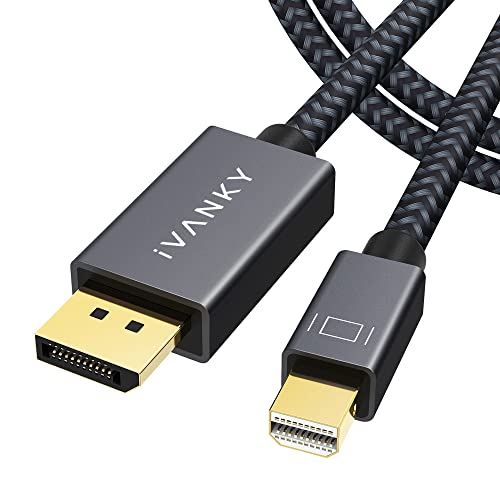
IVANKY Mini DisplayPort to DisplayPort Cable 1M, 8K@60Hz Ultra HD Nylon Braided & Gold-Plated Mini DP to DP Cable Thunderbolt Compatible for MacBook Air, MacBook Pro, Surface Pro/Laptop
Original price was: £8.99.£7.64Current price is: £7.64. *View On Amazon*





Why the Right Video Cable Matters
Using the correct video cable affects more than just the display; it can determine:
Maximum screen resolution
Refresh rate and smoothness (e.g. 60Hz vs 144Hz)
Colour accuracy and HDR support
Audio signal transmission (for HDMI and DisplayPort)
Device compatibility with monitors, TVs, projectors, and docking stations
With over 35 years of experience in computer accessories, we offer only quality-tested video cables that support high performance, durability, and device matching.
Buying Guide: How to Choose the Right Computer Video Cable
1. Identify Your Port Types
| Port Type | Common Use |
|---|---|
| HDMI | Modern monitors, TVs, and projectors |
| DisplayPort | PC monitors, gaming displays, and high refresh rates |
| USB-C (with DisplayPort Alt Mode) | Newer laptops, tablets, and docking stations |
| Mini DisplayPort / Thunderbolt 2 | Older Macs and Microsoft Surface devices |
| DVI | Older monitors and GPUs |
| VGA | Legacy projectors and business displays |
| USB-C to HDMI/DP | For ultrabooks without native video ports |
🔍 Check both your computer and display device to match the correct cable type.
2. Match Resolution and Refresh Rate Requirements
| Cable Type | Max Resolution / Use |
|---|---|
| HDMI 1.4 | 1080p at 60Hz / basic HD monitors |
| HDMI 2.0 | 4K at 60Hz / mainstream 4K displays |
| HDMI 2.1 | 8K or 4K at 120Hz / next-gen gaming monitors and TVs |
| DisplayPort 1.2 | 4K at 60Hz or 1440p at 144Hz |
| DisplayPort 1.4 | 4K at 120Hz or 8K at 60Hz with DSC |
| USB-C (DP Alt Mode) | 4K at 60Hz (depending on device) |
| DVI-D Dual Link | 1440p at 60Hz |
| VGA | Up to 1080p (analogue, not ideal for modern displays) |
✅ For gaming or high-resolution work, use DisplayPort or HDMI 2.0+ to ensure smooth and clear visuals.
Top Video Cable Types and Their Uses
✅ HDMI (High-Definition Multimedia Interface)
HDMI to HDMI – Most common modern connection
HDMI to DVI – For older monitors (note: no audio)
HDMI to VGA – For legacy projectors (requires active converter)
High-Speed HDMI with Ethernet – Supports 4K, ARC, and more
HDMI 2.1 – Best for 120Hz+ 4K gaming setups or 8K displays
✅ DisplayPort (DP) & Mini DisplayPort
DisplayPort to DisplayPort – High-end gaming and professional use
Mini DP to HDMI or DP – Popular for older Apple and Surface devices
DisplayPort to HDMI – For connecting PCs to HDMI monitors/TVs
DisplayPort 1.4 – Supports 4K at 120Hz and HDR
Locking connectors – Often used in secure installations
✅ USB-C Video Cables (with DP Alt Mode)
USB-C to HDMI / DP – Video output from newer laptops and tablets
USB-C Multiport Adapters – Add video + USB + charging in one
Thunderbolt 3/4 to DisplayPort – High-resolution displays from MacBooks and ultrabooks
✅ DVI (Digital Visual Interface)
DVI-D Dual Link – Up to 2560×1440 resolution
DVI to HDMI – Video only (no sound)
DVI-I – Carries both analogue and digital signals (requiresa compatible display)
✅ VGA (Video Graphics Array)
VGA to VGA – Analogue-only, used in older monitors and projectors
VGA to HDMI (Active Converter) – Must convert digital signal; requires power
Key Features to Look For
Gold-Plated Connectors – Improve signal and resist corrosion
Braided or Reinforced Cable Jackets – Prevent fraying and extend cable life
Shielding – Reduces interference and signal degradation
Locking Mechanisms (DP) – Prevent accidental disconnection
Certified Standards (e.g., HDMI Premium Certified) – Ensure compatibility with 4K/8K and HDR formats
Active vs Passive Adapters – Required when converting signals (e.g. DP to HDMI)
Expert Tips for Choosing & Using Video Cables
Match resolution + refresh rate: A lower-spec cable can bottleneck your display
Label your cables if using multiple monitors
Avoid cheap, unbranded HDMI cables — they often underperform or degrade quickly
Use short cables for high resolutions (e.g. under 2m for 4K @ 60Hz)
Check for driver support when using USB-C to video adapters
Active adapters are needed when converting from digital to analogue (e.g. HDMI to VGA)
Recommended Picks by Use Case
| Use Case | Recommended Cable | Features |
|---|---|---|
| Home Office with HD Monitor | HDMI 2.0 Cable | 4K @ 60Hz, 2m, gold-plated |
| Gaming PC to High-Refresh Display | DisplayPort 1.4 Cable | 144Hz+ @ 1440p or 4K, locking plug |
| MacBook to Monitor | USB-C to HDMI / DP | Supports 4K @ 60Hz, plug-and-play |
| Legacy Monitor to New PC | DVI to HDMI | Digital signal, no audio |
| Projector Setup | VGA Cable (or HDMI to VGA converter) | Secure screws, 1.5m to 10m length options |
| Dual Monitor Setup | DP to HDMI + HDMI to HDMI | Compatible with most modern GPUs |
FAQ: Computer Video Cables
What’s better: HDMI or DisplayPort?
DisplayPort is better for higher refresh rates and resolutions, especially in gaming or professional use. HDMI is more universal, especially with TVs and consumer monitors.
Can I use a USB-C to HDMI cable with any USB-C port?
Only if the port supports DisplayPort Alt Mode or Thunderbolt 3/4, not all USB-C ports support video output.
Do video cables carry sound?
Yes, HDMI, DisplayPort, and USB-C carry audio. DVI and VGA do not.
What’s the maximum length for a video cable?
HDMI: Up to 5m (longer may require active cables)
DisplayPort: Up to 3m for full bandwidth
VGA/DVI: 5–10m, but the signal can degrade
Can I daisy-chain monitors with DisplayPort?
Yes, if both the graphics card and monitors support DisplayPort Multi-Stream Transport (MST).
Do I need an active adapter?
Yes, when converting digital to analogue (e.g. HDMI to VGA). Passive adapters only work with compatible signal types.
Connect Your Display the Right Way
With over 35 years of experience in computer accessories, we know how crucial it is to get the right video cable for your setup. Whether you’re building a dual-monitor workspace, gaming at 144Hz, or running presentations, our wide selection of video cables delivers clear visuals, stable performance, and long-term durability.
Explore our full range of computer video cables today, and enjoy crisp, uninterrupted visuals in every setup.
Looking for more options?
Browse our full range of Computers and Accessories for other great choices to suit your space, goals, and budget.
 Getting ready for Summer? View our Home and Garden Products

Heading outdoors this winter? Take a look at our Outdoor Clothing.