Quick Summary
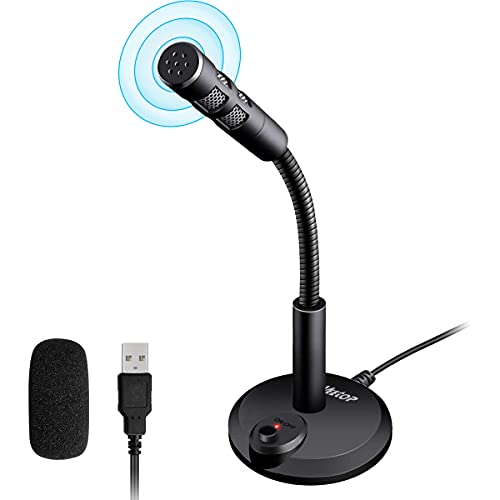
The JOUNIVO JV610 is a USB microphone for computer use with a 360 degree gooseneck design, a mute button and an LED indicator. It is set up for streaming, recording, dictation, podcasting and YouTube use, and the USB connection is described as plug and play.
The microphone is also presented with a cardioid polar pattern, noise-canceling technology and a 1.8 m USB cable. For buyers, that makes the main checks straightforward: confirm the USB connection suits your computer and review whether the gooseneck style suits the way you want to position the mic.
Who It Is Best For
This microphone suits buyers who want a desktop USB mic for a PC or laptop and prefer a position-adjustable gooseneck design. It also fits people who want quick muting, visible status feedback from the LED indicator and a simple plug and play setup.
It is aimed at tasks such as streaming, recording, dictation, podcasting and YouTube use. If you need a microphone for a computer and want a desk-mounted style rather than a handheld one, the JV610 is the relevant model to check.
Key Details
| Detail | Verified information and buyer relevance |
|---|---|
| Brand | JOUNIVO, so you can match the product listing to the correct maker. |
| Model | JV610, which helps identify the exact version. |
| Connection | USB plug and play, with no driver required according to the listing. |
| Cable length | 1.8 m USB cable, giving a stated lead length for desktop positioning. |
| Positioning | 360 degree gooseneck design for adjustable placement on the desk. |
| Controls | Mute button with LED indicator and volume adjustable wording in the description. |
| Audio pattern | Cardioid polar pattern, described as focusing on what you want to record. |
| Compatibility | Compatible with Windows 7, 8, 10 and 11, plus macOS. |
| Construction | Metal pipe and heavy-duty ABS stand are mentioned in the description. |
Why Buyers Choose It
- The 360 degree gooseneck design gives you adjustable positioning on a desk.
- The mute button and LED indicator give a clear way to check and change microphone status.
- The 1.8 m USB cable gives a defined connection length for computer setups.
- The stated cardioid polar pattern and noise-canceling technology are positioned for recording voice while reducing background noise and echo.
How It Works
- Connect the microphone to a computer using the USB cable.
- Use the plug and play setup described for Windows and macOS.
- Adjust the gooseneck position to place the microphone where you want it.
- Use the mute button when you need to mute or unmute the microphone.
- Check the LED indicator to view the working status.
Real World Use
On a desk, the microphone can be positioned with the gooseneck to suit your setup for streaming, podcasting, dictation or recording. The USB connection and stated cable length are the main practical points to check if your computer is further from your preferred mic position.
The model is also described for use with voice tasks such as talking to Cortana, so it is clearly aimed at computer-based voice input as well as content creation.
What To Know Before You Buy
Check that your computer has a USB port available and review the 1.8 m cable length against your desk layout. The microphone is presented for Windows 7, 8, 10 and 11, plus macOS, so confirm your system before ordering. If you want a fixed desktop microphone with a gooseneck, the shape and control layout are the key points to review.
The cardioid polar pattern, mute button, LED indicator and noise-canceling wording are all part of the stated specification, so they are the main features to compare with your intended use.
Common Buyer Questions
Does it need drivers?
No. It is described as USB plug and play with no driver required.
Which computers does it work with?
It is stated as compatible with Windows 7, 8, 10 and 11, as well as macOS.
How long is the USB cable?
The cable is stated as 1.8 m, or 6 ft.
Can I mute it quickly?
Yes. A one-click mute and unmute button is included, with an LED indicator for working status.
Final Buying View
The JOUNIVO JV610 is a USB desktop microphone for buyers who want a computer mic with adjustable positioning, mute control and a visible status light. Confirm your operating system and cable length needs before choosing it.