Quick Summary
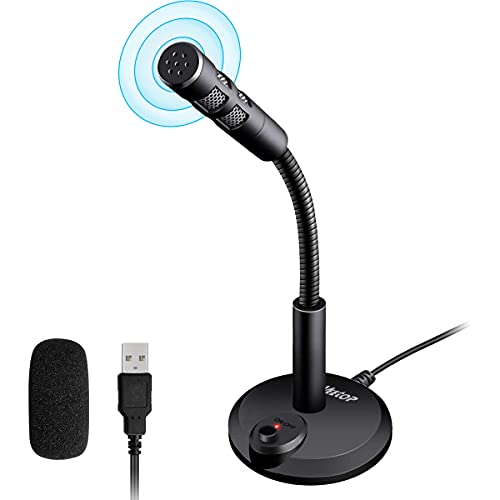
The Veetop USB Microphone is an omnidirectional PC mic for conferencing, gaming, chat and podcasting. It connects by USB and is described as suitable for laptop, Mac, PS4, Windows and Linux use. The microphone also includes a foam cover and a one-button on and off switch on the base.
It is set up for voice capture, video chat and other recording or voice input uses, with a 1.45 m cable and a 360-degree gooseneck for positioning.
Who It Is Best For
This microphone suits buyers who want a USB desktop mic for calls, chatting, dictation, gaming, podcasting or similar voice tasks. It is also relevant for anyone who needs compatibility across the named devices and operating systems listed in the product title and description.
Key Details
| Detail | Verified information and buyer relevance |
|---|---|
| Brand | Veetop. |
| Product type | USB microphone for conferencing, gaming, chat and podcasting. |
| Pickup pattern | Omnidirectional, so it captures sound from all directions around the microphone. |
| Connection | USB connection for PC or laptop use. |
| Compatibility stated | Laptop, Mac, PS4, Windows and Linux. |
| Included item | Foam cover included in the package. |
| Controls | Independent one-button switch on the base for microphone on and off control. |
| Cable length | 1.45 m cable for positioning on a desk or table. |
| Gooseneck | 360-degree gooseneck for adjusting height and rotation. |
| Material | Environment-friendly PVC and plastic are stated in the description. |
Why Buyers Choose It
- Omnidirectional pickup is stated, which means the microphone is intended to capture sound from around it rather than from one narrow direction.
- The one-button switch on the base gives direct on and off control without needing to use the computer.
- The 1.45 m cable and 360-degree gooseneck give some flexibility in desk placement and positioning.
- The included foam cover is a useful extra item for the microphone package.
How It Works
- Connect the microphone to a PC or laptop by USB.
- Use the base switch to turn the microphone on or off.
- Adjust the gooseneck to the height and angle you want.
- If using it for the first time, or after restarting the computer, adjust the microphone volume in the computer settings.
Real World Use
The microphone is described for video conferencing, Skype, dictation, speech recognition, online chatting, singing, gaming, podcasting and YouTube recording. Its table base, cable length and gooseneck make it a desktop-style microphone that can be positioned on a work surface.
What To Know Before You Buy
Check that the named compatibility matches your device or operating system before ordering, especially if you plan to use it with PS4, Mac, Windows or Linux. Review the 1.45 m cable length and the desk space available for the base and gooseneck. The description also notes that microphone volume should be adjusted in computer settings when first used or after a restart.
Common Buyer Questions
Does it work without extra software?
Yes. It is described as plug and play with no extra software to be installed.
Can I turn the microphone off without using my computer?
Yes. The base has an independent one-button switch for on and off control.
Is it adjustable on a desk?
Yes. It has a 360-degree gooseneck and a stable base for table placement.
What should I do when using it for the first time?
Adjust the microphone volume in your computer settings when first using it, or after restarting the computer.
Final Buying View
Choose this Veetop USB microphone if you want a desktop mic for conferencing, gaming, chat or podcasting with USB connection and the stated device compatibility. Check the cable length, base placement and system match before ordering.