Quick Summary
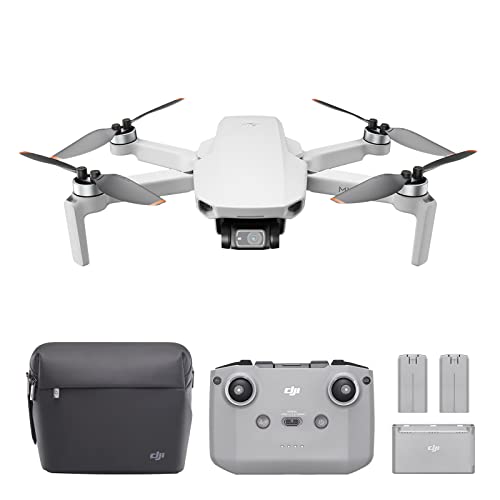
The K600GPS is a brushless drone with an EIS camera and a 4.5-inch screen on the controller. It is presented as a drone for adult beginners, with GPS functions, app control and a phone-free FPV viewing setup.
The main buying checks here are the exact camera setup, the controller screen size, GPS features and any storage limit if you plan to record footage.
Key Details
| Detail | Verified information and buyer relevance |
|---|---|
| Product type | Brushless drone with camera |
| Model | K600GPS |
| Camera | EIS camera with a 90° tiltable lens. Check this if camera angle matters for your intended shots. |
| Controller screen | 4.5-inch integrated screen for FPV viewing without a phone. |
| Control options | APP control is available, so buyers can compare how they plan to fly and view the feed. |
| Flight features | GPS auto return, follow me mode, waypoint flight and fixed-point fly functions are stated. |
| Storage | Supports up to 32GB TF cards. |
What to Compare Before Buying
- Camera setup: Check whether the 90° tilting camera and EIS camera setup suit the kind of footage you want to capture.
- Viewing method: The controller has a 4.5-inch screen, so compare that with your preference for built-in viewing versus using a phone.
- Flight functions: GPS auto return, follow me mode and waypoint flight are included, so compare whether those functions match how you want to fly.
- Storage limit: The drone supports up to 32GB TF cards, so check that against the amount of footage you expect to keep on the device.
- Variant check: Confirm that the selected offer is for the K600GPS version with the screen controller and not a different configuration.
Before You Decide
Confirm the K600GPS model, the 4.5-inch screen controller and the camera setup before choosing an offer. If GPS return, follow me or waypoint flight matter to you, make sure those are the exact functions you want. Also check the 32GB TF card limit against your storage needs.
Planning Your First Flights
A drone with a built-in screen is easiest to prepare when you decide in advance whether you want to fly with the controller display or app control. Before the first flight, check the battery charge, card capacity and the space available for a clear take-off area. If you plan to record regularly, it also helps to set aside a simple storage routine for the card and controller so the drone is ready for the next session.