



A Stylish and Affordable AIO for Everyday Use
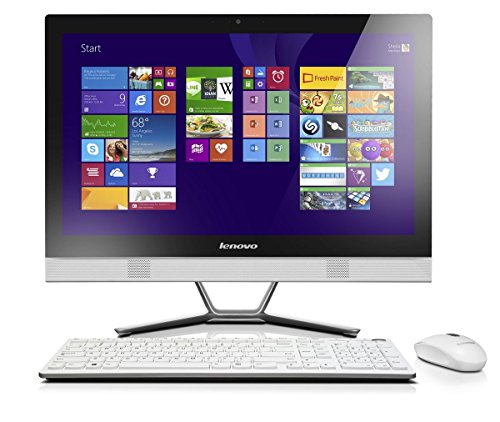
The Lenovo C50 All-in-One PC combines elegance and practicality, making it a great choice for home offices, students, and families. Its 23-inch display provides clear visuals for work, browsing, or entertainment, while the slim all-in-one design saves desk space without sacrificing usability.
Powered by the Intel Core i3-4005U processor running at 1.7GHz, this AIO handles everyday tasks like word processing, browsing, and media playback with ease. The system comes with 8GB DDR3 RAM for smooth multitasking and a 1TB HDD for generous file and media storage. An integrated DVD-RW drive adds versatility, allowing you to access or burn physical media when needed.
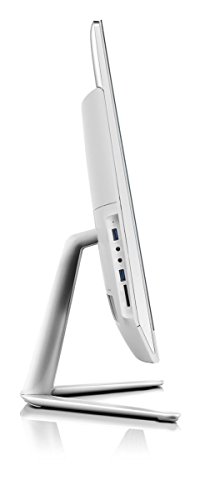
The full metal V-stand gives the Lenovo C50 a premium look, while features like HDMI output, Wi-Fi, and Bluetooth keep it connected to modern accessories and peripherals. It also includes a wired USB AccuType keyboard and mouse, ensuring you’re ready to go straight out of the box.
Pros and Cons
Pros:
Slim 23″ all-in-one design saves space
1TB HDD provides large storage for files and media
Includes DVD-RW drive for physical media access
Sliding back cover makes upgrades tool-free and easy
Comes with Lenovo AccuType keyboard and wired mouse
Elegant white finish with metal V-stand
Cons:
Intel i3-4005U is an older processor by modern standards
HDD storage is slower compared to SSDs
Ships with Windows 8.1, which may require upgrading to Windows 10/11 for modern compatibility
Not suitable for demanding gaming or heavy creative tasks
What the Product is Used For
The Lenovo C50 is ideal for:
Home offices looking for an affordable and stylish AIO
Students who need a reliable desktop for assignments and browsing
Families who want a shared PC for streaming, documents, and video calls
Users who still rely on DVDs for software, backups, or entertainment
Why We Like This Product (YPC Team Review)
At YPC, we tested the Lenovo C50 in our admin workspace. We found it reliable for email, spreadsheets, and video calls, and the 1TB HDD gave us plenty of room for storage. The stand made it look stylish in the room, and we liked how easy it was to open the back panel for upgrades. While the processor shows its age, it’s still a dependable, budget-friendly option for light computing.
Alternatives Worth Considering
Dell OptiPlex 3030 – smaller 19.5″ display but runs Windows 10 Pro.
HP 24-cb1009ng – modern design with a Full HD display and Windows 11.
Lenovo IdeaCentre AIO 3 – updated specs and more compact design for family use.
Tips on How to Use Correctly
Upgrade to an SSD for faster performance and boot times.
Consider upgrading the OS from Windows 8.1 to Windows 10 or 11.
Use HDMI output to connect an external monitor if needed.
Take advantage of the tool-free back cover for easy upgrades.
Comparisons
Compared with the Dell OptiPlex 3030, the Lenovo has a bigger display and easier upgrades, but Dell ships with a newer OS.
Against the HP 24-cb1009ng, the Lenovo offers larger storage but weaker performance.
Versus the IdeaCentre AIO 3, the C50 is more affordable but lacks modern hardware efficiency.
Full Tech Specification
| Specification | Details |
|---|---|
| Brand | Lenovo |
| Model | C50 |
| Display | 23″ Full HD (1920 × 1080) |
| Processor | Intel Core i3-4005U, dual-core, 1.7GHz |
| Graphics | Integrated Intel graphics |
| Memory (RAM) | 8GB DDR3 |
| Storage | 1TB HDD |
| Optical Drive | DVD-RW |
| Operating System | Windows 8.1 |
| Camera | Integrated webcam |
| Audio | Integrated speakers |
| Connectivity | Wi-Fi, Bluetooth, HDMI out, USB ports, Ethernet |
| Keyboard & Mouse | Wired USB AccuType keyboard and mouse included |
| Colour | White |
| EAN | Not specified |
Frequently Asked Questions
1. Can I upgrade the storage?
Yes, the sliding back panel makes it easy to install an SSD or additional drive.
2. Does it come with a keyboard and mouse?
Yes, a wired AccuType keyboard and USB mouse are included.
3. Can it run Windows 10 or 11?
Yes, you can upgrade from Windows 8.1 to a newer OS for better compatibility.
4. Is the display touchscreen?
No, it’s a standard 23″ display.
5. Can I use it for gaming?
It can handle light casual games but not modern AAA titles.
6. Does it have an HDMI port?
Yes, HDMI output is included.
7. Is the RAM upgradeable?
Yes, the DDR3 RAM can be expanded.
8. Is the DVD drive included?
Yes, it comes with a built-in DVD-RW.
9. Is this PC good for students?
Yes, it’s well-suited for research, writing, and video calls.
10. Does it support Bluetooth?
Yes, Bluetooth connectivity is built in.
Looking for more options?
Browse our full range of All In One PC's for other great choices to suit your space, goals, and budget.