Quick Summary
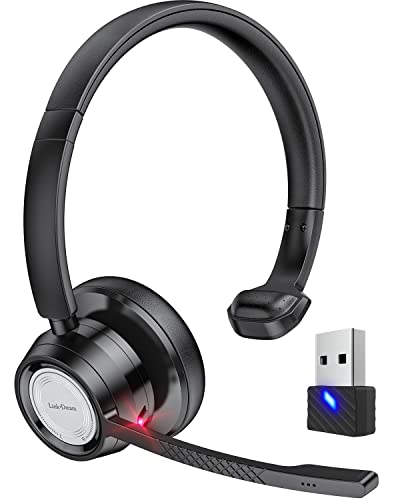
The Link Dream BH60 is a Bluetooth headset with microphone and USB dongle for calls and computer use. It includes CVC8.0 noise cancelling technology, a microphone that can rotate 270°, and Bluetooth 5.0 connectivity.
The headset is also described as weighing 103 grams, with a rechargeable 250mAh micro polymer battery and a mute function operated by the microphone lever.
Who It Is Best For
This headset is aimed at people who need wireless audio and microphone use for calling or online communication. It is listed for use with phones, computers and communication software such as Skype, Teams and Zoom, so it suits buyers who want a headset for those kinds of tasks.
Key Details
| Detail | Verified information and buyer relevance |
|---|---|
| Brand and model | Link Dream BH60. |
| Product type | Bluetooth headset with microphone and USB dongle. |
| Noise cancelling | CVC8.0 noise cancelling technology is stated, with a microphone intended to reduce echoes and ambient noise. |
| Microphone movement | The microphone rotates 270°, which gives flexibility when positioning it for calls. |
| Weight | 103 grams, which is a useful check for buyers considering on-head comfort and carry weight. |
| Bluetooth version | Bluetooth 5.0. |
| Connection distance | 30m for phone calls, 45m for music in an open field, and 10m for the Bluetooth transmitter. |
| Battery | 250mAh rechargeable micro polymer battery. |
| Use time | 24 hours of use and 30 hours of music playback are stated, with 10 months of standby time when stationary. |
| Charging time | 2 hours for a full charge. |
| Mute function | The microphone can be muted by turning the microphone lever. |
| Compatibility note | Compatible with iPhone, Samsung, most smart Android phones and computers, with a note that it is not compatible with computers above Win 11. |
Why Buyers Choose It
- CVC8.0 noise cancelling technology and a rotating microphone give you a set-up intended for clearer calls.
- The included USB dongle supports computer devices without Bluetooth, which matters if your laptop or PC has no built-in Bluetooth.
- The stated mute function on the microphone lever gives a simple way to stop being heard during a call.
- The listed weight of 103 grams is a useful check for buyers comparing headsets by weight.
How It Works
- Pair the headset through Bluetooth 5.0, or use the USB dongle with a compatible computer device.
- Adjust the microphone angle by rotating it up to 270°.
- Use the microphone lever to lower it for a call, or turn it to mute the microphone when needed.
- Connect with supported communication software such as Skype, Teams or Zoom where required.
Real World Use
This headset is set up for voice calls, video meetings and computer communication. The USB dongle is relevant if you want to use it with a computer that does not have Bluetooth, and the stated open-field range may matter if you plan to move away from the connection point while using it.
What To Know Before You Buy
Confirm that your device matches the stated compatibility before ordering, especially if you plan to use it with a computer above Win 11. If you need the USB dongle for a non-Bluetooth computer, check that this is the version you want. Review the weight, battery timings and connection distance against your intended use so the headset fits your setup.
Common Buyer Questions
Can it be used for Zoom, Teams or Skype?
Yes. It is listed for use with communication software such as Skype, Teams and Zoom.
Does it have a mute function?
Yes. The microphone can be muted by turning the microphone lever.
What kind of connection does it use?
It uses Bluetooth 5.0 and also includes a USB dongle for computer use without Bluetooth.
Is it suitable for all computers?
No. It is stated as not compatible with computers above Win 11, so that check matters before ordering.
Final Buying View
The BH60 is a Bluetooth headset with microphone and USB dongle for calls, online meetings and computer use. The strongest buying checks are the stated compatibility limits, the dongle requirement for some computers and the need to confirm the connection method suits your setup.