

Quick Summary
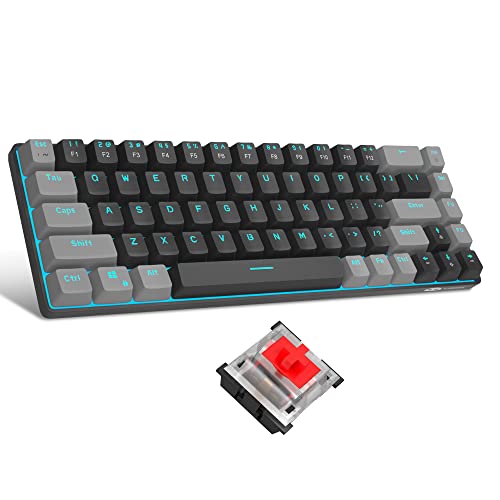
The MageGee portable 60% mechanical gaming keyboard is a compact 68-key wired keyboard with LED blue backlighting and red switches. It keeps separate arrow keys and the F-keys needed for gaming or work, while taking up less desk space than a full-size layout.
It is a USB 2.0 plug and play keyboard, so it works without drivers or software. The package also includes 13 red keycaps, a detachable USB-C cable, a key puller and an instruction manual.
Who It Is Best For
This keyboard suits buyers who want a smaller mechanical keyboard for gaming or office use and still want arrow keys and function keys available. It is also worth checking if you want a wired keyboard that connects by USB and comes in a black and grey finish.
Key Details
| Detail | Verified information and buyer relevance |
|---|---|
| Brand | MageGee. |
| Model | MK-Box. |
| Layout | 60% compact layout with 68 keys, plus separate arrow keys and F-keys. |
| Switch type | Red switch for linear, smoother key feel with minimal resistance. |
| Backlighting | Blue LED backlit with 15 backlight modes. |
| Controls | Fn + Ins changes backlight modes, Fn + left or right arrow changes speed, and Fn + up or down arrow changes brightness. |
| Connection | USB 2.0 wired connection with plug and play use. |
| Compatibility | Windows 2000, XP, ME, Vista, 7, 8, Linux and Mac. |
| Included items | Mechanical keyboard, 13 red keycaps, detachable USB-C cable, key puller and instruction manual. |
| Design details | Black and grey design, ergonomic suspension double-colour injection keycap, double kickstand feet and detachable USB cable. |
Why Buyers Choose It
- The 68-key compact layout keeps the keyboard smaller while still retaining separate arrow keys and F-keys.
- The red switches are described as linear and smoother, with minimal resistance for key presses.
- Blue LED backlighting with 15 modes gives the board adjustable illumination.
- The plug and play USB 2.0 connection avoids driver or software setup.
What To Know Before You Buy
Check that a 68-key compact layout suits your typing and gaming setup, especially if you want a smaller keyboard without losing arrow keys. The keyboard uses a wired USB 2.0 connection, so confirm that this suits your device and desk arrangement. If you want to use the lighting, the backlight is controlled through Fn key combinations, so it is worth being comfortable with those shortcuts before ordering.
Pros: Compact 68-key layout keeps separate arrow keys and F-keys.
Cons: Wired use means it is not a wireless keyboard.
Common Buyer Questions
Does it keep arrow keys on a compact layout?
Yes. The keyboard has a 60% compact layout with separate arrow keys.
Does it need drivers or software?
No. It is a USB 2.0 plug and play keyboard.
What comes in the box?
The package includes the keyboard, 13 red keycaps, a detachable USB-C cable, a key puller and an instruction manual.
Which systems is it compatible with?
It is listed for Windows 2000, XP, ME, Vista, 7, 8, Linux and Mac.
Final Buying View
If you want a compact mechanical keyboard with 68 keys, blue LED backlighting and wired USB connectivity, the MageGee MK-Box is a clear option to compare against your setup. Check the layout, connection type and included items before ordering.


