
Computer Keyboards
Computer keyboards are essential input devices used for typing, shortcuts, gaming, browsing, office work, study and everyday computer control. Whether you need a simple keyboard for home use, a comfortable model for long working days or a gaming keyboard with extra features where listed, the right keyboard can make your setup easier and more comfortable to use.
This category can include wired keyboards, wireless keyboards, mechanical keyboards, membrane keyboards, compact keyboards, full size keyboards, gaming keyboards, ergonomic keyboards and keyboard accessories, depending on the products listed. Features vary by item, so always check the product details for layout, connection type, compatibility, size, switch type, power requirements and intended use before buying.
- Computer Keyboards
TECURS Wireless Mechanical RGB Gaming Keyboard, UK Layout, TKL 65%, Red Switch, Black
£39.99 *View On Amazon* - Computer Keyboards
HP 400 Backlit Wired Keyboard, Black, UK Layout
Original price was: £49.99.£30.85Current price is: £30.85. *View On Amazon* - Computer Keyboards
PERIXX PERIBOARD-106M Wired Full-Size USB Keyboard, UK QWERTY
£29.99 *View On Amazon* - Computer Keyboards
Perixx PERIBOARD-524B UK QWERTY Wired Ergonomic Split Keyboard, Compact TKL, Black
£83.97 *View On Amazon* - Computer Keyboards
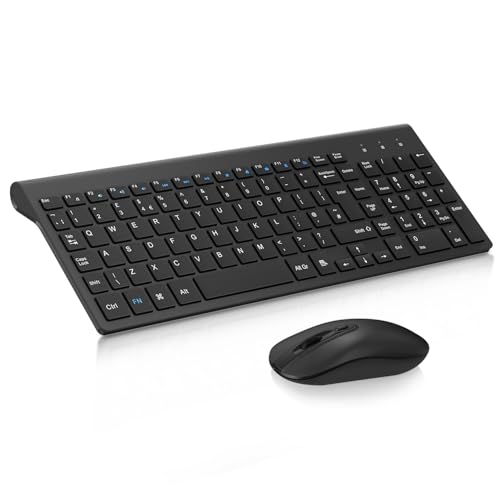
seenda Rechargeable Wireless Keyboard and Mouse Set, Ultra Slim Silent USB, Full Size QWERTY UK Layout, Black and Grey
Original price was: £37.99.£35.99Current price is: £35.99. *View On Amazon* - Computer Keyboards
cimetech Wireless Keyboard and Mouse Combo, 2.4G, QWERTY UK Layout, Black
£27.99 *View On Amazon* - Computer Keyboards
iClever Wireless Keyboard and Mouse Set, Full Size, Rechargeable, 2.4G USB
Original price was: £33.99.£28.89Current price is: £28.89. *View On Amazon* - Computer Keyboards
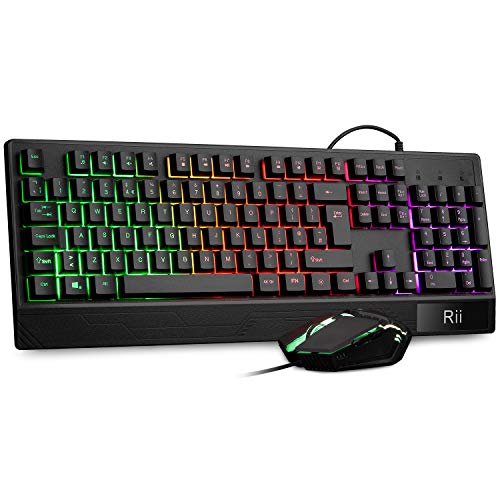
Rii Gaming Keyboard and Mouse Set, RGB Backlit, Working UK Layout
£24.98 *View On Amazon* - Computer Keyboards
HP 450 Programmable Wireless Keyboard, Black
Original price was: £49.99.£21.00Current price is: £21.00. *View On Amazon* - Computer Keyboards
Redragon K709 65% Wired Gasket RGB Gaming Keyboard, 68 Keys, Hot-Swap Mechanical Keyboard
Original price was: £39.99.£35.19Current price is: £35.19. *View On Amazon* - Computer Keyboards
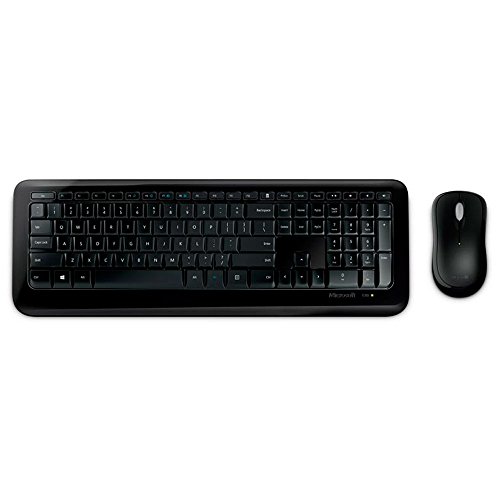
Microsoft Wireless Desktop 850 for Business Keyboard Black
£59.99 *View On Amazon* - Computer Keyboards
Redragon K530 Pro Draconic 60% Wireless RGB Mechanical Keyboard
Original price was: £54.99.£49.99Current price is: £49.99. *View On Amazon* - Computer Keyboards
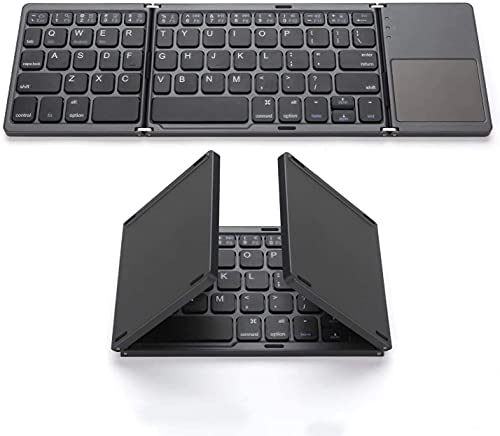
Zedo Foldable Bluetooth Keyboard with Touchpad, Pocket Size, Rechargeable Li-ion Battery
£22.95 *View On Amazon* - Computer Keyboards
RedThunder K10 Wired Gaming Keyboard and Mouse Combo, UK Layout, White
Original price was: £45.99.£37.13Current price is: £37.13. *View On Amazon* - Computer Keyboards
Perixx PERIDUO-713 Wireless 2.4 GHz Cute Keyboard and Mouse Combo, UK Layout, Pastel Pink
Original price was: £34.99.£31.99Current price is: £31.99. *View On Amazon* - Computer Keyboards
Arteck 2.4G Wireless Keyboard with Media Hotkeys
Original price was: £19.99.£18.99Current price is: £18.99. *View On Amazon* - Computer Keyboards
Arteck 2.4G Wireless Keyboard and Mouse Combo with Rechargeable Battery
Original price was: £45.99.£39.09Current price is: £39.09. *View On Amazon* - Computer Keyboards
YINDIAO T8 60% Mechanical Gaming Keyboard, 68-Key TKL Compact Layout, Milk Shake
£38.39 *View On Amazon*










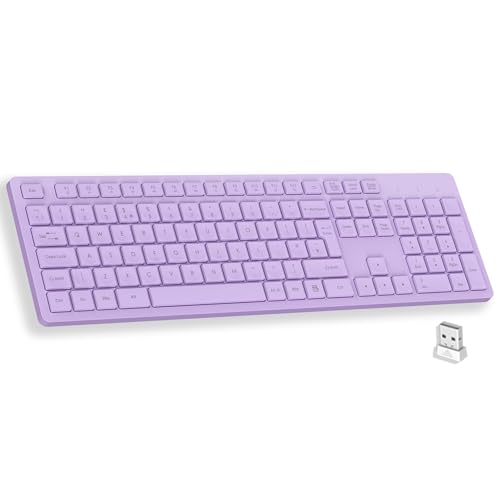
What Are Computer Keyboards?
Computer keyboards are input devices that let you type letters, numbers, commands and shortcuts into a computer or compatible device. They are used with desktop computers, laptops, tablets, smart TVs and other devices where supported.
A keyboard can be very simple, or it can include extra features such as media keys, number pads, backlighting, programmable keys, wireless connectivity or wrist support where listed. The best choice depends on how you type, what device you use and what you need the keyboard to do.
What Are Computer Keyboards Used For?
Computer keyboards are used for writing documents, sending emails, entering data, coding, gaming, online browsing, video editing, design work, studying, chatting and general computer use. They are one of the most used parts of any desk setup.
For office work, comfort and layout are usually important. For students, portability and simple compatibility may matter more. For gaming, key feel, responsiveness and extra controls may be useful where listed. For home use, a straightforward keyboard that is easy to connect and comfortable to type on may be enough.
How To Choose The Right Computer Keyboard
Start by checking the device you want to use it with. A keyboard may connect by USB, Bluetooth, a wireless receiver or another listed connection type. Make sure the keyboard is compatible with your computer, operating system and available ports before buying.
Next, think about how much you type. If you work at a desk for long periods, comfort, key feel and layout should be priorities. If the keyboard is only for occasional use, a simple and compact option may be more practical.
Size is also important. A full size keyboard usually includes a number pad, which can be useful for spreadsheets and data entry. A compact keyboard takes up less desk space and may be easier to carry, but it may remove or combine some keys.
Key Features To Compare
Connection type is one of the most important features to compare. Wired keyboards are simple and do not usually need charging. Wireless keyboards reduce cable clutter but may need batteries, charging or a receiver where listed.
Keyboard layout also matters. UK layout, US layout and other regional layouts can place certain symbols in different positions. If you are used to a particular layout, check the product details carefully before choosing.
Key type can affect feel. Mechanical keyboards may offer a more distinct key press depending on the switch type where listed. Membrane or low profile keyboards may feel quieter, softer or slimmer depending on the product.
Other useful features to compare include keyboard size, number pad, backlighting, media keys, shortcut keys, wrist rest, adjustable feet, spill resistant wording where listed, cable length, battery guidance, device switching and care instructions.
Wired Keyboards Compared With Wireless Keyboards
Wired keyboards connect using a cable, often through a USB port where compatible. They can be a practical choice for desktop setups, office use, gaming and situations where you do not want to think about battery life.
Wireless keyboards can help keep a desk tidier and may be useful for laptops, tablets, smart TVs and flexible workspaces where compatible. They may use Bluetooth or a small wireless receiver where listed.
The main trade off is simplicity versus flexibility. A wired keyboard is usually straightforward, while a wireless keyboard gives more freedom of placement if the connection and power needs suit your setup.
Mechanical Keyboards Compared With Membrane Keyboards
Mechanical keyboards use individual switch mechanisms under the keys where listed. They are often chosen by users who like a more defined typing feel, gaming response or customisation options depending on the model.
Membrane keyboards usually use a softer key system and may be lighter, quieter or more affordable depending on the product. They can be a good choice for everyday typing, office work and general home use.
The right choice depends on preference. Mechanical keyboards can feel more tactile and responsive, while membrane keyboards may feel simpler and quieter for shared spaces.
Full Size Keyboards Compared With Compact Keyboards
Full size keyboards usually include a number pad, function keys and a wider layout. They can be useful for office work, finance tasks, spreadsheets, data entry and users who prefer a familiar desktop keyboard shape.
Compact keyboards save desk space and can be easier to carry. They may be useful for smaller desks, laptop setups, travel and minimalist workspaces. However, some compact designs may remove the number pad or combine keys, which may take time to get used to.
The main choice is comfort and familiarity versus space saving. If you use numbers often, a full size keyboard may be more practical. If desk space matters, a compact keyboard may be better.
Guidance For Home Users, Office Users and Gamers
Home users should look for a keyboard that is easy to connect, comfortable to type on and suitable for the devices in the house. A simple wired or wireless keyboard may be enough for browsing, emails and everyday tasks.
Office users may want to compare typing comfort, key spacing, number pad, noise level and wrist support where listed. If you type for long periods, small comfort details can make a noticeable difference.
Gamers may look for features such as mechanical switches, backlighting, anti ghosting, programmable keys, faster response claims or gaming modes where listed. Compatibility with your PC, console or software should always be checked before buying.
Use Cases By Setup and Activity
For desktop computers, a full size wired or wireless keyboard can create a comfortable permanent setup. A number pad may be useful for office work and spreadsheets.
For laptops, an external keyboard can make desk use more comfortable, especially when paired with a monitor, mouse and laptop stand where compatible.
For tablets and mobile devices, a Bluetooth keyboard may be useful where supported. Check device compatibility and operating system guidance carefully.
For gaming setups, key feel, layout, desk space, lighting and connection type may all matter. Choose based on the games you play and the features listed.
For shared family computers, durability, simple connection and easy cleaning may be more important than specialist features.
Fit, Compatibility and Connection Types
Compatibility should always be checked before buying a computer keyboard. A keyboard may be designed for Windows, macOS, ChromeOS, tablets, smart TVs or other systems where listed, and some keys may behave differently across devices.
Connection type is also important. USB A, USB C, Bluetooth and wireless receivers are not the same. Make sure your device has the correct connection or supports the keyboard’s wireless method.
If the keyboard needs batteries or charging, check the product guidance. If it uses a receiver, make sure you have a spare port and keep the receiver safe, as it may be needed for the keyboard to work.
Comfort, Ergonomics and Typing Feel
A comfortable keyboard should support your normal typing style without causing unnecessary strain. Key spacing, keyboard height, wrist angle and desk position can all affect comfort during long sessions.
Some keyboards may include ergonomic shapes, split layouts, wrist rests, low profile keys or adjustable feet where listed. These features can help some users, but comfort is personal and depends on your hands, desk and typing habits.
Typing feel is also personal. Some people prefer firm keys, while others prefer softer, quieter typing. If noise matters in a shared office, bedroom or living room, check whether the product is described as quiet or low noise where listed.
Safety and Practical Use
Computer keyboards should be used according to the product instructions. Keep liquids away from keyboards unless the product clearly states suitable spill resistant features, and even then care should still be taken.
Route cables safely so they do not create trip hazards or get caught under chairs, desks or equipment. For wireless keyboards, keep batteries and small receivers away from young children.
If a keyboard becomes hot, smells unusual, stops working properly or has damaged cables or ports, stop using it and check the product guidance. Do not use damaged electrical accessories.
Care, Cleaning and Maintenance
Keyboards can collect dust, crumbs and oils from regular use, so routine cleaning is useful. Turn the keyboard off or unplug it before cleaning, and follow the care instructions for the product.
Use suitable cleaning tools and avoid soaking the keyboard. A soft brush, dry cloth or carefully used cleaning method may help remove loose dirt where appropriate. Do not use harsh cleaners unless the product guidance says they are suitable.
Check keys, cables, battery compartments, wireless receivers and feet from time to time. If keys begin sticking, letters wear away or the keyboard becomes unreliable, it may be time to replace it.
Storage and Desk Organisation Tips
Store spare keyboards clean and dry. Avoid placing heavy items on top of keys, as this may damage the keyboard or affect the key feel.
For desk setups, keep the keyboard at a comfortable distance and leave enough room for a mouse, monitor, notebook or other accessories. Cable ties or desk organisers may help keep wired keyboards tidy.
If travelling with a keyboard, protect it in a suitable bag or case where possible. Compact keyboards should still be protected from pressure, liquids and rough handling.
Useful Accessories To Consider
Useful accessories may include a computer mouse, mouse mat, wrist rest, keyboard cover where compatible, USB hub, docking station, monitor, laptop stand, desk mat, cleaning cloths and cable organisers.
For office setups, a keyboard and mouse combination can make daily work more comfortable. For gaming, a suitable mouse, headset and mouse mat may complete the setup where compatible. For laptops, a stand and external keyboard can help create a more comfortable desk position.
Why Buy From YPC?
At YPC, we understand active lifestyles and the need for practical products that work in real use. Computer keyboards can vary by layout, connection type, size, key feel, compatibility, power method, comfort features and intended use, so it helps to compare the details carefully before choosing.
YPC makes it easier to browse computer keyboards in a practical way, with options that can be compared by listed features, device needs and typing style. Whether you are buying for work, study, gaming, home use or a better desk setup, you can browse and compare computer keyboards at YPC to find suitable options for your computer setup.
FAQs
What should I look for when buying a computer keyboard?
Look for compatibility, connection type, keyboard layout, size, key feel, comfort features, power method and intended use. Check the product listing carefully before buying.
Is a wired or wireless keyboard better?
A wired keyboard is simple and does not usually need charging, while a wireless keyboard reduces cable clutter and gives more placement freedom. The better choice depends on your setup.
What is the difference between a mechanical keyboard and a membrane keyboard?
A mechanical keyboard uses individual switches under the keys where listed, while a membrane keyboard usually has a softer key system. Mechanical keyboards often feel more defined, while membrane keyboards may feel quieter or simpler.
Do computer keyboards work with laptops?
Many external keyboards can work with laptops where compatible. Check the connection type, operating system support and whether your laptop has the right port or wireless support.
What is a full size keyboard?
A full size keyboard usually includes the main keys, function keys, arrow keys and a number pad. It can be useful for office work, spreadsheets and data entry.
What is a compact keyboard?
A compact keyboard is smaller than a full size keyboard and may remove or combine some keys to save space. It can be useful for smaller desks, travel or laptop setups.
Are gaming keyboards worth it?
A gaming keyboard may be useful if you want features such as mechanical switches, backlighting, programmable keys or gaming focused controls where listed. For basic typing, a standard keyboard may be enough.
What keyboard layout should I choose?
Choose the layout you are used to, such as UK layout where listed. Different layouts can place symbols and keys in different positions, so check before buying.
How do I clean a computer keyboard?
Unplug it or turn it off first, then follow the product care guidance. Remove loose dirt carefully and use suitable cleaning tools. Avoid soaking the keyboard or using harsh cleaners unless approved.
Why is my wireless keyboard not working?
Common causes include low batteries, charging issues, a disconnected receiver, Bluetooth pairing problems or device compatibility. Check the product instructions and make sure the keyboard is connected correctly.
 Getting ready for Summer? View our Home and Garden Products

Heading outdoors this winter? Take a look at our Outdoor Clothing.