

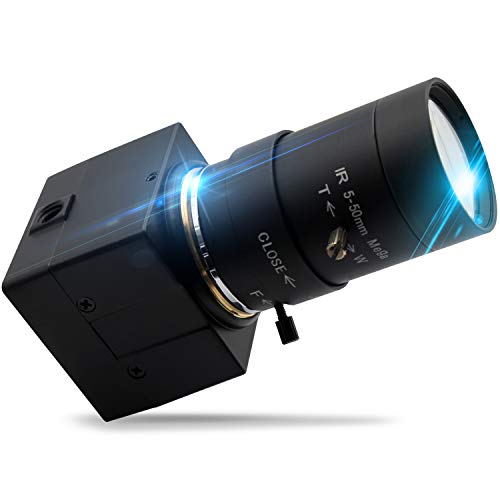
Quick Summary
This 1080P USB webcam combines a 5-50mm optical zoom lens, manual focus and a CMOS OV2710 sensor for computer-based video capture. It is a USB plug and play camera for PC and laptop use, with stated video output options up to 1920 x 1080 at 30fps, 1280 x 720 at 60fps and 640 x 480 at 100fps.
The camera is described as compact and suitable for a range of video capture and machine vision uses. A 3 metre cable is stated, and the unit supports USB 2.0 data transmission.
Who It Is Best For
This camera suits buyers who need a USB webcam with an optical zoom lens and manual focus for computer-connected video capture. It also fits users who want a compact camera for embedded applications or other stated uses such as 3D scanning, VR camera work, electronic microscopes, medical machines and automated image acquisition systems.
Key Details
| Detail | Verified information and buyer relevance |
|---|---|
| Product type | USB webcam with zoom lens for PC and laptop use. |
| Lens | 5-50mm optical zoom lens with manual focus for adjustable framing. |
| Sensor | CMOS OV2710 sensor. |
| Video output | Stated output options include 1920 x 1080 at 30fps, 1280 x 720 at 60fps and 640 x 480 at 100fps. |
| Connection | USB plug and play with USB 2.0 support and no driver installation required. |
| Cable length | Default 3 metre cable, which affects positioning distance from the computer. |
| Compatibility | Stated to work with WinXP, Vista, Windows 7/8/10, Linux with UVC, Mac OS X 10.4.8 or later, Wince with UVC and Android 4.0 or above with UVC. |
| Stated applications | Skype, OBS, Zoom, GoToMeeting, Facebook Live and YouTube livestreaming services are listed, along with machine vision and embedded uses. |
Why Buyers Choose It
- The 5-50mm optical zoom lens gives a stated zoom range that lets you adjust the framing for your setup.
- Manual focus gives direct control over focus adjustment when positioning the camera.
- The stated 1920 x 1080 at 30fps output gives a clear full HD option for supported use.
- The 3 metre cable provides extra reach between the camera and the computer connection point.
How It Works
- Connect the camera to a USB port on the computer.
- Run the software to display and record video.
- Use manual focus and the 5-50mm optical zoom lens to adjust the image as required.
- Use compatible software or a supported system for the intended application.
Real World Use
The camera is described as compact with a thin profile for embedded applications. It is also listed for machine vision, 3D scanner setups, VR camera use, electronic microscopes, medical machines and automated image acquisition systems. The stated 3 metre cable may help with placement where the camera needs to sit away from the computer connection point.
What To Know Before You Buy
Check that your intended use matches the stated USB and UVC compatibility before ordering. Review the zoom range, output options and cable length against your setup so the camera suits the distance and framing you need. The listing also states that a bracket is not included, even though the camera can be connected to one.
Pros: The camera combines a 5-50mm optical zoom lens with plug and play USB connection.
Cons: A bracket is not included.
Common Buyer Questions
Does it need a driver installation?
No. It is stated to be plug and play with no driver installation required.
What video output options are stated?
The listed options are 1920 x 1080 at 30fps, 1280 x 720 at 60fps and 640 x 480 at 100fps.
Which devices and systems are listed as compatible?
The camera is stated to work with WinXP, Vista, Windows 7/8/10, Linux with UVC, Mac OS X 10.4.8 or later, Wince with UVC and Android 4.0 or above with UVC.
Is a bracket included?
No. The camera can be connected to a bracket, but one is not supplied.
Final Buying View
If you need a USB webcam with a 5-50mm optical zoom lens, manual focus and stated support for several operating systems, this model gives a clear set of verified features to compare. Check the selected compatibility, output mode and cable length before ordering.




