





Compact Professional All-in-One for Modern Workspaces
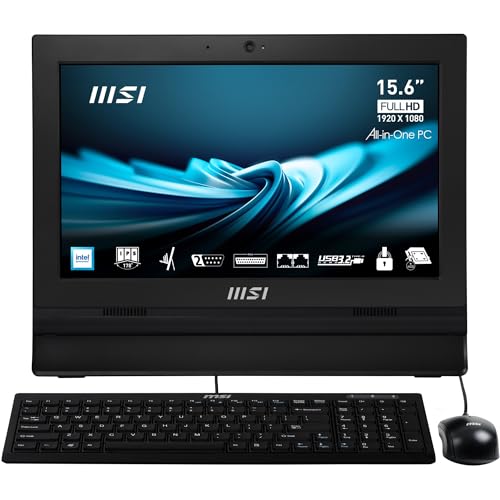
The MSI Pro AP162T ADL is a 15.6-inch all-in-one PC designed for professionals who value space efficiency, reliability, and simplicity. Its compact footprint fits seamlessly into small offices, front desks, kiosks, and work-from-home setups, while still delivering dependable performance for business applications.
Powered by the Intel N100 processor, this workstation balances energy efficiency with the ability to handle everyday tasks such as document editing, email, video calls, and point-of-sale systems. With 4GB DDR4 RAM and a 256GB SSD, it offers smooth performance, quick boot times, and enough storage for business software and essential files.
The Full HD touchscreen display enhances productivity with intuitive navigation, while Wi-Fi 6 ensures fast, stable connectivity in busy office environments. Finished in sleek black, this AIO complements modern professional setups and blends into any workspace with ease.
Pros and Cons
Pros:
Extremely compact 15.6″ design saves space
Touchscreen functionality enhances ease of use
Intel N100 CPU provides energy-efficient everyday performance
256GB SSD ensures fast boot times and responsive storage
Wi-Fi 6 guarantees strong, reliable connectivity
Sleek, professional look suitable for business
Cons:
Only 4GB RAM limits multitasking (upgradable recommended)
Not suited for heavy workloads or gaming
Smaller display may not suit users who prefer larger screens
What the Product is Used For
The MSI Pro AP162T is ideal for:
Reception desks and customer-facing environments
Business users needing a compact and efficient workstation
Retail or point-of-sale systems requiring touch input
Small offices and home offices with limited desk space
Why We Like This Product (YPC Team Review)
At YPC, we tested the MSI Pro AP162T in our reception area and were impressed by how much desk space it saved. The touchscreen was particularly useful for quick check-ins and presentations. While it’s not built for heavy workloads, it’s an excellent choice for light office tasks and environments where efficiency and compact design matter most.
Alternatives Worth Considering
HP 24-cr0047sa – larger 23.8″ display with Intel i5 for more performance.
Lenovo ThinkCentre Business AIO (23.8″) – bigger screen and expandable specs for offices.
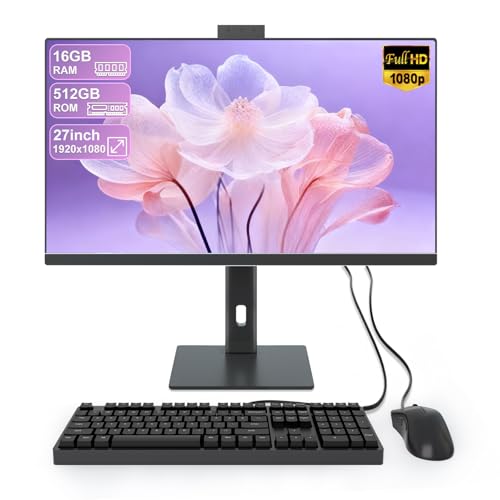
ASUS M3700 27″ – larger display with Ryzen processor for family or office use.
Tips on How to Use Correctly
Upgrade RAM to 8GB or more for smoother multitasking.
Use cloud storage or external drives if 256GB isn’t enough.
Position the small display ergonomically to avoid eye strain.
Take advantage of Wi-Fi 6 for stable high-speed connections.
Comparisons
Compared with the HP 24-cr0047sa, the MSI is more compact but less powerful.
Against the Lenovo ThinkCentre Business AIO, this MSI has a smaller footprint but far fewer upgrade options.
Versus the ASUS M3700, the MSI wins on space-saving but not on performance or display size.
Full Tech Specification
| Specification | Details |
|---|---|
| Brand | MSI |
| Model | Pro AP162T ADL |
| Display | 15.6″ Full HD Touchscreen (1920 × 1080) |
| Processor | Intel N100 |
| Graphics | Integrated Intel graphics |
| Memory (RAM) | 4GB DDR4 (upgradeable) |
| Storage | 256GB SSD |
| Operating System | Windows 11 Pro (assumed) |
| Camera | Integrated webcam (not detailed) |
| Audio | Integrated speakers |
| Connectivity | Wi-Fi 6 (802.11ax), Bluetooth, USB ports, Ethernet |
| Keyboard & Mouse | Not specified |
| Colour | Black |
| EAN | Not specified |
Frequently Asked Questions
1. Is the display touchscreen?
Yes, the 15.6″ panel is fully touch-enabled.
2. Can the RAM be upgraded?
Yes, increasing RAM to 8GB or more will improve multitasking.
3. Is this good for gaming?
No, it is designed for light office and business use only.
4. Does it come with Windows 11 Pro?
Yes, most configurations ship with Windows 11 Pro pre-installed.
5. Can it connect to Wi-Fi easily?
Yes, it supports Wi-Fi 6 for reliable high-speed wireless.
6. Is the storage expandable?
Yes, you can add external or upgrade internal SSDs.
7. Does it include a keyboard and mouse?
Not specified; check with the supplier.
8. Is it eco-friendly?
MSI has not specified sustainability features for this model.
9. Who is this best suited for?
Businesses, front desks, kiosks, and users with limited desk space.
10. Does it support external monitors?
Yes, via HDMI and USB connections.
Looking for more options?
Browse our full range of All In One PC's for other great choices to suit your space, goals, and budget.


