

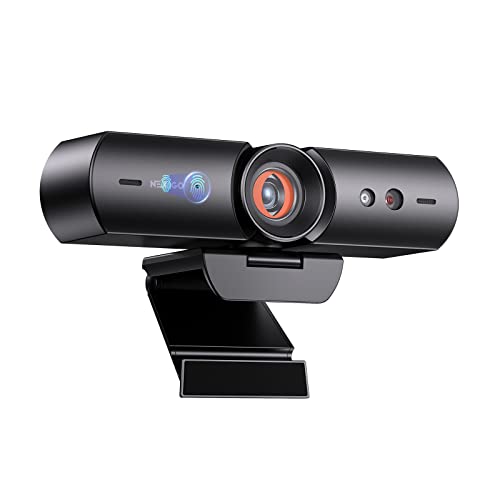
Quick Summary
The NexiGo HelloCam is a 1080p webcam for PC with Windows Hello support and a built-in microphone. It combines face recognition login with a patented automatic shutter, so you can use it for video calls, recording and conferencing while keeping privacy control close at hand.
It is also described with facial enhancement and built-in noise-cancelling microphones, making it a feature-led webcam for everyday computer use.
Who It Is Best For
This webcam suits buyers who want a computer camera for Windows 10 or Windows 11 Hello Face, along with a privacy cover and microphone in one unit. It is also a sensible fit if you want one webcam for video calling, recording, conferencing, streaming or online school.
Key Details
| Detail | Verified information and buyer relevance |
|---|---|
| Brand | NexiGo, so the product is clearly identified for shoppers comparing listings. |
| Model | HelloCam, the named product line used in the title and description. |
| Resolution | 1080p Full HD, with up to 1920 x 1080 at 30fps for video use. |
| Windows Hello support | Compatible with Windows 10 and 11 Hello Face for face-based sign-in. |
| Privacy cover | Patented automatic shutter that opens and closes automatically, with manual touch sensor control also mentioned. |
| Microphone | Built-in noise-cancelling microphones for audio during calls and recordings. |
| Image feature | Facial enhancement and Automatic Exposure are mentioned for clearer image adjustment in changing light. |
| Lens and focus range | 3.5mm lens, optimised between 12.4 to 47.2 inches for fixed-distance use. |
Why Buyers Choose It
- Windows Hello Face support means it is aimed at buyers who want face recognition login on a compatible Windows PC.
- The automatic shutter adds a direct privacy control that opens and closes with use.
- 1080p Full HD at 30fps gives a clear, standard video specification for calls and recordings.
- Built-in noise-cancelling microphones reduce the need for a separate mic in simple setups.
How It Works
The webcam connects to a PC and is used for video calls, recording, conferencing and other listed camera tasks. When Windows Hello is being used, it recognises the face on a compatible Windows 10 or 11 lock screen. The privacy cover opens automatically when you enter a video call and closes again when the camera is no longer in use. A touch sensor on the webcam also allows manual privacy cover control.
Automatic Exposure adjusts exposure and gain according to outside light levels, which is intended to keep the image clear across different lighting conditions. The fixed-distance lens focus note means placement matters, so position it within the stated range when setting up your desk.
Real World Use
In daily use, this webcam is aimed at desktop or laptop owners who want one camera for login, meetings and recording. The built-in microphone keeps the setup compact, while the automatic shutter gives an easy visual privacy check when the camera is not active. The stated focus range is useful when placing the camera on a monitor, desk or stand within the recommended distance.
What To Know Before You Buy
Check that your PC is running Windows 10 or Windows 11 if you want to use Windows Hello Face. Review the stated 1080p, 30fps video specification, the built-in microphone, and the automatic shutter controls before ordering. If you need a webcam for a fixed desk position, the stated 12.4 to 47.2 inches optimisation range is worth checking against your setup.
Common Buyer Questions
Does it work with Windows Hello?
Yes, it is described as compatible with Windows 10 and 11 Hello Face.
Does it have a privacy cover?
Yes, it has a patented automatic shutter and also mentions manual touch sensor control.
What video quality does it support?
It is a Full HD 1080p webcam with up to 1920 x 1080 at 30fps.
Does it include a microphone?
Yes, built-in noise-cancelling microphones are mentioned.
Final Buying View
The NexiGo HelloCam is best suited to buyers who want a Windows Hello webcam with 1080p video, a built-in microphone and automatic privacy cover control. Confirm your Windows version and check the fixed-distance placement guidance before choosing it.


