

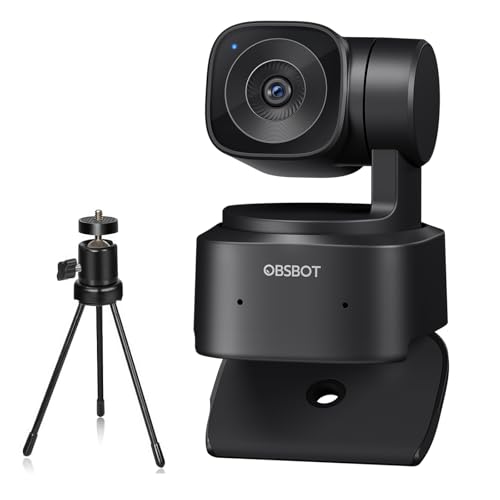
Quick Summary
The OBSBOT Tiny SE is a USB webcam for PC with Full HD 1080P at 100FPS, AI tracking and a built-in microphone. It is set up for video calling, conferencing, streaming and other camera-based tasks where smooth capture and clear image detail matter.
It also includes a tripod and supports plug-and-play use, so it is ready to connect to a laptop or desktop with USB. The camera supports staggered HDR, dual ISO and multiple shooting modes, including horizontal, vertical and inverted use.
Who It Is Best For
This webcam suits buyers who want a PC camera for video calls, live streaming, webinars, online teaching, gaming or content creation. It is also relevant for anyone who wants AI tracking, preset positions and gesture control in a webcam setup.
Key Details
| Detail | Verified information and buyer relevance |
|---|---|
| Product type | USB webcam for PC, suitable for laptop or desktop use. |
| Video specification | Full HD 1080P at 100FPS, with a stated maximum resolution of 1920 x 1080. |
| Sensor | 2 MP sensor is stated in the product details. |
| AI tracking | Includes AI tracking with area tracking and body part tracking options. |
| Shooting modes | Supports horizontal, vertical and inverted shooting modes. |
| Low-light features | Staggered HDR, dual native ISO and a 1/2.8-inch stacked CMOS sensor are stated. |
| Gesture control | Dynamic Gesture Control 2.0 includes hand gestures for target lock and zoom control. |
| Included items | A microphone, mobile tripod and Type-C cable are included. |
| Connection | USB connectivity and plug-and-play use are stated. |
| Compatibility | Designed for laptop, desktop, conferencing and streaming software use. |
Why Buyers Choose It
- 1080P at 100FPS gives a clearly stated high frame rate for camera use.
- AI tracking with area and body part tracking supports more controlled framing during calls or streams.
- Preset positions and multiple shooting modes give more setup flexibility.
- Gesture control reduces the need for manual camera adjustment during use.
- USB plug-and-play setup keeps connection straightforward for PC, laptop or desktop use.
How It Works
- Connect the webcam by USB.
- Attach it using the mounting clip, or use the included mobile tripod.
- Select the shooting mode needed for your setup, including horizontal, vertical or inverted use.
- Use the preset positions if you want to save and switch between camera scenes.
- Use the gesture controls for target lock or zoom when working within the supported setup.
Real World Use
The camera is aimed at everyday computer-based use such as conferencing, streaming, teaching and gaming. The tripod and mounting clip give mounting options for a laptop, desk or screen, while USB connectivity supports quick placement in a PC setup.
The stated low-light features, including staggered HDR and dual ISO, are relevant if the camera is used in changing indoor lighting conditions.
What To Know Before You Buy
Check that the webcam’s USB connection suits your device and that you are happy with the included mounting options. If you want to use AI tracking, gesture control or preset positions, make sure those features match how you plan to work. The camera also supports horizontal, vertical and inverted shooting, so review which orientation you need before ordering.
Common Buyer Questions
Does this webcam work with a laptop or desktop?
Yes. It is stated for laptop and desktop use with USB connectivity.
Does it include a microphone?
Yes. A microphone is included in the product description.
Can it be used in different orientations?
Yes. Horizontal, vertical and inverted shooting modes are stated.
What comes in the box?
The listed inclusions are the webcam, a microphone, a mobile tripod and a Type-C cable.
Final Buying View
If you want a USB webcam for PC with AI tracking, 1080P at 100FPS and plug-and-play use, this model brings together several useful camera features in one setup. Check the USB connection, the included mounting options and the shooting mode you need before ordering.


