

Quick Summary
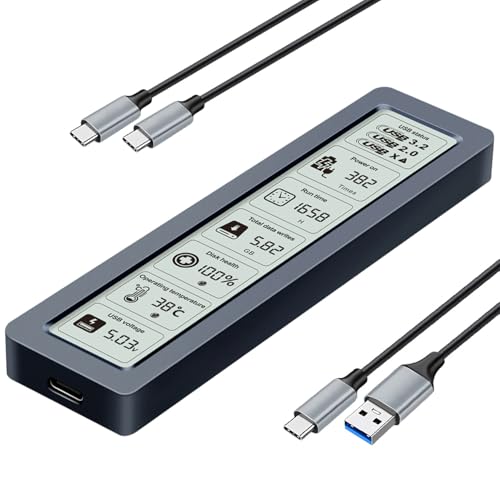
The ORICO M.2 NVMe SSD Enclosure is a transparent external solid state drive adapter enclosure for PCI-E M-Key NVMe SSDs. It supports USB 3.2 Gen 2 at 10 Gbps and is listed for 2280, 2260, 2242 and 2230 sizes.
The enclosure is supplied as a USB Type C converter case and the description mentions C to C and C to A cable options. It also states plug and play use, hot plug support and a blue indicator lamp.
Who It Is Best For
This enclosure suits buyers who need to place a compatible M.2 NVMe SSD into an external case for use with devices that match the stated connection and system requirements. The size and keying check matters, because it is listed for PCI-E NVMe M-Key SSDs only.
Key Details
| Detail | Verified information and buyer relevance |
|---|---|
| Brand | ORICO, so the product identity is clear. |
| Product type | M.2 NVMe SSD enclosure, used as an external solid state drive adapter enclosure. |
| Connection | USB 3.2 Gen 2 at 10 Gbps, with USB Type C converter case wording. |
| Supported SSD sizes | 2280, 2260, 2242 and 2230 sizes are listed, so the selected drive size should be checked before ordering. |
| Supported key type | PCI-E M-Key SSDs only are stated. |
| Included cable options | C to C cable and C to A cable are mentioned, which gives two stated connection options. |
| Compatibility | Windows, Mac and Linux are stated, along with laptops, desktop PCs, game consoles and type C smartphones. |
| Use notes | Plug and play, hot plug and a blue indicator lamp are mentioned. |
| Additional features | JSM583 main control chip, UASP acceleration protocol, TRIM instructions, silicone cushions and 10 minute sleep status are all stated. |
Why Buyers Choose It
- The listed USB 3.2 Gen 2 10 Gbps connection gives a clear speed specification for the enclosure.
- The stated support for four SSD lengths helps buyers match the case to the drive they already have.
- The mention of C to C and C to A cable options gives flexibility over the connection type used.
- The plug and play wording means setup is intended to be straightforward once a compatible SSD is fitted.
How It Works
To use the enclosure, insert the SSD, fix it with a screw and then connect it to your device. The description also states that no driver is needed and that hot plug is supported. A blue indicator lamp shows operating status.
Real World Use
The enclosure is described for use with laptops, desktop PCs, game consoles and type C smartphones. It is presented as portable and transparent, with the case intended to be carried and used as an external drive housing.
What To Know Before You Buy
Check that your SSD is a PCI-E NVMe M-Key drive and that its size matches one of the listed formats before ordering. The enclosure is not stated to suit NGFF, NVME B-Key or M+B-Key SSDs, so the drive keying is the main compatibility check. Review the connection you plan to use, as both C to C and C to A cable options are mentioned.
Common Buyer Questions
Which SSDs fit this enclosure?
It is listed for PCI-E NVMe M-Key SSDs in 2280, 2260, 2242 and 2230 sizes.
Does it need drivers?
No driver is needed, and the enclosure is stated to support plug and play.
What devices is it listed for?
Windows, Mac and Linux systems are mentioned, along with laptops, desktop PCs, game consoles and type C smartphones.
What should I check before ordering?
Confirm the SSD size and key type, because NGFF, NVME B-Key and M+B-Key SSDs are not stated as compatible.
Final Buying View
Choose this enclosure if you need an ORICO external case for a compatible PCI-E NVMe M-Key SSD and want the stated USB 3.2 Gen 2 connection. Confirm the SSD size and key type before ordering.