




Quick Summary
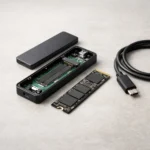
The ORICO TCM2-Black is a transparent external SSD enclosure for NVMe M.2 PCI-E M-Key SSDs. It connects by Type-C over USB 3.1 Gen2 and supports 2280, 2260, 2242 and 2230 sizes, making it a straightforward way to house a compatible drive in a portable case.
The enclosure is described with a transparent design and comes with C to C and C to A cables. It is also stated to support UASP acceleration protocol and TRIM instructions, with a blue indicator lamp showing operating status.
Who It Is Best For
This enclosure is for buyers with a compatible PCI-E NVMe M.2 M-Key SSD who want to use it externally through a Type-C connection. It is also relevant if you need support for one of the stated SSD sizes and want a case that works with Windows, Mac and Linux systems.
Key Details
| Detail | Verified information and buyer relevance |
|---|---|
| Brand | ORICO, as named in the product title and description. |
| Model | TCM2-Black, which identifies the specific enclosure variant. |
| Product type | External SSD adapter enclosure for NVMe M.2 drives. |
| Connection | Type-C over USB 3.1 Gen2, with C to C and C to A cables included. |
| Supported SSD sizes | 2280, 2260, 2242 and 2230 are stated, so the drive size must match. |
| Compatible drive type | PCI-E M.2 M-Key SSDs are supported, while NGFF, NVMe B-Key and M+B-Key SSDs are stated as not applicable. |
| System compatibility | Windows, Mac and Linux are stated, along with use on laptops, desktop PCs, game consoles and type-C smartphones. |
| Included cables | C to C cable and C to A cable are included, giving two connection options. |
| Status indicator | A blue indicator lamp is stated to show operating status. |
| Other stated features | UASP acceleration protocol, TRIM instructions, two heat dissipation silicone cushions, an additional silicone cushion, and automatic sleep after 10 minutes of inactivity. |
Why Buyers Choose It
- Type-C USB 3.1 Gen2 connectivity gives you the stated external connection format for a compatible NVMe M.2 drive.
- The included C to C and C to A cables provide two connection options for different host devices.
- Support for four stated SSD sizes gives flexibility if your drive matches one of the listed formats.
- The stated blue indicator lamp gives a clear operating status check.
How It Works
- Insert a compatible PCI-E NVMe M.2 M-Key SSD into the enclosure.
- Fix the SSD with a screw.
- Connect the enclosure to your device using the appropriate cable.
- No driver is needed, and plug and play plus hot plug are stated as supported.
Real World Use
The enclosure is described as portable and transparent, so it is positioned as a carryable case for an internal NVMe M.2 SSD. It is stated for use with laptops, desktop PCs, game consoles and type-C smartphones, so the main check is whether your device connection and SSD keying match the listed requirements.
What To Know Before You Buy
Check that your SSD is a PCI-E NVMe M.2 M-Key drive before ordering. The enclosure is stated for 2280, 2260, 2242 and 2230 sizes, and it does not apply to NGFF, NVMe B-Key or M+B-Key SSDs. Confirm that your device can use a Type-C connection and choose the cable that suits your setup.
Common Buyer Questions
Which SSDs fit this enclosure?
PCI-E NVMe M.2 M-Key SSDs in 2280, 2260, 2242 and 2230 sizes are stated as compatible.
Does it include cables?
Yes, a C to C cable and a C to A cable are included.
What systems is it stated to support?
Windows, Mac and Linux are stated, along with use on laptops, desktop PCs, game consoles and type-C smartphones.
Does it need drivers?
No driver is stated as needed, with plug and play and hot plug support mentioned.
Final Buying View
This enclosure suits buyers with a compatible NVMe M.2 M-Key SSD who want a transparent Type-C external case with the stated cable options and size support. Confirm the SSD key type and size before ordering.


