Quick Summary
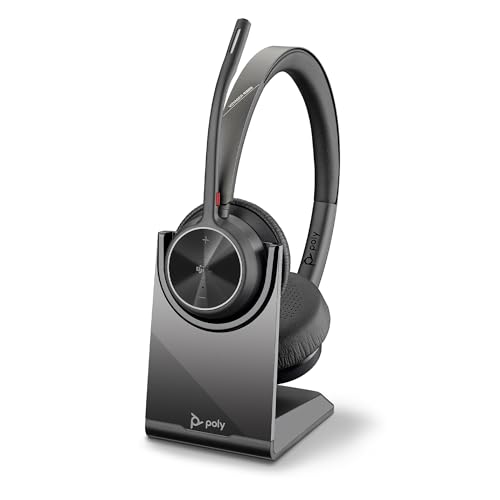
The HP Poly Voyager 4320 UC is a wireless headset with a charge stand, designed for computer and mobile use. It includes a noise-cancelling boom mic, and the listing also highlights a Microsoft Teams button for quick access to Teams.
It connects to a PC via the included BT700 USB-C Bluetooth adapter, or via USB-A using the included USB-C to USB-A adapter, and it can also connect to a mobile phone using Bluetooth 5.2.
Who It Is Best For
This headset suits buyers who want one device for computer calls and mobile connection, with a charge stand for desk use. It is also relevant if you want the Teams button and the stated flexibility to move around while connected to a computer.
Key Details
| Detail | Verified information and buyer relevance |
|---|---|
| Product type | Wireless headset with charge stand for computer and phone use. |
| Microphone | Noise-cancelling boom mic with Acoustic Fence technology. |
| Mute control | Pinch-to-mute button on the mic boom, with dynamic mute alert. |
| Computer connection | Includes a BT700 USB-C Bluetooth adapter, or USB-A connection using the included USB-C to USB-A adapter. |
| Mobile connection | Connects to a mobile phone using Bluetooth 5.2. |
| Stated wireless range | Up to 164 ft (50 m) when connected with the included Bluetooth adapter. |
| Battery claim | Up to 24 hours of wireless talk time on a single charge. |
| Charging | Desktop charging stand included. |
| Use case | Designed for hybrid working, with a portable design and travel pouch mentioned in the listing. |
| Platform note | Dedicated Microsoft Teams button, with integration with Zoom and other platforms mentioned. |
Why Buyers Choose It
- The noise-cancelling dual mic and Acoustic Fence technology are stated to reduce background noise for calls.
- The included adapters give you a choice between USB-C and USB-A computer connection.
- The desktop charging stand keeps charging simple at a desk.
- The Microsoft Teams button gives direct access to Teams for collaboration.
Real World Use
The headset is set up for home or office use, with the listing noting freedom to move while connected to a computer and a portable design for hybrid working. It also mentions passive noise isolation, an adjustable padded headband and memory foam ear cushions.
What To Know Before You Buy
Check your preferred connection method before ordering. The headset is listed with a BT700 USB-C Bluetooth adapter, plus a USB-C to USB-A adapter for USB-A use, and it also pairs with a mobile phone over Bluetooth 5.2.
Pros: The headset includes a charge stand and multiple connection options for computer and mobile use.
Cons: The exact contents and any variation-specific details should be checked against the selected listing.
Common Buyer Questions
Can I connect it to a PC?
Yes. It includes a BT700 USB-C Bluetooth adapter, and you can also use the included USB-C to USB-A adapter for USB-A connection.
Can I use it with a mobile phone?
Yes. The listing says it connects to a mobile phone using Bluetooth 5.2.
Does it come with charging support?
Yes. A desktop charging stand is included.
Is it set up for Teams use?
Yes. It includes a dedicated Microsoft Teams button.
Final Buying View
If you want a wireless headset with a charge stand, computer and mobile connection options, and a Teams button, the Voyager 4320 UC is set up for that kind of desk and hybrid-working use. Confirm the connection method you need before ordering.