






Quick Summary
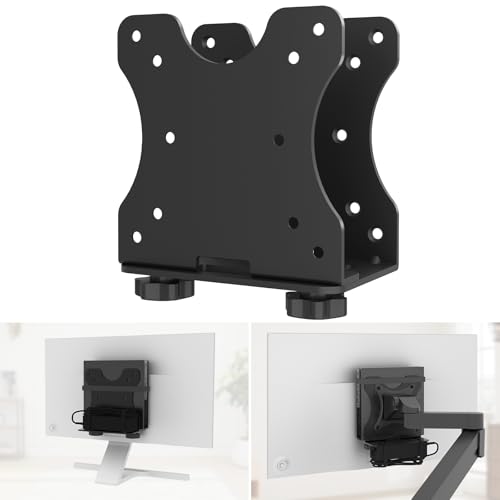
The Shinar VESA mount is a mounting bracket for a mini PC, designed for under-desk or wall mounting and behind-the-monitor placement. It is described as compatible with Dell Mini PC and with VESA standards, including 75 x 75 mm and 100 x 100 mm formats.
The bracket can be fitted in more than one position, so it is worth checking your monitor or mounting setup before choosing an offer. The stated maximum load is 5 kg.
Key Details
| Detail | Verified information and buyer relevance |
|---|---|
| Product type | VESA mount bracket for a mini PC, for under-desk, wall or behind-monitor placement. |
| Compatibility | Compatible with Dell Mini PC and described as suitable for most mini PCs and small computers. |
| VESA fit | Works with 75 x 75 mm and 100 x 100 mm VESA formats. Check your monitor or arm before ordering. |
| Maximum load | 5 kg. Compare this with the weight of the mini PC you plan to mount. |
| Mounting method | Can be fixed with screws, and double-sided adhesive tape is also mentioned for flexible positioning. |
| Protection | Padding is included between the holder and housing to help prevent scratches or damage. |
What to Compare Before Buying
- VESA size: Confirm whether your monitor or mount uses 75 x 75 mm or 100 x 100 mm VESA spacing.
- Load capacity: The stated limit is 5 kg, so check the weight of the mini PC you want to mount.
- Mounting position: Decide whether you want under-desk, wall or behind-monitor placement.
- Attachment method: Check whether you want screw fixing or the adhesive-tape option mentioned for positioning.
Choosing the Correct Version
This bracket is aimed at mini PCs and small computers, with Dell Mini PC named in the product identity and VESA compatibility called out as a key fit point. Before choosing an offer, check the exact monitor or arm VESA size and the weight of the mini PC you plan to mount.
Before You Decide
Confirm the VESA pattern, the 5 kg load limit and the type of mounting position you want. If you are buying for a Dell Mini PC, check that the selected bracket matches your setup and the way you want to place the device.


