

Quick Summary
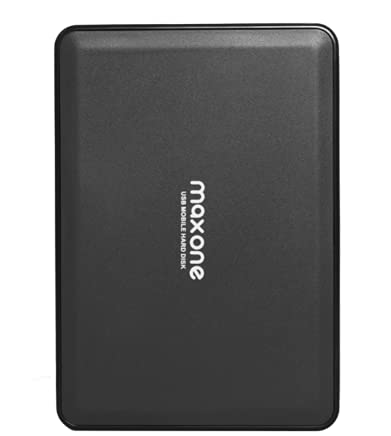
The Sonnics 500GB Red External Portable Hard Drive is a portable storage drive with USB 3.1 support and a Type C adapter supplied for Type C use. It is described as slim and lightweight, and it runs from a USB 2.0, USB 3.0 or USB 3.1 port without an external power source.
It is also formatted to FAT32 for use with operating systems and gaming consoles, and the listing notes smart TV recording and playback use, with one stated limitation for Sony TVs.
Who It Is Best For
This drive suits buyers who want portable external storage for a Windows PC, Mac, smart TV, XBOX ONE or PS4, and who need a USB-connected drive that does not require separate power. It also suits anyone who wants to connect through a standard Type A USB connection or the supplied Type C adapter.
Key Details
| Detail | Verified information and buyer relevance |
|---|---|
| Brand | Sonnics, useful for identifying the exact product listing. |
| Storage capacity | 500GB, which helps buyers judge whether the drive suits their storage need. |
| Colour | Red, so the chosen finish can be checked before ordering. |
| Connection | USB 3.1 support, with a Type C adapter supplied for Type C connection. |
| Power | Runs from a USB 2.0, USB 3.0 or USB 3.1 port and does not need an external power source. |
| Format | Formatted to FAT32 for use with operating systems and gaming consoles. |
| Compatibility | Listed for Windows PC, Mac, smart TV, XBOX ONE and PS4, with a note that it is not suitable for Sony TVs. |
| Console note | XBOX ONE users are advised to use a minimum 320GB version, so the selected capacity needs checking. |
| Included adapter | Type C adapter supplied, which matters if you plan to use a Type C connection. |
Why Buyers Choose It
- USB 3.1 support gives a stated super speed transfer rate of 10Gbps depending on the device.
- It runs from the USB port alone, so no separate power source is needed.
- FAT32 formatting makes it ready for use with operating systems and gaming consoles as listed.
- The supplied Type C adapter broadens the connection options for Type C use.
How It Works
- Connect the drive to a standard Type A USB port, or use the supplied Type C adapter for a Type C connection.
- Use a USB 2.0, USB 3.0 or USB 3.1 port, as the drive runs straight from the USB connection.
- Use it for portable storage, or connect it to a smart TV for recording and playback where supported.
- On Xbox One, check the stated minimum capacity note before choosing this version.
Real World Use
The hard drive is described as a portable external drive, so it is intended to be moved between compatible devices as needed. It can be used with Windows PC, Mac, smart TV, XBOX ONE and PS4, and the smart TV note indicates it can be used for recording and playing back films and television programmes where supported.
Because it is listed as slim and lightweight, it may be easier to carry and store than a bulkier drive. Confirm the chosen connection type, the device you want to use, and the Sony TV limitation before ordering.
What To Know Before You Buy
Check that 500GB is the right capacity for your needs, and confirm that your device works with a USB-connected external drive in the way you intend to use it. If you need Type C use, the adapter is supplied, but the drive also works from a standard Type A USB connection.
Review the console note before ordering if you plan to use it with XBOX ONE, and note the stated limitation that it is not suitable for Sony TVs.
Common Buyer Questions
Does it need its own power supply?
No, it runs from a USB 2.0, USB 3.0 or USB 3.1 port without an external power source.
Can it be used with Type C devices?
Yes, a Type C adapter is supplied for Type C connection.
Is it suitable for Xbox One?
The listing says Xbox One users need a minimum 320GB version and above, so this 500GB version fits that note.
Can it be used with a Sony TV?
No, it is stated as not suitable for Sony TVs.
Final Buying View
This 500GB Sonnics external hard drive is aimed at buyers who want portable USB storage with Type C support, FAT32 formatting and compatibility with the listed devices. Check the device you plan to use, the console note if relevant, and the Sony TV limitation before you choose.