

Quick Summary
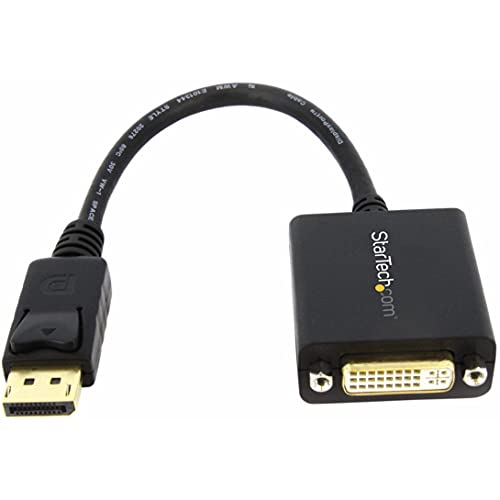
The StarTech.com DP2DVI2 is a DisplayPort to DVI adapter for connecting a DVI monitor or projector to a DisplayPort source. It supports DisplayPort 1.2 HBR2 to DVI-D digital output and is described as a passive video converter with an attached 6″ (15 cm) cable.
The adapter is aimed at buyers who need a simple DisplayPort to DVI connection for a primary or secondary display. It also includes a latching DisplayPort connector and support for DVI screw locking cables to help keep the connection secure.
Key Details
| Detail | Verified information and buyer relevance |
|---|---|
| Brand | StarTech.com, for clear product identification. |
| Model | DP2DVI2, the model reference to check before choosing an offer. |
| Product type | DisplayPort to DVI adapter, for linking a DisplayPort source to a DVI display. |
| Signal type | DisplayPort 1.2 HBR2 to DVI-D digital only single-link. |
| Connection format | DisplayPort male to DVI female adapter dongle. |
| Cable length | 6″ (15 cm) attached cable, useful when planning the space between devices. |
| Display support | 1920×1200 / 1080p at 60Hz, which is the stated display output support. |
| Other stated features | Latching DisplayPort connector, DVI screw locking support, EDID and DDC pass-through, HDCP 1.4. |
What to Compare Before Buying
- Source connection: This adapter is for DisplayPort sources, so check that your device has the right output.
- Display input: It is for a DVI display or projector, so confirm the display has the matching DVI input.
- Signal type: The adapter passes a digital DVI-D signal, so it is not a general analogue DVI solution.
- Cable reach: The attached cable is 15 cm, so compare that with the space between your devices.
- Display requirement: The stated support is 1920×1200 / 1080p at 60Hz, so check that matches the screen you plan to use.
Compatibility, Size and Fit
This adapter is described as compatible with DP++ sources, including workstations, desktops, laptops, small form factor computers and docking stations. It is intended for DVI displays and projectors.
The connector arrangement is important here: DisplayPort male on the source side and DVI female on the display side. The product also notes that the DVI connector is DVI-I in form, while only a digital signal passes through.
What Is Included
- 1 x DisplayPort to DVI adapter with attached cable
Before You Decide
Check the model DP2DVI2, the DisplayPort-to-DVI connection you need, and the 15 cm attached cable before choosing an offer. Also confirm that your display uses DVI and that you need a digital DVI-D signal rather than an analogue connection.
Common Buyer Questions
Does it need drivers?
No software or drivers are required.
Can it be used with more than one display type?
It is described as suitable for connecting a DVI monitor or projector, or for adding a second display to a workstation.
How It Works
The adapter converts a DisplayPort 1.2 HBR2 output to a DVI-D digital signal. It is a passive converter, so the connected source must support DP++ for use.
The latching DisplayPort connector and screw-locking DVI support are included to help keep the physical connection secure once connected.